 Cao Note
ECharts
Apache ECharts 是一个功能丰富的 JavaScript 可视化库。当前最新版本为 5.5.x。支持折线图、柱状图、饼图、散点图、地图等主流图表类型。
基础使用
安装
bash
npm install echartsnpm install echarts快速上手
js
import * as echarts from 'echarts'

// 1. 初始化
const chart = echarts.init(document.getElementById('main'))

// 2. 配置
chart.setOption({
  tooltip: {},
  xAxis: {
    type: 'category',
    data: ['Mon', 'Tue', 'Wed', 'Thu', 'Fri'],
  },
  yAxis: { type: 'value' },
  series: [{ type: 'line', data: [820, 932, 901, 1290, 1330] }],
})

// 3. 自适应
window.addEventListener('resize', () => chart.resize())
import * as echarts from 'echarts'
// 1. 初始化
const chart = echarts.init(document.getElementById('main'))
// 2. 配置
chart.setOption({
tooltip: {},
xAxis: {
type: 'category',
data: ['Mon', 'Tue', 'Wed', 'Thu', 'Fri'],
},
yAxis: { type: 'value' },
series: [{ type: 'line', data: [820, 932, 901, 1290, 1330] }],
})
// 3. 自适应
window.addEventListener('resize', () => chart.resize())常用图表
柱状图
js
{
  xAxis: { type: 'category', data: ['A', 'B', 'C', 'D'] },
  yAxis: { type: 'value' },
  series: [{ type: 'bar', data: [23, 45, 12, 67] }],
}
{
xAxis: { type: 'category', data: ['A', 'B', 'C', 'D'] },
yAxis: { type: 'value' },
series: [{ type: 'bar', data: [23, 45, 12, 67] }],
}饼图
js
{
  series: [{
    type: 'pie',
    data: [
      { name: '直接访问', value: 335 },
      { name: '搜索引擎', value: 1548 },
    ],
    radius: ['40%', '70%'], // 环形图
  }],
}
{
series: [{
type: 'pie',
data: [
{ name: '直接访问', value: 335 },
{ name: '搜索引擎', value: 1548 },
],
radius: ['40%', '70%'], // 环形图
}],
}Vue 3 中使用
vue
<script setup>
import { ref, onMounted, onUnmounted } from 'vue'
import * as echarts from 'echarts'

const chartRef = ref(null)
let chart = null

onMounted(() => {
  chart = echarts.init(chartRef.value)
  chart.setOption({
    xAxis: { type: 'category', data: ['A', 'B', 'C'] },
    yAxis: { type: 'value' },
    series: [{ type: 'bar', data: [10, 20, 30] }],
  })
  window.addEventListener('resize', chart.resize)
})

onUnmounted(() => {
  chart?.dispose()
})
</script>

<template>
  <div ref="chartRef" style="width:100%;height:400px"></div>
</template><script setup>
import { ref, onMounted, onUnmounted } from 'vue'
import * as echarts from 'echarts'
const chartRef = ref(null)
let chart = null
onMounted(() => {
chart = echarts.init(chartRef.value)
chart.setOption({
xAxis: { type: 'category', data: ['A', 'B', 'C'] },
yAxis: { type: 'value' },
series: [{ type: 'bar', data: [10, 20, 30] }],
})
window.addEventListener('resize', chart.resize)
})
onUnmounted(() => {
chart?.dispose()
})
</script>
<template>
<div ref="chartRef" style="width:100%;height:400px"></div>
</template>移动端
echarts 全端兼容,一款使 echarts 图表能跑在 uniapp 各端中的插件, 支持 uniapp/uniappx(web,ios,安卓)
下载导入到 uni_modules
jsx
import lEchart from '~/uni_modules/lime-echart/components/l-echart/l-echart.vue';
const echarts = require('../../uni_modules/lime-echart/static/echarts.min')

const chartRef = ref(null)
const option = {
  grid: {
    left: '3%',
    right: '3%',
    bottom: '10%',
    containLabel: true
  },
  tooltip: {},
  legend: {
    data: ['悦来电', '快电', '新电途', 'E充网', '其他'],
    bottom: '0%',
    icon: 'circle', // 设置图例图标为圆形
    // itemWidth: 10, // 圆形的直径
    // itemHeight: 10, // 圆形的直径
    // itemStyle: {
    //   borderRadius: 10 // 使圆形更加圆润
    // }

  },
  xAxis: {
    type: 'category',
    data: ['0点', '1点', '2点', '3点', '4点', '5点', '6点', '7点', '8点', '9点', '10点', '11点', '12点', '13点', '14点', '15点', '16点', '17点', '18点', '19点', '20点', '21点', '22点', '23点'],
    axisLabel: {
      interval: 3 // 显示所有刻度标签
    }
  },
  yAxis: {
    nameLocation: 'middle',
    nameGap: 10,
    axisLabel: {
      formatter: '{value} 度'
    },
    splitLine: {
      show: true
    },
  },
  series: [
    {
      name: '悦来电',
      type: 'bar',
      stack: '总量',
      data: [1200, 130, 140, 1500, 160, 170, 1800, 190, 200, 210, 2200, 230, 240, 250, 260, 270, 280, 290, 300, 310, 3220, 330, 340, 3510],
      itemStyle: { color: '#003366' }, barCategoryGap: '0%'
    },
    {
      name: '快电',
      type: 'bar',
      stack: '总量',
      data: [60, 70, 80, 90, 100, 110, 120, 130, 1040, 150, 160, 170, 180, 190, 200, 210, 220, 230, 240, 250, 260, 2270, 280, 290],
      itemStyle: { color: '#FFA500' }
    },
    {
      name: '新电途',
      type: 'bar',
      stack: '总量',
      data: [80, 90, 100, 110, 120, 1030, 140, 150, 160, 170, 180, 190, 200, 210, 220, 230, 240, 250, 260, 270, 280, 290, 3020, 310],
      itemStyle: { color: '#007FFF' }
    },
    {
      name: 'E充网',
      type: 'bar',
      stack: '总量',
      data: [70, 800, 90, 100, 1010, 120, 130, 140, 150, 1600, 170, 180, 190, 200, 210, 220, 230, 240, 250, 260, 270, 280, 290, 3200],
      itemStyle: { color: '#FF4500' }
    },
    {
      name: '其他',
      type: 'bar',
      stack: '总量',
      data: [500, 60, 70, 80, 90, 100, 1100, 120, 130, 140, 150, 160, 170, 180, 190, 200, 210, 20, 230, 2410, 250, 2260, 270, 280],
      itemStyle: { color: '#A020F0' }
    }
  ]
};


onMounted(() => {
  // 组件能被调用必须是组件的节点已经被渲染到页面上
  setTimeout(async () => {
    if (!chartRef.value) return
    const myChart = await chartRef.value.init(echarts)
    myChart.setOption(option)
  }, 300)
})
<view style="width:100%; height:600rpx;"><l-echart ref="chartRef"></l-echart></view
import lEchart from '~/uni_modules/lime-echart/components/l-echart/l-echart.vue';
const echarts = require('../../uni_modules/lime-echart/static/echarts.min')
const chartRef = ref(null)
const option = {
grid: {
left: '3%',
right: '3%',
bottom: '10%',
containLabel: true
},
tooltip: {},
legend: {
data: ['悦来电', '快电', '新电途', 'E充网', '其他'],
bottom: '0%',
icon: 'circle', // 设置图例图标为圆形
// itemWidth: 10, // 圆形的直径
// itemHeight: 10, // 圆形的直径
// itemStyle: {
// borderRadius: 10 // 使圆形更加圆润
// }
},
xAxis: {
type: 'category',
data: ['0点', '1点', '2点', '3点', '4点', '5点', '6点', '7点', '8点', '9点', '10点', '11点', '12点', '13点', '14点', '15点', '16点', '17点', '18点', '19点', '20点', '21点', '22点', '23点'],
axisLabel: {
interval: 3 // 显示所有刻度标签
}
},
yAxis: {
nameLocation: 'middle',
nameGap: 10,
axisLabel: {
formatter: '{value} 度'
},
splitLine: {
show: true
},
},
series: [
{
name: '悦来电',
type: 'bar',
stack: '总量',
data: [1200, 130, 140, 1500, 160, 170, 1800, 190, 200, 210, 2200, 230, 240, 250, 260, 270, 280, 290, 300, 310, 3220, 330, 340, 3510],
itemStyle: { color: '#003366' }, barCategoryGap: '0%'
},
{
name: '快电',
type: 'bar',
stack: '总量',
data: [60, 70, 80, 90, 100, 110, 120, 130, 1040, 150, 160, 170, 180, 190, 200, 210, 220, 230, 240, 250, 260, 2270, 280, 290],
itemStyle: { color: '#FFA500' }
},
{
name: '新电途',
type: 'bar',
stack: '总量',
data: [80, 90, 100, 110, 120, 1030, 140, 150, 160, 170, 180, 190, 200, 210, 220, 230, 240, 250, 260, 270, 280, 290, 3020, 310],
itemStyle: { color: '#007FFF' }
},
{
name: 'E充网',
type: 'bar',
stack: '总量',
data: [70, 800, 90, 100, 1010, 120, 130, 140, 150, 1600, 170, 180, 190, 200, 210, 220, 230, 240, 250, 260, 270, 280, 290, 3200],
itemStyle: { color: '#FF4500' }
},
{
name: '其他',
type: 'bar',
stack: '总量',
data: [500, 60, 70, 80, 90, 100, 1100, 120, 130, 140, 150, 160, 170, 180, 190, 200, 210, 20, 230, 2410, 250, 2260, 270, 280],
itemStyle: { color: '#A020F0' }
}
]
};
onMounted(() => {
// 组件能被调用必须是组件的节点已经被渲染到页面上
setTimeout(async () => {
if (!chartRef.value) return
const myChart = await chartRef.value.init(echarts)
myChart.setOption(option)
}, 300)
})
<view style="width:100%; height:600rpx;"><l-echart ref="chartRef"></l-echart></view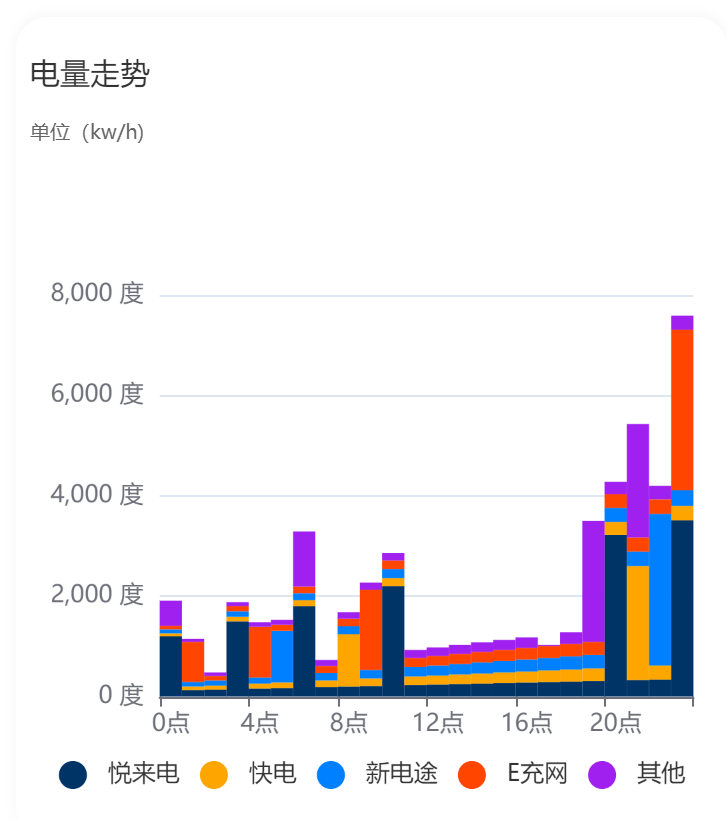
常用配置
x 坐标轴刻度标签的相关设置
 axisLabel: {
      interval: 3 // 每隔几个显示的刻度
  }
axisLabel: {
interval: 3 // 每隔几个显示的刻度
}图表中添加自定义的图形和文本
jsx
graphic: [
            {
                type: 'text',
                left: 'center',
                top: 'middle',
                style: {
                    text: '总收入:$1000',
                    textAlign: 'center',
                    fill: 'red',
                    fontSize: 20
                }
            }
],graphic: [
{
type: 'text',
left: 'center',
top: 'middle',
style: {
text: '总收入:$1000',
textAlign: 'center',
fill: 'red',
fontSize: 20
}
}
],