 Cao Note
ES6+新特性
数据类型扩展
let const
ES6 新增了 let 和 const 命令,用于声明变量,其声明的变量只在声明所在的块级作用域内有效
let const var 的区别
var声明的变量会提升到作用域的顶部,let const不存在变量提升var声明的全局变量会被挂载到全局对象window上,而let const不会var可以对一个变量进行重复声明,而let const不能重复声明var声明的变量作用域范围是函数作用域,let const声明的变量作用域范围是块级作用域const声明的是一个只读的常量,一旦声明常量的值就不能改变(必须对变量进行初始化)- 基本类型保证值不可变
- 引用类型保证内存指针不可变
逻辑符号简写
a ||= b // 等同于 a = a || b  如果 a 为真则返回 a,如果 a 为假则返回 b
c &&= d // 等同于 c = c && d  如果 a 为真,则返回 b , 如果 a 为假,则返回 a
e ??= f // 等同于 e = e ?? f  如果 e 为 null或未定义,则返回 f;如果e为真,则返回e。
a ||= b // 等同于 a = a || b 如果 a 为真则返回 a,如果 a 为假则返回 b
c &&= d // 等同于 c = c && d 如果 a 为真,则返回 b , 如果 a 为假,则返回 a
e ??= f // 等同于 e = e ?? f 如果 e 为 null或未定义,则返回 f;如果e为真,则返回e。字符串扩展
包含是否的结果都是 true 或 false;
includes(str) : 判断是否包含指定的字符串 true|false === indexOf,也可以用于数组;includes 是使用全等的;startsWith(str) : 判断是否以指定字符串开头endsWith(str) : 判断是否以指定字符串结尾repeat(count) : 重复指定次数 返回一个新的字符串
javascript 就是由面向对象思想造出来的一个产品 语法是 ECMAscript
var s1 = 'abc' //字面量形式创建一个字符串类型的数据var s1 = 'abc' //字面量形式创建一个字符串类型的数据虽然是字面量形式创建的字符串,字面量形式创建的数据也能继承 构造函数创建出来的字符串对象 的特性
只有对象才有属性和方法
字面量形式创建的字符串 本质上(底层)也是由 new String() 创建出来的
padStart、padEnd
(1)接收两个参数,第一个参数为最小长度,第二个参数为补全字符串;
'1'.padStart(2, '0') //返回 '01'
'1'.padEnd(2, '0') //返回 '10''1'.padStart(2, '0') //返回 '01'
'1'.padEnd(2, '0') //返回 '10'(2)如果原字符串等于或大于指定的最小长度,则返回原字符串;
'10'.padStart(2, '0') //返回 '10''10'.padStart(2, '0') //返回 '10'(3)如果原字符串的长度小于补全字符串的长度,则截去超出位数的补全字符串;
'09-12'.padStart(10, 'YYYY-MM-DD') // "YYYY-09-12"
'09-12'.padEnd(10, 'YYYY-MM-DD') // "09-12YYYY-"'09-12'.padStart(10, 'YYYY-MM-DD') // "YYYY-09-12"
'09-12'.padEnd(10, 'YYYY-MM-DD') // "09-12YYYY-"模板字符串
模板字符串 (template string) 是增强版的字符串,用反引号(`)标识。它可以当作普通字符串、定义多行字符串或者在字符串中嵌入变量、函数调用以及表达式
let name = 'maomao'
let age = 18

/* ES5 拼接字符串 */
let es5Str = '我叫: ' + name + ',我的年龄是: ' + (age + 1) + ' 岁'

/* ES6 模板字符串 */
let es6Str = `我叫: ${name},我的年龄是: ${age + 1} 岁`
let name = 'maomao'
let age = 18
/* ES5 拼接字符串 */
let es5Str = '我叫: ' + name + ',我的年龄是: ' + (age + 1) + ' 岁'
/* ES6 模板字符串 */
let es6Str = `我叫: ${name},我的年龄是: ${age + 1} 岁`at()
//数组
const arr = ['a', 'b', 'c', 'd']
// 倒数第一个元素
console.log(arr.at(-1)) // d
console.log(arr.at(-2)) // c
//字符串
const str = 'Coding Beauty'
console.log(str.at(-1)) // y
console.log(str.at(-2)) // t
//TypedArray对象
const typedArray = new Uint8Array([16, 32, 48, 64])
console.log(typedArray.at(-1)) // 64
console.log(typedArray.at(-2)) // 48
//数组
const arr = ['a', 'b', 'c', 'd']
// 倒数第一个元素
console.log(arr.at(-1)) // d
console.log(arr.at(-2)) // c
//字符串
const str = 'Coding Beauty'
console.log(str.at(-1)) // y
console.log(str.at(-2)) // t
//TypedArray对象
const typedArray = new Uint8Array([16, 32, 48, 64])
console.log(typedArray.at(-1)) // 64
console.log(typedArray.at(-2)) // 48数字的扩展
isFinite(i) : 判断是否是有限大的数isNaN(i) : 判断是否是 NaN,两个 NaN 是不等的;Number.isInteger(i) : 判断是否是整数parseInt(str) : 将字符串转换为对应的数值Math.trunc(i) : 直接去除小数部分,必须是纯数字,如果数字带单位,则会是 NAN
数组扩展
Array.from
将伪数组对象或可遍历对象转换为真数组,需要一个变量来接收
Array.from(v,[callback])
Array.from 转换对象的时候,键名必须写数字下标, 必须加 length 长度,否则会失败;
一个类数组对象,必须要有 length,属性名必须是数值,属性名作为数组的索引号,如果不带 length,from 转换出来的将是空数组;
Array.from 的第二个参数为回调函数,指定返回的数组是什么形式的,参数 item,index,arr
const cities = [
  { id: 1, age: 18 },
  { id: 2, age: 20 },
]
let arr = Array.from(cities, ({ age }) => age) //[18,20] 返回对象中的每一项
//{age} 第二个参数返回数组的每一项,也可以不填写;
const cities = [
{ id: 1, age: 18 },
{ id: 2, age: 20 },
]
let arr = Array.from(cities, ({ age }) => age) //[18,20] 返回对象中的每一项
//{age} 第二个参数返回数组的每一项,也可以不填写;小括号中代表每一个对象,使用对象解构,将年龄返回出来;如果是返回一个对象,则键名需要以[]中括号形式返回;
Array.of
Array.of() 用于将一组值转换为数组
Array.of(3, 11, 8) // [3,11,8]
Array.of(3) // [3]
Array.of(3).length // 1Array.of(3, 11, 8) // [3,11,8]
Array.of(3) // [3]
Array.of(3).length // 1Array.of()
Array.of() 方法的主要目的是弥补数组构造函数 Array() 的不足(因为参数个数的不同会导致Array()的行为有差异)
Array() // []
Array(3) // [, , ,]
Array(3, 11, 8) // [3, 11, 8]Array() // []
Array(3) // [, , ,]
Array(3, 11, 8) // [3, 11, 8]Array.of() 总是返回参数值组成的数组。如果没有参数就返回一个空数组
/* Array.of() 的模拟实现 */
function ArrayOf() {
  return [].slice.call(arguments)
}
/* Array.of() 的模拟实现 */
function ArrayOf() {
return [].slice.call(arguments)
}Array.fill
使用什么来填充
Array(5).fill('') // 将数组填充5个空字符串;fill填写字符;Array(5).fill('') // 将数组填充5个空字符串;fill填写字符;includes()
includes() 方法返回一个布尔值,表示某个数组是否包含给定的值(ES2016 引入)
const arr = [1, 2, NaN]
arr.includes(2) // true
arr.includes(4) // false
arr.includes(NaN) // true
const arr = [1, 2, NaN]
arr.includes(2) // true
arr.includes(4) // false
arr.includes(NaN) // trueincludes() 和 indexOf() 的对比
indexOf() 不够语义化,其含义是找到参数值的第一个出现位置,所以要去比较是否不等于 -1,表达起来不够直观indexOf() 内部使用严格相等运算符 (===) 进行判断,这会导致对 NaN 的误判
find() 和 findIndex()
find() 方法用于找出第一个符合条件的数组成员,如果没有符合条件的成员则返回 undefined
findIndex() 方法用于找出第一个符合条件的数组成员的位置,如果没有符合条件的成员则返回 -1
const arr = [1, 5, 10, 15]

/* find() */
arr.find((item) => item > 9) // 10
arr.find((item) => item === 9) // undefined

/* findIndex() */
arr.findIndex((item) => item > 9) // 2
arr.findIndex((item) => item === 9) // -1
const arr = [1, 5, 10, 15]
/* find() */
arr.find((item) => item > 9) // 10
arr.find((item) => item === 9) // undefined
/* findIndex() */
arr.findIndex((item) => item > 9) // 2
arr.findIndex((item) => item === 9) // -1at()
at() 方法接受一个整数(支持负数)作为参数返回对应位置的成员,如果参数位置超出了数组范围则返回 undefined
const arr = ['maomao', 18]

arr.at(0) // 'maomao'
arr.at(-1) // 18
arr.at(99) // undefined
const arr = ['maomao', 18]
arr.at(0) // 'maomao'
arr.at(-1) // 18
arr.at(99) // undefinedflat() 和 flatMap()
flat() 方法用于将嵌套的数组拍平变成一维的数组,该方法返回一个新数组不改变原数组
flatMap() 方法会先对原数组的每个成员执行一个函数(相当于执行 Array.prototype.map()) 然后对返回值组成的数组执行 flat() 方法,该方法返回一个新数组不改变原数组
/* flat() */
const arr1 = [1, 2, [3, [4, 5]]]
const arr2 = [1, 2,3 , 4, 5]

arr1.flat() // [1, 2, 3, [4, 5]]
arr1.flat(2) // [1, 2, 3, 4, 5]

arr2.flat() // [1, 2, 4, 5]

/* flatMap() */
const arr = [1, 2, 3, 4]
arr.flatMap((x) => [[x * 2]]) // [[2], [4], [6], [8]]
// 相当于 [[2, 4], [3, 6], [4, 8]].flat()
/* flat() */
const arr1 = [1, 2, [3, [4, 5]]]
const arr2 = [1, 2,3 , 4, 5]
arr1.flat() // [1, 2, 3, [4, 5]]
arr1.flat(2) // [1, 2, 3, 4, 5]
arr2.flat() // [1, 2, 4, 5]
/* flatMap() */
const arr = [1, 2, 3, 4]
arr.flatMap((x) => [[x * 2]]) // [[2], [4], [6], [8]]
// 相当于 [[2, 4], [3, 6], [4, 8]].flat()flat() 和 flatMap() 注意点
flat()方法默认只会拉平一层flat()方法会跳过原数组中的空位flatMap()只能展开一层数组
数组分组
// Object.groupBy返回一个普通对象
const fruits = [
  { name: 'Apple', color: 'red' },
  { name: 'Banana', color: 'yellow' },
  { name: 'Cherry', color: 'red' },
  { name: 'Lemon', color: 'yellow' },
  { name: 'Grape', color: 'purple' },
]

const fruitsByColor = Object.groupBy(fruits, (fruit) => fruit.color)
// 注意,使用Object.groupBy方法返回一个没有原型(即没有继承任何属性和方法)的对象。这意味着该对象不会继承Object.prototype上的任何属性或方法。
// Map.groupBy返回一个 Map 对象
const fruits = [

  { name: 'Apple', color: 'red' },
  { name: 'Banana', color: 'yellow' },
  { name: 'Cherry', color: 'red' },
  { name: 'Lemon', color: 'yellow' },
  { name: 'Grape', color: 'purple' },
]

const fruitsByColor = Map.groupBy(fruits, (fruit) => fruits.color) // 返回map对象
// Object.groupBy返回一个普通对象
const fruits = [
{ name: 'Apple', color: 'red' },
{ name: 'Banana', color: 'yellow' },
{ name: 'Cherry', color: 'red' },
{ name: 'Lemon', color: 'yellow' },
{ name: 'Grape', color: 'purple' },
]
const fruitsByColor = Object.groupBy(fruits, (fruit) => fruit.color)
// 注意,使用Object.groupBy方法返回一个没有原型(即没有继承任何属性和方法)的对象。这意味着该对象不会继承Object.prototype上的任何属性或方法。
// Map.groupBy返回一个 Map 对象
const fruits = [
{ name: 'Apple', color: 'red' },
{ name: 'Banana', color: 'yellow' },
{ name: 'Cherry', color: 'red' },
{ name: 'Lemon', color: 'yellow' },
{ name: 'Grape', color: 'purple' },
]
const fruitsByColor = Map.groupBy(fruits, (fruit) => fruits.color) // 返回map对象toReversed
// 该方法返回一个新数组,新数组的元素顺序与原数组相反。
const numarr = [1, 2, 3, 4, 5, 6, 7, 8, 9, 10]
console.log('numarr', numarr.toReversed()); //[10, 9, 8, 7, 6, 5, 4, 3, 2, 1]
// 该方法返回一个新数组,新数组的元素顺序与原数组相反。
const numarr = [1, 2, 3, 4, 5, 6, 7, 8, 9, 10]
console.log('numarr', numarr.toReversed()); //[10, 9, 8, 7, 6, 5, 4, 3, 2, 1]toSorted
// 该方法返回一个新数组,新数组的元素是原数组元素的排序结果。
const numarr = [1, 2, 3, 88, 5, 6, 55, 8, 9, 10]
console.log('numarr', numarr.toSorted((a, b) => a - b)); //
// 该方法返回一个新数组,新数组的元素是原数组元素的排序结果。
const numarr = [1, 2, 3, 88, 5, 6, 55, 8, 9, 10]
console.log('numarr', numarr.toSorted((a, b) => a - b)); //toSpliced
// 该方法返回一个新数组,新数组删除了原数组从指定位置开始的指定数量的元素。
const numarr = [1, 2, 3, 88, 5, 6, 55, 8, 9, 10]
console.log('numarr', numarr.toSpliced(2, 3)); //[1, 2, 88, 8, 9, 10]
// 该方法返回一个新数组,新数组删除了原数组从指定位置开始的指定数量的元素。
const numarr = [1, 2, 3, 88, 5, 6, 55, 8, 9, 10]
console.log('numarr', numarr.toSpliced(2, 3)); //[1, 2, 88, 8, 9, 10]with
// 该方法返回一个新数组,新数组在指定索引位置的元素被替换为指定值。
const numarr = [1, 2, 3, 88, 5, 6, 55, 8, 9, 10]
console.log('numarr', numarr.with(2,9999)) //[1, 2, 9999, 88, 5, 6, 55, 8, 9, 10]
// 该方法返回一个新数组,新数组在指定索引位置的元素被替换为指定值。
const numarr = [1, 2, 3, 88, 5, 6, 55, 8, 9, 10]
console.log('numarr', numarr.with(2,9999)) //[1, 2, 9999, 88, 5, 6, 55, 8, 9, 10]findLast
// 从数组中获取匹配元素的最后一个实例,如果找不到匹配元素,则返回 undefined。// 从数组中获取匹配元素的最后一个实例,如果找不到匹配元素,则返回 undefined。对象扩展
Object.is
Object.is() 方法用来比较两个值是否严格相等,严格比较运算符 (===) 的行为基本一致
Object.is('key', 'key') // true
Object.is({}, {}) // falseObject.is('key', 'key') // true
Object.is({}, {}) // falseObject.is() 与 === 的不同之处
+0不等于-0
/* +0 不等于 -0 */
;+0 === -0 // true
Object.is(+0, -0) // false

/* NaN 等于自身 */
NaN === NaN // false
Object.is(NaN, NaN) // true
/* +0 不等于 -0 */
;+0 === -0 // true
Object.is(+0, -0) // false
/* NaN 等于自身 */
NaN === NaN // false
Object.is(NaN, NaN) // true对象浅拷贝
Object.assign(target, source1, source2..)
将源对象的属性复制到目标对象身上,source 是源对象;
浅拷贝修改属性值之后,源对象的值不会被改变,如果是数组或对象,则会被改变;
需要声明一个空对象再进行拷贝;
也可以:let obj3 = Object.assign({},obj1,obj2...)常用于合并对象;
对象深拷贝
var obj1 = JSON.parse(JSON.stringify(arr/obj))
将对象转换成字符串,再将字符串转换成对象,所以需要一个变量来接收,就是一个新的对象;
数组或对象深拷贝, 函数不能拷贝;
深拷贝原理:(数组,对象都可用)浅拷贝+递归
function deepCopy(obj) {
  if (Object.prototype.toString.call(obj).slice(8, -1) == 'Object') {
    var result = {}
  } else if (Object.prototype.toString.call(obj).slice(8, -1) == 'Array') {
    var result = []
  } //判断数据类型类型  如果是数组则初始一个  []  如果是一个Object则初始一个 {}

  //浅拷贝,但是+ 递归思想,就实现了深拷贝
  for (var attr in obj) {
    if (typeof obj[attr] == 'object') {
      //判断传入的键值是否是数组或对象
      result[attr] = deepCopy(obj[attr]) //如果是对象则再调用一次函数; 实现递归;
    } else {
      result[attr] = obj[attr] //将每一天数据输入进对象或数组;
    }
  }
  return result
}
function deepCopy(obj) {
if (Object.prototype.toString.call(obj).slice(8, -1) == 'Object') {
var result = {}
} else if (Object.prototype.toString.call(obj).slice(8, -1) == 'Array') {
var result = []
} //判断数据类型类型 如果是数组则初始一个 [] 如果是一个Object则初始一个 {}
//浅拷贝,但是+ 递归思想,就实现了深拷贝
for (var attr in obj) {
if (typeof obj[attr] == 'object') {
//判断传入的键值是否是数组或对象
result[attr] = deepCopy(obj[attr]) //如果是对象则再调用一次函数; 实现递归;
} else {
result[attr] = obj[attr] //将每一天数据输入进对象或数组;
}
}
return result
}属性简写
ES6 允许在大括号里面直接写入变量和函数作为对象的属性和方法
/* 属性简写 */
// ES5 写法
const key = 'maomao'
const obj = { key: key }

// ES6 写法
const key = 'maomao'
const obj = { key }

/* 方法简写 */
// ES5 写法
const obj = {
  log: function () {
    console.log('maomao')
  },
}

// ES6 写法
const key = 'maomao'
const obj = {
  log() {},
}
/* 属性简写 */
// ES5 写法
const key = 'maomao'
const obj = { key: key }
// ES6 写法
const key = 'maomao'
const obj = { key }
/* 方法简写 */
// ES5 写法
const obj = {
log: function () {
console.log('maomao')
},
}
// ES6 写法
const key = 'maomao'
const obj = {
log() {},
}属性简写
简写的对象方法不能用作构造函数否则会报错
const obj = {
  f() {
    this.name = 'maomao'
  },
}

new obj.f() // 报错
const obj = {
f() {
this.name = 'maomao'
},
}
new obj.f() // 报错属性名表达式
// 定义属性名
const key = 'age'
const obj = {
  ['name' + 1]: 'maomao',
  [key]: 18,
}

// 定义方法名
const obj = {
  ['log' + 'name']() {
    console.log('maomao')
  },
}
// 定义属性名
const key = 'age'
const obj = {
['name' + 1]: 'maomao',
[key]: 18,
}
// 定义方法名
const obj = {
['log' + 'name']() {
console.log('maomao')
},
}属性名表达式
属性名表达式与属性简写不能同时使用否则会报错
// 报错
const key = 'name';
const obj = { [key] }

// 正确
const key = 'name';
const obj = { [key]: 'maomao'};
// 报错
const key = 'name';
const obj = { [key] }
// 正确
const key = 'name';
const obj = { [key]: 'maomao'};属性名表达式如果是一个对象会自动将其转为字符串 [object Object]
const keyA = { a: 1 }
const keyB = { b: 2 }

const obj = {
  [keyA]: 'valueA',
  [keyB]: 'valueB',
}

console.log(obj) // {[object Object]: 'valueB'}
const keyA = { a: 1 }
const keyB = { b: 2 }
const obj = {
[keyA]: 'valueA',
[keyB]: 'valueB',
}
console.log(obj) // {[object Object]: 'valueB'}Object.assign()
Object.assign() 方法用于对象的合并,将源对象的所有可枚举属性复制到目标对象(第一个参数是目标对象后面的参数都是源对象)
const target = { a: 1, b: 1 }

const source1 = { b: 2, c: 2 }
const source2 = { c: 3 }

Object.assign(target, source1, source2)
const target = { a: 1, b: 1 }
const source1 = { b: 2, c: 2 }
const source2 = { c: 3 }
Object.assign(target, source1, source2)只有一个参数时会直接返回该参数
const obj = { a: 1 }
Object.assign(obj) === obj // true
const obj = { a: 1 }
Object.assign(obj) === obj // true传入参数不是对象时会先转成对象再返回
typeof Object.assign(1) // "object"
typeof Object.assign(true) // "object"
typeof Object.assign(1) // "object"
typeof Object.assign(true) // "object"传入非对象类型的场景
/* undefined 和 null */
// 首位参数时会报错
Object.assign(undefined) // TypeError
Object.assign(null) // TypeError
// 非首位参数时会忽略
const obj = {}
Object.assign(obj, undefined) === obj // true
Object.assign(obj, null) === obj // true

/* 非首位参数为数值 布尔值 字符串时 */
// 数值和布尔值会忽略
const obj = {}
Object.assign(obj, 1, true) === obj // true
// 字符串会以字符数组的形式做合并
Object.assign({}, 'maomao') // {0: 'm', 1: 'a', 2: 'o', 3: 'm', 4: 'a', 5: 'o'}

/* 数组 */
// 当参数都为数组时
Object.assign([1, 2, 3], [4, 5]) // [4, 5, 3]
// 当首位参数为对象时,后续参数为数组时
Object.assign({ a: 1 }, [1, 2]) // {0: 1, 1: 2, a: 1}
/* undefined 和 null */
// 首位参数时会报错
Object.assign(undefined) // TypeError
Object.assign(null) // TypeError
// 非首位参数时会忽略
const obj = {}
Object.assign(obj, undefined) === obj // true
Object.assign(obj, null) === obj // true
/* 非首位参数为数值 布尔值 字符串时 */
// 数值和布尔值会忽略
const obj = {}
Object.assign(obj, 1, true) === obj // true
// 字符串会以字符数组的形式做合并
Object.assign({}, 'maomao') // {0: 'm', 1: 'a', 2: 'o', 3: 'm', 4: 'a', 5: 'o'}
/* 数组 */
// 当参数都为数组时
Object.assign([1, 2, 3], [4, 5]) // [4, 5, 3]
// 当首位参数为对象时,后续参数为数组时
Object.assign({ a: 1 }, [1, 2]) // {0: 1, 1: 2, a: 1}传入数组时会把数组当对象处理
Object.assign([1, 2, 3], [4, 5]) // [4, 5, 3]Object.assign([1, 2, 3], [4, 5]) // [4, 5, 3]Object.assign() 总结和应用场景
总结
Object.assign()是浅拷贝方法- 存在同名属性时,后面的属性会覆盖前面的属性
- 只有一个参数时会直接返回该参数
- 传入参数不是对象时会先转成对象再返回
- 传入
undefined和null时- 如果为第一个参数会报错(无法转成对象)
- 如果不为第一个参数时会被忽略
- 传入数组时会把数组当对象处理
应用场景
/* 为对象添加属性 */
class Point {
  constructor(x, y) {
    Object.assign(this, { x, y })
  }
}

/* 为对象添加方法 */
Object.assign(Function.prototype, {
  log() {},
})

/* 拷贝对象 */
const clone = (origin) => Object.assign({}, origin)

/* 合并多个对象 */
const merge = (target, ...sources) => Object.assign(target, ...sources)

/* 为属性指定默认值 */
const DEFAULTS = { duration: 2000 }
function toast(options) {
  options = Object.assign({}, DEFAULTS, options)
}
toast({ content: '提示' }) // {duration: 2000, content: '提示'}
/* 为对象添加属性 */
class Point {
constructor(x, y) {
Object.assign(this, { x, y })
}
}
/* 为对象添加方法 */
Object.assign(Function.prototype, {
log() {},
})
/* 拷贝对象 */
const clone = (origin) => Object.assign({}, origin)
/* 合并多个对象 */
const merge = (target, ...sources) => Object.assign(target, ...sources)
/* 为属性指定默认值 */
const DEFAULTS = { duration: 2000 }
function toast(options) {
options = Object.assign({}, DEFAULTS, options)
}
toast({ content: '提示' }) // {duration: 2000, content: '提示'}Object.keys() Object.value() Object.entries()
Object.keys() 方法返回一个数组,其成员为参数对象自身的(不含继承的)所有可遍历属性的键名(ES5 引入)
Object.value() 方法返回一个数组,其成员为参数对象自身的(不含继承的)所有可遍历属性的键值(ES2017 引入)
Object.entries() 方法返回一个数组(二维数组),其成员为参数对象自身的(不含继承的)所有可遍历属性的键值对数组(ES2017 引入)
const obj = { name: 'maomao', age: 18 }
Object.keys(obj) // ['name', 'age']
Object.values(obj) //  ['maomao', 18]
Object.entries(obj) // [['name', 'maomao'], ['age', 18]]
const obj = { name: 'maomao', age: 18 }
Object.keys(obj) // ['name', 'age']
Object.values(obj) // ['maomao', 18]
Object.entries(obj) // [['name', 'maomao'], ['age', 18]]Object.fromEntries()
Object.fromEntries() 方法是 Object.entries() 的逆操作,用于将键值对的数据结构还原为对象
Object.fromEntries([['name', 'maomao']]) // {name: 'maomao'}

/* Map 转对象 */
const map = new Map([['name', 'maomao']])
Object.fromEntries(map) // {name: 'maomao'}

/* 将查询字符串转为对象 */
const params = 'name=maomao&age=18'
Object.fromEntries(new URLSearchParams(params)) // {name: 'maomao', age: '18'}Object.fromEntries([['name', 'maomao']]) // {name: 'maomao'}
/* Map 转对象 */
const map = new Map([['name', 'maomao']])
Object.fromEntries(map) // {name: 'maomao'}
/* 将查询字符串转为对象 */
const params = 'name=maomao&age=18'
Object.fromEntries(new URLSearchParams(params)) // {name: 'maomao', age: '18'}Object.hasOwn()
检查某个对象自身是否拥有某个属性
const obj = Object.create(null)
obj.color = 'green'
obj.age = 2
obj.hasOwnProperty = () => false

console.log(Object.hasOwn(obj, 'color')) // true
console.log(Object.hasOwn(obj, 'name')) // false  基本等价于obj.hasOwnProperty('name')
const obj = Object.create(null)
obj.color = 'green'
obj.age = 2
obj.hasOwnProperty = () => false
console.log(Object.hasOwn(obj, 'color')) // true
console.log(Object.hasOwn(obj, 'name')) // false 基本等价于obj.hasOwnProperty('name')逆序查找 findLast()和 findLastIndex()
const nums = [7, 14, 3, 8, 10, 9]

const lastEven = nums.findLast((num) => num % 2 === 0)
const lastEvenIndex = nums.findLastIndex((num) => num % 2 === 0)

console.log(lastEven) // 10
console.log(lastEvenIndex) // 4
const nums = [7, 14, 3, 8, 10, 9]
const lastEven = nums.findLast((num) => num % 2 === 0)
const lastEvenIndex = nums.findLastIndex((num) => num % 2 === 0)
console.log(lastEven) // 10
console.log(lastEvenIndex) // 4对象遍历方法对比
| 方法名 | 说明 | 继承的原型属性 | 不可枚举属性 | Symbol 属性 | 返回值 |
|---|---|---|---|---|---|
| for...in | 遍历对象自身和继承的所有可枚举属性(不含 Symbol 属性) | ✅ | ❌ | ❌ | key |
| Object.keys | 遍历对象自身所有可枚举属性(不含 Symbol 属性) | ❌ | ❌ | ❌ | [key...] |
| Object.getOwnPropertyNames | 遍历对象自身所有属性(不含 Symbol 属性) | ❌ | ✅ | ❌ | [key...] |
| Object.getOwnPropertySymbols | 遍历对象自身所有的 Symbol 属性 | ❌ | ✅ | ✅ | [key...] |
| Reflect.ownKeys | 遍历对象自身所有的属性(包含不可枚举和 Symbol 属性) | ❌ | ✅ | ✅ | [key...] |
| Object.values | 遍历对象自身所有可枚举属性(不含 Symbol 属性) | ❌ | ❌ | ❌ | [value...] |
| Object.entries | 遍历对象自身所有可枚举属性(不含 Symbol 属性) | ❌ | ❌ | ❌ | [[key,value]...] |
遍历顺序
ES5 没有规定遍历顺序,其遍历顺序由浏览器厂商定义(可以简单理解为无序的)
ES6 之后规定遍历顺序将按如下规则进行
- 首先遍历所有数值键,按照数值升序排列。
- 其次遍历所有字符串键,按照加入时间升序排列。
- 最后遍历所有
Symbol键,按照加入时间升序排列。
ES6 内部定义了 [[OwnPropertyKeys]]() 方法对属性进行分类和排序
函数的扩展
参数默认值
/* ES5 */
function add(x, y) {
  // 当参数 y 对应的布尔值为 false 则该赋值不起作用
  y = y || 1
  console.log(x + y)
}
add(10) // 11
add(10, 2) // 12
add(10, 0) // 11

/* ES6 */
function add(x, y = 1) {
  console.log(x + y)
}
add(10) // 11
add(10, 2) // 12
add(10, 0) // 10
/* ES5 */
function add(x, y) {
// 当参数 y 对应的布尔值为 false 则该赋值不起作用
y = y || 1
console.log(x + y)
}
add(10) // 11
add(10, 2) // 12
add(10, 0) // 11
/* ES6 */
function add(x, y = 1) {
console.log(x + y)
}
add(10) // 11
add(10, 2) // 12
add(10, 0) // 10函数参数的默认值
- 参数变量是默认声明的不能用
let或const再次声明,否则会报错 - 使用参数默认值时函数不能有同名参数
- 参数默认值的位置应该是函数的尾参数
剩余参数(rest 参数)
ES6 引入 rest 参数(形式为 ...变量名) 用于获取函数的剩余参数(可以替换 arguments 对象)
function log(name, ...params) {
  console.log(name, params)
}

log('maomao', 1, 2) // maomao [1, 2]
log('maomao', 1, 2, 3) // maomao [1, 2, 3]
function log(name, ...params) {
console.log(name, params)
}
log('maomao', 1, 2) // maomao [1, 2]
log('maomao', 1, 2, 3) // maomao [1, 2, 3]剩余参数(rest 参数)
rest参数是一个真正的数组,数组特有的方法都可以使用rest参数之后不能再有其他参数,否则会报错- 函数的
length属性,不包括rest参数
箭头函数
ES6 允许使用箭头(=>)定义函数
// 不需要参数时使用一个圆括号代表参数部分
const fn = () => {}
// 等同于
const fn = function () {}

// 当函数体只有 return 时
const fn = (value) => value
// 等同于
const fn = function (value) {
  return value
}
// 不需要参数时使用一个圆括号代表参数部分
const fn = () => {}
// 等同于
const fn = function () {}
// 当函数体只有 return 时
const fn = (value) => value
// 等同于
const fn = function (value) {
return value
}箭头函数与普通函数的区别
this- 普通函数
this指向是动态的(取决于函数的调用方式)- 可以用
call apply bind改变this指向
- 箭头函数
this指向是固定的,指向定义时上层作用域中的this(它没有自己的this)call apply bind无法改变箭头函数的this指向(上下文值始终按词法解析)- 全局作用域下
this指向全局对象
- 普通函数
- 箭头函数不可以当作构造函数(不能使用
new运算符,否则会报错) - 箭头函数的函数体内不可以使用
arguments super new.target - 箭头函数不可以使用 yield 命令(不能用作
Generator函数) - 在
class中使用箭头函数其this会和类实例进行绑定
注意点(以下场合不应该使用箭头函数)
- 定义对象方法且该方法内部包括
this时 - 定义原型方法且该方法内部包括
this时 - 需要动态
this时
/* ES6 */
const log = () => {
  console.log('log this:', this)
}

function fn() {
  setTimeout(() => {
    console.log('fn this:', this)
  }, 100)
}

/* babel 编译后的 ES5 代码 */
var _this = this

var log = function log() {
  console.log('log this:', _this)
}

function fn() {
  var _this2 = this

  setTimeout(function () {
    console.log('fn this:', _this2)
  }, 100)
}
/* ES6 */
const log = () => {
console.log('log this:', this)
}
function fn() {
setTimeout(() => {
console.log('fn this:', this)
}, 100)
}
/* babel 编译后的 ES5 代码 */
var _this = this
var log = function log() {
console.log('log this:', _this)
}
function fn() {
var _this2 = this
setTimeout(function () {
console.log('fn this:', _this2)
}, 100)
}扩展运算符: ...
使用 arguments 无法进行 forEach 遍历,...参数可以进行遍历,是真正的数组
...变量名,类似于arguments,是真正的数组
- ...作为形参使用:,必须写到形参末尾,形参前面没传的参数全部追加到...参数中;
function fn(a, ...args) {
  console.log(args) //args为[2,3,4];
  console.log(...args) // 2,3,4
}
fn(1, 2, 3, 4)
//原生实现方法
function fn(a, b) {
  const ext = Array.prototype.slice.call(arguments, 2)
  console.log(a, b, ext) //a:1,b:2,ext:[3,4]
}
function fn(a, ...args) {
console.log(args) //args为[2,3,4];
console.log(...args) // 2,3,4
}
fn(1, 2, 3, 4)
//原生实现方法
function fn(a, b) {
const ext = Array.prototype.slice.call(arguments, 2)
console.log(a, b, ext) //a:1,b:2,ext:[3,4]
}数组的使用
- 数组的展开:函数传参数的时候(实参)等同于 apply;
- 复制数组 arr2=[...arr1] 修改 arr2 不影响 arr1。
- 拼接数组 arr=[...arr1,...arr2]
- 将字符串转数组 arr=[...str]
将一个字符串转换为数组的方法:
str.split('')[...str]Array.from(str)
数组的展开应用场景
jsfunction fn3(...arr) { fn(...arr) //输入和下行一样; fn.apply(null, arr) //调用fn函数,null为不改变fn函数中的this } function fn(a, b, c) { console.log(a, b, c, '----') } fn3(11, 22, 33)function fn3(...arr) { fn(...arr) //输入和下行一样; fn.apply(null, arr) //调用fn函数,null为不改变fn函数中的this } function fn(a, b, c) { console.log(a, b, c, '----') } fn3(11, 22, 33)
对象的使用
解构赋值
jslet { x, y, ...z } = { x: 1, y: 2, a: 3, b: 4 } x // 1 y // 2 z // { a: 3, b: 4 } // 解构赋值要求等号右边是一个对象,如果是undefined或null会报错,因为它们无法转为对象; let { ...z } = null // 出错 let { ...z } = undefined //出错 // 解构赋值是浅拷贝, 不能复制对象的原型属性 let o = Object.create({ x: 1, y: 2 }) o.z = 3 let { x, ...newObj } = o let { y, z } = newObj x // 1 y // undefined z // 3let { x, y, ...z } = { x: 1, y: 2, a: 3, b: 4 } x // 1 y // 2 z // { a: 3, b: 4 } // 解构赋值要求等号右边是一个对象,如果是undefined或null会报错,因为它们无法转为对象; let { ...z } = null // 出错 let { ...z } = undefined //出错 // 解构赋值是浅拷贝, 不能复制对象的原型属性 let o = Object.create({ x: 1, y: 2 }) o.z = 3 let { x, ...newObj } = o let { y, z } = newObj x // 1 y // undefined z // 3解构赋值...必须在最后面,否则报错;
拷贝对象
jslet z = {a:3,b:4} let n = { ...z } // 等同于 let n = Object.assign({},z) n //{a:3,b:4} // 如果是空对象, 没有任何效果 {...{}, a:1} // {a:1} {...1} //{} 等同于: { ...Object(1) } {...true} // {} {...undefined} // {} {...null} // {}let z = {a:3,b:4} let n = { ...z } // 等同于 let n = Object.assign({},z) n //{a:3,b:4} // 如果是空对象, 没有任何效果 {...{}, a:1} // {a:1} {...1} //{} 等同于: { ...Object(1) } {...true} // {} {...undefined} // {} {...null} // {}扩展运算符只是复制了对象的实例属性,没有原型属性,如果需要原型属性可以使用下面的方法
js// 写法一 const clone1 = { __proto__: Object.getPrototypeOf(obj), ...obj, } // 写法二 const clone2 = Object.assign(Object.create(Object.getPrototypeOf(obj)), obj) // 写法三 const clone3 = Object.create(Object.getPrototypeOf(obj), Object.getOwnPropertyDescriptors(obj)) // __proto__属性在非浏览器的环境不一定部署,推荐使用二和三// 写法一 const clone1 = { __proto__: Object.getPrototypeOf(obj), ...obj, } // 写法二 const clone2 = Object.assign(Object.create(Object.getPrototypeOf(obj)), obj) // 写法三 const clone3 = Object.create(Object.getPrototypeOf(obj), Object.getOwnPropertyDescriptors(obj)) // __proto__属性在非浏览器的环境不一定部署,推荐使用二和三扩展运算符放置的位置
js// 如果自定义属性, 放在扩展运算符后面, 则扩展运算符内部的同名属性会被覆盖 let ao = { ...a, x: 1, y: 2 } // 如果放在前面, 就相当于是默认赋值了 let ao = { x: 1, y: 2, ...a }// 如果自定义属性, 放在扩展运算符后面, 则扩展运算符内部的同名属性会被覆盖 let ao = { ...a, x: 1, y: 2 } // 如果放在前面, 就相当于是默认赋值了 let ao = { x: 1, y: 2, ...a }深拷贝
jslet obj = {name:'',age:18,list:['hh','mm']} let obj2 = {...obj,list:[...obj.list]} 引用类型需要继续扩展let obj = {name:'',age:18,list:['hh','mm']} let obj2 = {...obj,list:[...obj.list]} 引用类型需要继续扩展合并对象
jslet obj1 = { name: '' } let obj2 = { age: 18 } let obj3 = { ...obj1, ...obj2 } // 等同于 let ab = Object.assign({}, obj1, obj2)let obj1 = { name: '' } let obj2 = { age: 18 } let obj3 = { ...obj1, ...obj2 } // 等同于 let ab = Object.assign({}, obj1, obj2)扩展运算符后面跟表达式
jsconst obj = { ...(x > 1 ? {a: 1} : {}), b:2 } // 数组放表达式 const arr = [ ...(x > 1 ? ['a'] : []), 'b' ] [...[],1] // [1]const obj = { ...(x > 1 ? {a: 1} : {}), b:2 } // 数组放表达式 const arr = [ ...(x > 1 ? ['a'] : []), 'b' ] [...[],1] // [1]
扩展运算符 (spread)是三个点 (...) 它好比 rest 参数的逆运算
函数调用
扩展运算符在函数调用时可以将一个数组变为参数序列,从而可以替代函数的 apply() 方法
// 举个 🌰 求出一个数组最大元素
/* ES5 写法 */
Math.max.apply(null, [2022, 520, 1314])

/* ES6 写法 */
Math.max(...[2022, 520, 1314])
// 等同于
Math.max(2022, 520, 1314)
// 举个 🌰 求出一个数组最大元素
/* ES5 写法 */
Math.max.apply(null, [2022, 520, 1314])
/* ES6 写法 */
Math.max(...[2022, 520, 1314])
// 等同于
Math.max(2022, 520, 1314)解构赋值
解构对象
const obj = {
  name: 'maomao',
  age: 18,
}

// ES5 写法
const name = obj.name
const age = obj.age

/* ES6 解构写法 */
const { name, age } = obj
// 重命名
const { name: myName } = obj

/* 指定默认值 */
const { x = 1, y = 2 } = { y: null }
console.log(x) // 1
console.log(y) // null
const obj = {
name: 'maomao',
age: 18,
}
// ES5 写法
const name = obj.name
const age = obj.age
/* ES6 解构写法 */
const { name, age } = obj
// 重命名
const { name: myName } = obj
/* 指定默认值 */
const { x = 1, y = 2 } = { y: null }
console.log(x) // 1
console.log(y) // null解构数组
const arr = ['maomao', 18]

/* ES5 写法 */
const name = arr[0]
const age = arr[1]

/* ES6 解构写法 */
const [name, age] = arr
const { 0: name, 1: age } = arr

/* 指定默认值 */
const [x = 1] = []
const [y = 2] = [undefined]
console.log(x) // 1
console.log(y) // 2

const [z = 3] = [null]
console.log(z) // null
const arr = ['maomao', 18]
/* ES5 写法 */
const name = arr[0]
const age = arr[1]
/* ES6 解构写法 */
const [name, age] = arr
const { 0: name, 1: age } = arr
/* 指定默认值 */
const [x = 1] = []
const [y = 2] = [undefined]
console.log(x) // 1
console.log(y) // 2
const [z = 3] = [null]
console.log(z) // null解构字符串
字符串也可以解构赋值,因为字符串被转换成了一个类似数组的对象
const [a, b, c] = 'maomao'
console.log(a) // m
console.log(b) // a
console.log(c) // o

/* 解构 length 属性 */
const { length } = 'maomao'
console.log(length) // 6
const [a, b, c] = 'maomao'
console.log(a) // m
console.log(b) // a
console.log(c) // o
/* 解构 length 属性 */
const { length } = 'maomao'
console.log(length) // 6解构赋值注意点
- 解构数组和字符串时变量的取值由它的位置决定
- 解构对象时变量必须与属性同名,才能取到正确的值
- 变量在没有找到对应的值,多余的变量会被赋值为
undefined - 在指定默认值时,只有属性值严格等于
undefined才会生效 - 数组本质是特殊的对象,因此可以对数组进行对象属性的解构
- 解构数值和布尔值时会通过其对应的包装函数将其转换成对象再解构
undefined和null无法转为对象,在解构时会报错
const { toString } = 123
toString === Number.prototype.toString // true

const { toString } = true
toString === Boolean.prototype.toString // true

const { x } = undefined // TypeError
const { y } = null // TypeError
const { toString } = 123
toString === Number.prototype.toString // true
const { toString } = true
toString === Boolean.prototype.toString // true
const { x } = undefined // TypeError
const { y } = null // TypeErrorsymbol(符号、代号、象征)
主要解决命名冲突问题,主要目的是作为对象属性的标识符
(已有的原始数据类型:String, Number, boolean, null, undefined, 对象)
Symbol 特点
Symbol 属性值是唯一的,两个 symbol 是不相等的,主要是解决命名冲突问题
直接创建两个相同值的 symbol 在比较时是不相等的,如果需要相等可以使用 symbol.for(key)创建
原理是使用给定的 key 进行搜索,并返回对应的 key,如果没有则创建
Symbol 值不能与其他数据进行计算,包括同字符串拼串
Symbol 不支持 for in, for of 遍历;
Symbol 值作为对象属性名时,不能用点运算符,需要用中括号包起来;
symbol 不能使用 new,否则会报错,symbol 是一个原始类型的值,不是对象;
Symbol 函数可以接受一个字符串作为参数;
Symbol 可以使用 es6 提供的 Reflect.ownKeys()来获取到一个对象中的 Symbol 属性名
let s1 = Symbol('name')
let obj = {
  [s1]: 'hhh',
}
obj[s1] = 'hehe'
obj[Symbol()] = 'xixi' // 这样是获取不到的;
console.log(obj[s1])
let s1 = Symbol('name')
let obj = {
[s1]: 'hhh',
}
obj[s1] = 'hehe'
obj[Symbol()] = 'xixi' // 这样是获取不到的;
console.log(obj[s1])Symbol 作为对象属性的好处:只能使用 Symbol 变量来访问,不能通过 Symbol 来访问
Symbol 的实例方法
Symbol.for()
使用 Symbol.for 创建 symbol 值时,会先在全局搜索是否有创建过传入的字符串,如果有则直接返回,如果没有,则创建新的;
全局包括:当前页面、iframe、service worker;
const s1 = Symbol('haha')
const s2 = Symbol('haha')
s1 === s2 // false

const s3 = Symbol.for('xixi')
const s4 = Symbol.for('xixi')
s3 === s4 // true
const s1 = Symbol('haha')
const s2 = Symbol('haha')
s1 === s2 // false
const s3 = Symbol.for('xixi')
const s4 = Symbol.for('xixi')
s3 === s4 // trueSymbol.keyFor()
传入 symbol 变量返回创建时的标识,只能是使用 Symbol.for 创建的才可以返回,使用 Symbol 直接创建的是无法返回的;
const s5 = Symbol('lison')
const s6 = Symbol.for('hh')
Symbol.keyFor(s5) // undefined
Symbol.keyFor(s6) // hh
const s5 = Symbol('lison')
const s6 = Symbol.for('hh')
Symbol.keyFor(s5) // undefined
Symbol.keyFor(s6) // hh11 个内部的 Symbol 值
Symbol.hasInstance调用 instanceof 时触发jslet obj = { [Symbol.hasInstance] (other) { console.log(other) } } console.log({a:'a'} instanceof <any>obj) // 当使用instanceof时会首先调用Symbol.hasInstance方法let obj = { [Symbol.hasInstance] (other) { console.log(other) } } console.log({a:'a'} instanceof <any>obj) // 当使用instanceof时会首先调用Symbol.hasInstance方法Symbol.isConcatSpreadableconcat 不扁平化jslet arr = [1,2] [].concat(arr, [1,2]) // [1,2,3,4] arr[Symbol.isConcatSpreadable] = false [].concat(arr, [1,2]) // [[1,2],1,2] // 使用了该属性就不会被扁平化了let arr = [1,2] [].concat(arr, [1,2]) // [1,2,3,4] arr[Symbol.isConcatSpreadable] = false [].concat(arr, [1,2]) // [[1,2],1,2] // 使用了该属性就不会被扁平化了Symbol.species创建延伸实例Symbol.match调用 match 时会调用该方法Symbol.replaceSymbol.searchSymbol.splitSymbol.iteratorSymbol.toPromitiveSymbol.toStringTagSymbol.unscopables
es6 官网地址:https://es6.ruanyifeng.com/#docs/symbol
set 数组
类似于数组,里面的每一项都是唯一的,没有重复的值;
使用 Set 必须 new,返回一个对象,只能用 for..of 取值;
Set 这种数据结构经常和一维数组搭配使用,如果数组里面有重复的项,则会自动删除;
let sets = new Set([1,2,3,2,1]);
可以使用:Array.from(new Set([1,2,1])) 转换为可以遍历的数组;
或:[...new Set([1,2,1])];...将数组展开,之后添加数组;
Set 原型上的方法
add(value):增加;delete(value):删除;has(value):是否有;clear:清空size:同 length 一样;
集合数组方法
- 声明:
const a = new Set(arr1) - 并集:
new Set([...a,...b]) - 交集:
new Set([...a].filter(v=>b.has(v))) - 差集:
new Set([...a].filter(v=>!b.has(v)))
WeakSet
- WeakSet 结构与 Set 类似,里面的值都是弱引用;
- WeakSet 的成员只能是对象,而不能是其他类型的值;
let arr = [3, 4]
let ws = new WeakSet(arr) // 由于arr数组成员都是数字,因此会报错;

let arr = [
  [1, 2],
  [3, 4],
]
let ws = new WeakSet(arr) // 由于arr数组成员都是对象,因此可以;
let arr = [3, 4]
let ws = new WeakSet(arr) // 由于arr数组成员都是数字,因此会报错;
let arr = [
[1, 2],
[3, 4],
]
let ws = new WeakSet(arr) // 由于arr数组成员都是对象,因此可以;- WeakSet 结构下面的三个方法:
add()、delete()、has()
map 对象
- 类似于对象,键名不局限于字符串,各种类型值(包括对象)都可以当作键;
map 的方法:Map()、Map(array)、set(key, value)、get(key)、delete(key)、has(key)、clear()、size;
使用需要 new 实例化,也需要套二维数组;里面写键名和键值;
- 创建一个 map 对象
const curmap = new Map([
  ['name', 'lishi'],
  ['age', '18'],
])
const curmap = new Map([
['name', 'lishi'],
['age', '18'],
])map 对象与普通对象的转换;
将 map 转换为对象形式:
Object.fromEntries(map)将对象转换 map 形式:
Object.entries(obj)使用 for..of 遍历对象,并使用数组解构;
let map2 = [
  ['name', '张三'],
  ['age', 18],
]
for (let [key, value] of map2) {
  console.log(key, value)
}
// 使用Object.entries可以将对象转换成该结构
let map2 = [
['name', '张三'],
['age', 18],
]
for (let [key, value] of map2) {
console.log(key, value)
}
// 使用Object.entries可以将对象转换成该结构map 实用技巧
利用 map 来改写 if 判断语句
if(status === 1){}
else if(status === 2){}
else if(status === 3){}


// 改写
let map = new Map([
    [1, ()=>{}],
    [2, ()=>{}]
])
map.get(status)() // 执行时记得使用call绑定this指向


// 二元判断改写
let map = new Map([
    [{identity:'guest',status:1},()=>{}],
    [{identity:'master',status:2},()=>{}]
])
let action = [...map].filter(([key,value])=>(key.identity === 'guest' && key.status === 1))
action.forEach(([key,value])=>value()) // 因为里面是二维数组


// 如果函数一样, 可以使用记忆函数
const actions = () => {
    let actionA = function(){}
    let actionB = function(){}
    return new Map([
        [{identity:'guest',status:1},actionA],
        [{identity:'master',status:2},actionA],
        [{identity:'guest',status:2},actionB]
    ])
}
let action = [...actions()].filter(([key,value])=>(key.identity == identity && key.status == status))
action.forEach([key,value]=>value.call(this))


// 使用正则判断,将状态码以字符串形式判断
let actions = ()=>{
    let functionA = function(){}
    let functionB = function(){}
    return new Map([
        [/^guest_[1-4]$/, functionA],
        [/^guest_.*$/, functionB]
    ])
}
let action = [...actions()].filter(([key,value])=>(key.test(`${identity}_${status}`))) action.forEach(([key,value])=>value.call(this))if(status === 1){}
else if(status === 2){}
else if(status === 3){}
// 改写
let map = new Map([
[1, ()=>{}],
[2, ()=>{}]
])
map.get(status)() // 执行时记得使用call绑定this指向
// 二元判断改写
let map = new Map([
[{identity:'guest',status:1},()=>{}],
[{identity:'master',status:2},()=>{}]
])
let action = [...map].filter(([key,value])=>(key.identity === 'guest' && key.status === 1))
action.forEach(([key,value])=>value()) // 因为里面是二维数组
// 如果函数一样, 可以使用记忆函数
const actions = () => {
let actionA = function(){}
let actionB = function(){}
return new Map([
[{identity:'guest',status:1},actionA],
[{identity:'master',status:2},actionA],
[{identity:'guest',status:2},actionB]
])
}
let action = [...actions()].filter(([key,value])=>(key.identity == identity && key.status == status))
action.forEach([key,value]=>value.call(this))
// 使用正则判断,将状态码以字符串形式判断
let actions = ()=>{
let functionA = function(){}
let functionB = function(){}
return new Map([
[/^guest_[1-4]$/, functionA],
[/^guest_.*$/, functionB]
])
}
let action = [...actions()].filter(([key,value])=>(key.test(`${identity}_${status}`))) action.forEach(([key,value])=>value.call(this))摘抄: https://juejin.im/post/5bdfef86e51d453bf8051bf8#heading-1
WeakMap 对象
- 结构与 Map 类似,也是用于生成键值对的集合,
- Map 与 WeakMap 的区别
(1)WeakMap 只接受对象作为键名(null 除外),不接受其他类型的值,如果放入其他类型会报错
// WeakMap 可以使用 set 方法添加成员
const wm1 = new WeakMap()
const key = { foo: 1 }
wm1.set(key, 2)
wm1.get(key) // 2

// WeakMap 也可以接受一个数组,
// 作为构造函数的参数
const k1 = [1, 2, 3]
const k2 = [4, 5, 6]
const wm2 = new WeakMap([
  [k1, 'foo'],
  [k2, 'bar'],
])
wm2.get(k2) // "bar"
// WeakMap 可以使用 set 方法添加成员
const wm1 = new WeakMap()
const key = { foo: 1 }
wm1.set(key, 2)
wm1.get(key) // 2
// WeakMap 也可以接受一个数组,
// 作为构造函数的参数
const k1 = [1, 2, 3]
const k2 = [4, 5, 6]
const wm2 = new WeakMap([
[k1, 'foo'],
[k2, 'bar'],
])
wm2.get(k2) // "bar"(2)WeakMap 的键名所指向的对象,不计入垃圾回收机制
- WeakMap 的作用:当在对象上面存放一些数据,当我们在这个对象上面存放了数据之后,就会形成对这个对象的引用,因此该对象不再计入垃圾回收机制,如果不再需要,必须手动删除,否则会造成内存泄露, WeakMap 就是为了解决此类问题而诞生的
const e1 = document.querySelector('.box')
const e2 = document.querySelector('.demo')
let arr = [
  [e1, 'box 元素'],
  [e2, 'demo 元素'],
]
arr = null // 必须手动删除
const e1 = document.querySelector('.box')
const e2 = document.querySelector('.demo')
let arr = [
[e1, 'box 元素'],
[e2, 'demo 元素'],
]
arr = null // 必须手动删除WeakMap 的存放的键名是弱引用,垃圾回收机制不考虑该对象,只有所引用的对象的其他引用都被清除,垃圾回收机制就会释放该对象所占用的内存,不需要手动删除;
应用场景:如果想要往对象上面添加数据,又不想干扰垃圾回收机制,就可以使用 WeakMap,它所引用的对象,会在将来消失;
const map = new WeakMap()
const el = document.getElementById('example')
map.set(el, 'some information')
map.get(el) // someinformation
// 一旦el被清除,WeakMap的记录会自动被移除;
const map = new WeakMap()
const el = document.getElementById('example')
map.set(el, 'some information')
map.get(el) // someinformation
// 一旦el被清除,WeakMap的记录会自动被移除;注意:WeakMap 弱引用的只是键名,而不是键值,键值依然是正常引用
const map = new WeakMap()
let key = {}
let obj = { foo: 1 }
map.set(key, obj)
obj = null // 即使被删除了,key仍可用;
map.get(key) // {foo:1}
const map = new WeakMap()
let key = {}
let obj = { foo: 1 }
map.set(key, obj)
obj = null // 即使被删除了,key仍可用;
map.get(key) // {foo:1}- WeakMap 可用方法:get()、set()、has()、delete();
WeakMap 内存实例
在 cmd 打开之后执行以下操作
如果引用所指向的值占用特别多的内存时,可以使用 process.memoryUsage 查看,执行--expose-gc 可以开启手机执行垃圾回收机制;
node --expose-gc   # --expose-gc表示允许手机执行垃圾回收机制;
> global.gc()
undefined
> process.memoryUsage()
{ rss: 21667840,
  heapTotal: 8110080,
  heapUsed: 5061480,# 内存占用5m  5061480/1024KB*1024Byte
  external: 8710 }

# 先使用普通声明方式, 指向一个5*1024*1024的数组
> let key = new Array(5 * 1024 * 1024);
undefined
> let arr = [[key,1]]
undefined
> process.memoryUsage()
{ rss: 65339392,
  heapTotal: 52162560,
  heapUsed: 47268584, #内存占用47m
  external: 8712 }
> key = null
null
> process.memoryUsage()
{ rss: 65339392,
  heapTotal: 52162560,
  heapUsed: 47268584, #引用的key被清楚了,内存还是占用47m
  external: 8712 }
> arr = null  #经常容易被删除
null
> process.memoryUsage()
{ rss: 23592960,
  heapTotal: 10207232,
  heapUsed: 5301656, #当所有的引用删除之后,内存还原了;
  external: 8710 }


# 自行测试使用WeakMap声明, 由于WeakMap声明是弱引用, 因此删除引用对象之后WeakMap对象的引用会自动清除;
node --expose-gc # --expose-gc表示允许手机执行垃圾回收机制;
> global.gc()
undefined
> process.memoryUsage()
{ rss: 21667840,
heapTotal: 8110080,
heapUsed: 5061480,# 内存占用5m 5061480/1024KB*1024Byte
external: 8710 }
# 先使用普通声明方式, 指向一个5*1024*1024的数组
> let key = new Array(5 * 1024 * 1024);
undefined
> let arr = [[key,1]]
undefined
> process.memoryUsage()
{ rss: 65339392,
heapTotal: 52162560,
heapUsed: 47268584, #内存占用47m
external: 8712 }
> key = null
null
> process.memoryUsage()
{ rss: 65339392,
heapTotal: 52162560,
heapUsed: 47268584, #引用的key被清楚了,内存还是占用47m
external: 8712 }
> arr = null #经常容易被删除
null
> process.memoryUsage()
{ rss: 23592960,
heapTotal: 10207232,
heapUsed: 5301656, #当所有的引用删除之后,内存还原了;
external: 8710 }
# 自行测试使用WeakMap声明, 由于WeakMap声明是弱引用, 因此删除引用对象之后WeakMap对象的引用会自动清除;- WeakMap 的用途:典型的场合就是 DOM 节点作为键名,下面的例子
let el = document.getElementById('logo')
let wk = new WeakMap()
wk.set(el, { timesClick: 0 })
el.addEventListener(
  'click',
  function () {
    let logoData = wk.get(el)
    logoData.timesClick++
  },
  false,
)
let el = document.getElementById('logo')
let wk = new WeakMap()
wk.set(el, { timesClick: 0 })
el.addEventListener(
'click',
function () {
let logoData = wk.get(el)
logoData.timesClick++
},
false,
)当 DOM 节点被删除时,该状态就会自动消失,不存在内存泄露的风险;
Symbol 作为 WeakMap 的键
在这之前,WeakMap仅允许对象作为键值,新特性更容易创建和共享key。

var map = new WeakMap(); // 创建一个弱映射
function useSymbol(symbol){
    doSomethingWith(symbol);
    var called = map.get(symbol) || 0

上面的例子允许从外部调用者调用计数器,并在不再有引用时释放映射条目。
代码本身无法知道何时不再需要引用,如果使用普通的 Map,将会导致内存泄漏。
这是因为即使在调用它的客户端不再需要引用时,代码仍然会保留对该引用的持有。
在这种情况下使用 WeakMap,可以确保垃圾回收在不再存在对键符号的引用时删除映射条目。
在这之前,WeakMap仅允许对象作为键值,新特性更容易创建和共享key。
var map = new WeakMap(); // 创建一个弱映射
function useSymbol(symbol){
doSomethingWith(symbol);
var called = map.get(symbol) || 0
上面的例子允许从外部调用者调用计数器,并在不再有引用时释放映射条目。
代码本身无法知道何时不再需要引用,如果使用普通的 Map,将会导致内存泄漏。
这是因为即使在调用它的客户端不再需要引用时,代码仍然会保留对该引用的持有。
在这种情况下使用 WeakMap,可以确保垃圾回收在不再存在对键符号的引用时删除映射条目。运算符的扩展
?. 可选链操作符
ES2020 引入了可选链操作符(又名链判断运算符),其允许我们在读取对象内部的某个属性时,不需要判断属性的上层对象是否存在
// 可选链操作符之前的写法
const firstName =
  (message && message.body && message.body.user && message.body.user.firstName) || 'default'

// 可选链操作符简化写法
const firstName = message?.body?.user?.firstName || 'default'
// 可选链操作符之前的写法
const firstName =
(message && message.body && message.body.user && message.body.user.firstName) || 'default'
// 可选链操作符简化写法
const firstName = message?.body?.user?.firstName || 'default'可选链操作符 ?. 的三种写法
/* 属性是否存在 */
obj?.prop
obj?.[expr]
// 等同于
obj == null ? undefined : obj.prop

/* 函数或对象方法是否存在 */
func?.(...args)
// 等同于
func == null ? undefined : func()
/* 属性是否存在 */
obj?.prop
obj?.[expr]
// 等同于
obj == null ? undefined : obj.prop
/* 函数或对象方法是否存在 */
func?.(...args)
// 等同于
func == null ? undefined : func()注意点
- 可选链操作符相当于一种短路机制,只要不满足条件就不再往下执行
- 当有括号时,可选链操作符对圆括号外部没有影响,只对圆括号内部有影响。
- 右侧不得为十进制数值。为了保证兼容以前的代码,允许
foo?.3:0会被解析成foo ? .3 : 0,因此规定如果?.后面紧跟一个十进制数字,那么?.不再被看成是一个完整的运算符,而会按照三元运算符进行处理,即小数点会归属于后面的十进制数字形成一个小数。 - 禁止使用以下写法
// 构造函数
new a?.()
new a?.b()

// 右侧有模板字符串
a?.`{b}`
a?.b`{c}`

// 左侧是 super
super?.()
super?.foo

// 用于赋值运算符左侧
a?.b = c
// 构造函数
new a?.()
new a?.b()
// 右侧有模板字符串
a?.`{b}`
a?.b`{c}`
// 左侧是 super
super?.()
super?.foo
// 用于赋值运算符左侧
a?.b = c?? 空值合并运算符
ES2020 引入了空值合并运算符,只有运算符左侧的值为 null 或 undefined 时才会返回右侧的值
?? 和 || 的区别
??运算符只有左侧是null或undefined才会返回右侧的值||运算符只要左侧是假值(false、0、''、null、undefined、NaN)就会返回右侧的值
逻辑赋值运算符
ES2021 引了入三个新的逻辑赋值运算符,用于将逻辑运算符与赋值运算符进行结合
/* 或赋值运算符 */
x ||= y
// 等同于
x || (x = y)

/* 与赋值运算符 */
x &&= y
// 等同于
x && (x = y)

/* Null 赋值运算符 */
x ??= y
// 等同于
x ?? (x = y)
/* 或赋值运算符 */
x ||= y
// 等同于
x || (x = y)
/* 与赋值运算符 */
x &&= y
// 等同于
x && (x = y)
/* Null 赋值运算符 */
x ??= y
// 等同于
x ?? (x = y)https://es6.ruanyifeng.com/#docs/object#链判断运算符)
iterator(遍历器)
Iterator 和 for...of 遍历
Iterator 的作用有三个:
  一是为各种数据结构,提供一个统一的、简便的访问接口;
  二是使得数据结构的成员能够按某种次序排列;
  三是 ES6 创造了一种新的遍历命令for...of循环,Iterator 接口主要供for...of消费。
Iterator 的遍历过程是这样的:
(1)创建一个指针对象,指向当前数据结构的起始位置。也就是说,遍历器对象本质上,就是一个指针对象。
(2)第一次调用指针对象的next方法,可以将指针指向数据结构的第一个成员。
(3)第二次调用指针对象的next方法,指针就指向数据结构的第二个成员。
(4)不断调用指针对象的next方法,直到它指向数据结构的结束位置。
每一次调用next方法,都会返回数据结构的当前成员的信息。具体来说,就是返回一个包含value和done两个属性的对象。其中,value属性是当前成员的值,done属性是一个布尔值,表示遍历是否结束。
  for...of:能遍历的内容必须有Iterator接口;
  遍历数组:
  let set = new set([1,2,3])
  for (let value of set){
    console.log(value);
  }
使用for...of遍历map获得数组(第一个元素为key,第二个元素为value):
  解构赋值:for(let[key,value] of map){
     console.log(key,value);
  }
原生具备 Iterator 接口的数据结构如下:Array、Map、Set、String、TypedArray、函数的 arguments 对象、NodeList 对象。
Iterator 的作用有三个:
一是为各种数据结构,提供一个统一的、简便的访问接口;
二是使得数据结构的成员能够按某种次序排列;
三是 ES6 创造了一种新的遍历命令for...of循环,Iterator 接口主要供for...of消费。
Iterator 的遍历过程是这样的:
(1)创建一个指针对象,指向当前数据结构的起始位置。也就是说,遍历器对象本质上,就是一个指针对象。
(2)第一次调用指针对象的next方法,可以将指针指向数据结构的第一个成员。
(3)第二次调用指针对象的next方法,指针就指向数据结构的第二个成员。
(4)不断调用指针对象的next方法,直到它指向数据结构的结束位置。
每一次调用next方法,都会返回数据结构的当前成员的信息。具体来说,就是返回一个包含value和done两个属性的对象。其中,value属性是当前成员的值,done属性是一个布尔值,表示遍历是否结束。
for...of:能遍历的内容必须有Iterator接口;
遍历数组:
let set = new set([1,2,3])
for (let value of set){
console.log(value);
}
使用for...of遍历map获得数组(第一个元素为key,第二个元素为value):
解构赋值:for(let[key,value] of map){
console.log(key,value);
}
原生具备 Iterator 接口的数据结构如下:Array、Map、Set、String、TypedArray、函数的 arguments 对象、NodeList 对象。如何使得任何 JavaScript 对象都具有迭代能力
Object.prototype[Symbol.iterator] = function () {
  // 使用 Object.values(this) 方法获取对象的所有值,并返回这些值的迭代器对象
  return Object.values(this)[Symbol.iterator]()
}Object.prototype[Symbol.iterator] = function () {
// 使用 Object.values(this) 方法获取对象的所有值,并返回这些值的迭代器对象
return Object.values(this)[Symbol.iterator]()
}类
使用类定义面向对象不需要 function,直接 方法名(){};
什么是类
类是具有相同属性和方法(行为)的一类事务的集合
对象:类实例化后的某个具体的个体,使用类创建对象必须 new
属性通过 constructor 构造器来定义属性,构造器在类实例化时会被自动调用
类的三大特性
封装、
继承:在对原有类的属性及方法保留同时进行功能扩展
多态:根据不同的上下文环境表现出不同的形态
类的基本语法
通过 class 定义类
在类中通过 constructor 定义构造方法
通过 new 来创建类的实例
通过 extends 来实现类的继承
通过 super 调用父类的构造方法
类的定义方法
class People {
  static className = 'hello' // 静态属性,实例对象通过__proto__来访问,内部使用people来调用;
  constructor(names, ages) {
    //使用constructor来定义属性;
    this.name = names
    this.ages = ages
  }
  eat() {} //方法直接定义;
  static setRandom() {} //通过People来调用这个方法;
}
class People {
static className = 'hello' // 静态属性,实例对象通过__proto__来访问,内部使用people来调用;
constructor(names, ages) {
//使用constructor来定义属性;
this.name = names
this.ages = ages
}
eat() {} //方法直接定义;
static setRandom() {} //通过People来调用这个方法;
}静态属性是使用类名去访问的,而类里面的是使用 this 去访问的,创建static的区别在于不需要使用 this,这样 this 不会乱;
静态属性不需要实例化就可以直接调用,可以直接通过点静态的属性去调用;
类的继承
当子类中定义了 constructor 构造器时,则要在构造器中调用 super()方法,通过 super()方法给父类中的属性设置属性值,如果不需要修改或新增属性,则不需要写 constructor;
方法重构:当父类中的方法在子类满足不了需求时,则要在子类中定义和父类同名的方法;
同一个类可以被多次继承;
class Student extends People {
  constructor(names, ages) {
    super(names, ages) //必须调用此方法,括号接收属性;
  }
}
class Student extends People {
constructor(names, ages) {
super(names, ages) //必须调用此方法,括号接收属性;
}
}prototype 是原型 这是在构造函数上的
__proto__ 是原型链 实例对象访问的
super作为函数,指向父类的 constructor,因此 super 需要调用对应的参数;
super 作为对象时
- 在普通方法中使用:指向父类的原型对象
- 在静态方法中:指向父类
类的构造新写法
旧:
  class Car {
 		 constructor() {
   	 	this.color = 'blue';
    	this.age = 2;
  		}
		}
新:
  class Car {
  	color = 'blue';
  	age = 2;
   	#firstName = 'Joseph';        // 私有变量 使用in来判断某个对象是否拥有某个私有属性
   	hasColor() {
   	 return #firstName in this;   //console.log(car.hasColor()); // true
  	}
	}
旧:
class Car {
constructor() {
this.color = 'blue';
this.age = 2;
}
}
新:
class Car {
color = 'blue';
age = 2;
#firstName = 'Joseph'; // 私有变量 使用in来判断某个对象是否拥有某个私有属性
hasColor() {
return #firstName in this; //console.log(car.hasColor()); // true
}
}
es6新增小项
do 表达式
由于块级作用域只是一个语句,没有返回值,do 表达式增加了返回值
let x = do {
  let t = f()
  t * t + 1
} // 变量中的x为最终 t * t +1的值
let x = do {
let t = f()
t * t + 1
} // 变量中的x为最终 t * t +1的值do 的表达式的好处是可以封装多个语句
let x = do {
  if (foo()) {
    f()
  } else if (bar()) {
    g()
  } else {
    h()
  }
}
// 哪个函数执行,就会将哪个函数的结果赋值给x
let x = do {
if (foo()) {
f()
} else if (bar()) {
g()
} else {
h()
}
}
// 哪个函数执行,就会将哪个函数的结果赋值给xdo 可以用在 jsx 中,比三元运算符更好用
return (
  <nav>
    {do {
      if (true) {
        ;<Logout />
      } else {
        ;<LoginButton />
      }
    }}
  </nav>
)
return (
<nav>
{do {
if (true) {
;<Logout />
} else {
;<LoginButton />
}
}}
</nav>
)throw 表达式
js 规定 throw 只是一个命令,用来抛出错误,不能用于表达式中
console.log(throw new Error()) // 报错console.log(throw new Error()) // 报错console.log 的参数必须是表达式,否则就报错
新的提案支持 throw 用于表达式了
function save(name = throw new TypeError('Argument required')) {}
function set(value) {
  let a = value || throw new Error('Invalid value')
}
function save(name = throw new TypeError('Argument required')) {}
function set(value) {
let a = value || throw new Error('Invalid value')
}函数的部分执行
以前使用 bind 来生成新的函数
function add(x, y) {
  return x + y
}
var add7 = add.bind(null, 7)
add7(3) // 10
function add(x, y) {
return x + y
}
var add7 = add.bind(null, 7)
add7(3) // 10现在
var add7 = add(?, 7)
add7(3) // 10
var add7 = add(?, 7)
add7(3) // 10新提案中,?表示单个参数的占位符,...是多个参数的占位符
const f = (x, ...y) => [x, ...y]
const g = f(x, ?);
g(2,3,4) //

// 当g的值为不同的参数调用时
f(x, ?)   // [x, 2]
f(x, ...)  // [x, 2,3,4]
f(?, x)  // [2, x]
f(..., x)  // [2,3,4,x]
f(?, x, ?)  // [2, x, 3]
f(..., x, ...) // [2,3,4,x,2,3,4]
const f = (x, ...y) => [x, ...y]
const g = f(x, ?);
g(2,3,4) //
// 当g的值为不同的参数调用时
f(x, ?) // [x, 2]
f(x, ...) // [x, 2,3,4]
f(?, x) // [2, x]
f(..., x) // [2,3,4,x]
f(?, x, ?) // [2, x, 3]
f(..., x, ...) // [2,3,4,x,2,3,4]注意点
原函数发生变化,执行的结果也会不同
jslet f = (x, y) => x + y const g = f(?, 3) g(1) // 4 // 替换函数 f f = (x, y) => x * y g(1) // 3let f = (x, y) => x + y const g = f(?, 3) g(1) // 4 // 替换函数 f f = (x, y) => x * y g(1) // 3如果传入的值是表达式,每次调用时会重新求值
jslet a = 3 const f = (x, y) => x + y const g = f(?, a) g(1) // 4 // 改变 a 的值 a = 10 g(1) // 11let a = 3 const f = (x, y) => x + y const g = f(?, a) g(1) // 4 // 改变 a 的值 a = 10 g(1) // 11
管道运算符
管道是一个运算符,写作|>,左边是一个表达式,右边是一个函数,管道最大的好处是可以嵌套函数,写从左到右的链式表达式
function doubleSay(str) {
  return str + ', ' + str
}

function capitalize(str) {
  return str[0].toUpperCase() + str.substring(1)
}

function exclaim(str) {
  return str + '!'
}

// 以前的写法
exclaim(capitalize(doubleSay('hello')))
// "Hello, hello!"

// 管道的写法
'hello' |> doubleSay |> capitalize |> exclaim
// 'Hello, hello!'
function doubleSay(str) {
return str + ', ' + str
}
function capitalize(str) {
return str[0].toUpperCase() + str.substring(1)
}
function exclaim(str) {
return str + '!'
}
// 以前的写法
exclaim(capitalize(doubleSay('hello')))
// "Hello, hello!"
// 管道的写法
'hello' |> doubleSay |> capitalize |> exclaim
// 'Hello, hello!'管道运算符只能传递一个值,如果多个参数可以进行柯里化
function double(x) {
  return x + x
}
function add(x, y) {
  return x + y
}

let person = { score: 25 }
person.score |> double |> ((_) => add(7, _))
// 57
function double(x) {
return x + x
}
function add(x, y) {
return x + y
}
let person = { score: 25 }
person.score |> double |> ((_) => add(7, _))
// 57管道运算符也可以用于 await 函数
x |> await f
// 等同于
await f(x)

const userAge = userId |> await fetchUserById |> getAgeFromUser;
// 等同于
const userAge = getAgeFromUser(await fetchUserById(userId));
x |> await f
// 等同于
await f(x)
const userAge = userId |> await fetchUserById |> getAgeFromUser;
// 等同于
const userAge = getAgeFromUser(await fetchUserById(userId));Math.signbit()
用来判断一个值的正负,可以正确判断 0 是否是-0;
Math.signbit(0) // false
Math.signbit(-0) // trueMath.signbit(0) // false
Math.signbit(-0) // true双冒号运算符
函数绑定运算符::,双冒号左边是一个对象,右边是一个函数;
foo::bar
// 等同于
bar.bind(foo)

foo::bar(...arguments)
// 等同于
bar.apply(foo, arguments)foo::bar
// 等同于
bar.bind(foo)
foo::bar(...arguments)
// 等同于
bar.apply(foo, arguments)如果左边为空,右边是一个对象的方法,则绑定在该对象上面
var method = obj::obj.foo
// 等同于
var method = ::obj.foo

let log = ::console.log
// 等同于
var log = console.log.bind(console)
var method = obj::obj.foo
// 等同于
var method = ::obj.foo
let log = ::console.log
// 等同于
var log = console.log.bind(console)如果运算符的结果还是一个对象,可以采用链式写法
import { map, takeWhile, forEach } from 'iterlib'

getPlayers()
  ::map((x) => x.character())
  ::takeWhile((x) => x.strength > 100)
  ::forEach((x) => console.log(x))
import { map, takeWhile, forEach } from 'iterlib'
getPlayers()
::map((x) => x.character())
::takeWhile((x) => x.strength > 100)
::forEach((x) => console.log(x))Realm
创建一个 window 对象的副本,可以前往官网查看https://es6.ruanyifeng.com/#docs/proposals#Realm-API‘
Realm API 提供沙箱功能(sandbox),允许隔离代码,防止那些被隔离的代码拿到全局对象。
以前,经常使用<iframe>作为沙箱。
const globalOne = window;
let iframe = document.createElement('iframe');
document.body.appendChild(iframe);
const globalTwo = iframe.contentWindow;
const globalOne = window;
let iframe = document.createElement('iframe');
document.body.appendChild(iframe);
const globalTwo = iframe.contentWindow;上面代码中,<iframe>的全局对象是独立的(iframe.contentWindow)。Realm API 可以取代这个功能。
const globalOne = window;
const globalTwo = new Realm().global;
const globalOne = window;
const globalTwo = new Realm().global;上面代码中,Realm API单独提供了一个全局对象new Realm().global。
Realm API 提供一个Realm()构造函数,用来生成一个 Realm 对象。该对象的global属性指向一个新的顶层对象,这个顶层对象跟原始的顶层对象类似。
const globalOne = window;
const globalTwo = new Realm().global;
globalOne.evaluate('1 + 2') // 3
globalTwo.evaluate('1 + 2') // 3const globalOne = window;
const globalTwo = new Realm().global;
globalOne.evaluate('1 + 2') // 3
globalTwo.evaluate('1 + 2') // 3上面代码中,Realm 生成的顶层对象的evaluate()方法,可以运行代码。
下面的代码可以证明,Realm 顶层对象与原始顶层对象是两个对象。
let a1 = globalOne.evaluate('[1,2,3]');
let a2 = globalTwo.evaluate('[1,2,3]');
a1.prototype === a2.prototype; // false
a1 instanceof globalTwo.Array; // false
a2 instanceof globalOne.Array; // false
let a1 = globalOne.evaluate('[1,2,3]');
let a2 = globalTwo.evaluate('[1,2,3]');
a1.prototype === a2.prototype; // false
a1 instanceof globalTwo.Array; // false
a2 instanceof globalOne.Array; // false上面代码中,Realm 沙箱里面的数组的原型对象,跟原始环境里面的数组是不一样的。
Realm 沙箱里面只能运行 ECMAScript 语法提供的 API,不能运行宿主环境提供的 API。
globalTwo.evaluate('console.log(1)')
// throw an error: console is undefinedglobalTwo.evaluate('console.log(1)')
// throw an error: console is undefined上面代码中,Realm 沙箱里面没有console对象,导致报错。因为console不是语法标准,是宿主环境提供的。
如果要解决这个问题,可以使用下面的代码。
globalTwo.console = globalOne.console;globalTwo.console = globalOne.console;Realm()构造函数可以接受一个参数对象,该参数对象的intrinsics属性可以指定 Realm 沙箱继承原始顶层对象的方法。
const r1 = new Realm();
r1.global === this;
r1.global.JSON === JSON; // false

const r2 = new Realm({ intrinsics: 'inherit' });
r2.global === this; // false
r2.global.JSON === JSON; // true
const r1 = new Realm();
r1.global === this;
r1.global.JSON === JSON; // false
const r2 = new Realm({ intrinsics: 'inherit' });
r2.global === this; // false
r2.global.JSON === JSON; // true上面代码中,正常情况下,沙箱的JSON方法不同于原始的JSON对象。但是,Realm()构造函数接受{ intrinsics: 'inherit' }作为参数以后,就会继承原始顶层对象的方法。
用户可以自己定义Realm的子类,用来定制自己的沙箱。
class FakeWindow extends Realm {
init() {
super.init();
let global = this.global;
global.document = new FakeDocument(...);
global.alert = new Proxy(fakeAlert, { ... });
// ...
}
}class FakeWindow extends Realm {
init() {
super.init();
let global = this.global;
global.document = new FakeDocument(...);
global.alert = new Proxy(fakeAlert, { ... });
// ...
}
}上面代码中,FakeWindow模拟了一个假的顶层对象window
#!命令
支持在脚本之前添加一行命令
#!/usr/bin/env node#!/usr/bin/env node之后执行时
# 以前执行脚本的方式
$ node hello.js
# hashbang 的方式
$ ./hello.js# 以前执行脚本的方式
$ node hello.js
# hashbang 的方式
$ ./hello.jsimport.meta
返回引入模块的元信息
i
mport.meta.url 返回当前的 url 路径i
mport.meta.scriptElement 返回加载 script 的元素js// HTML 代码为 // <script type="module" src="my-module.js" data-foo="abc"></script> // my-module.js 内部执行下面的代码 import.meta.scriptElement.dataset.foo // "abc"// HTML 代码为 // <script type="module" src="my-module.js" data-foo="abc"></script> // my-module.js 内部执行下面的代码 import.meta.scriptElement.dataset.foo // "abc"
import.meta.globEager
在使用 vite 搭建的项目时,不要使用 require.context,而是使用该方法
const files = import.meta.globEager('../views/**/*.vue')
console.log(files) // {[path]: module}const files = import.meta.globEager('../views/**/*.vue')
console.log(files) // {[path]: module}globalThis
TIP
globalThis 是 ES2020 引入的全局对象标准引用,无论在浏览器、Node.js 还是 Web Worker 中都能获取到当前环境的全局对象。
- 浏览器中:
globalThis===window - Node.js 中:
globalThis===global - Web Worker 中:
globalThis===self
以前获取全局对象需要判断环境,现在直接用 globalThis 即可。
// 统一方式访问全局对象
console.log(globalThis)
// 在浏览器中
// globalThis.setTimeout === window.setTimeout // true
// 在 Node.js 中
// globalThis.setTimeout === global.setTimeout // true// 统一方式访问全局对象
console.log(globalThis)
// 在浏览器中
// globalThis.setTimeout === window.setTimeout // true
// 在 Node.js 中
// globalThis.setTimeout === global.setTimeout // truePromise
- Promise 对象实际上是一个许诺器,里面放将来要发生的事,这些事之间有依赖关系,且通常是异步; ajax、定时器、I/O 操作都是阻塞的,需要时间
- Promise 对象主要是解决“回调地狱”问题的,实际上是以同 步流程来解决异步回调问题的;
- promise 是一个构造函数,用来生成 promise 实例
Promise 的三种状态
pendding:初始化状态(刚刚许诺的状态);fullfilled||resolved:完成的状态rejected:失败的状态(拒绝);
创建 Promise 实例
使用 new 关键字创建 Promise 实例,Promise 接受一个回调函数,该回调函数两个形参,一个成功的回调函数和一个失败的回调函数;
两个形参分别对应 then 方法的两个回调函数,通过调用对应的形参执行对应的回调函数,通过括号可以发送参数;
new Promise(function (resolved, rejected) {
if (true) {
resolved()
}
})new Promise(function (resolved, rejected) {
if (true) {
resolved()
}
})Promise 实例方法
then
then:接收 Promise 的状态,包含两个方法,一个成功的回调函数和一个可选的失败回调函数;支持链式调用
then 方法传参:在第一个 then 方法中 return,第二个 then 方法需要一个形参来接收;
var prom = new Promise((resolved, rejected) => {
resolved(1)
})
prom
.then(
(data) => {
console.log(222)
return data
},
() => {},
)
.then((data) => {
console.log(data)
})var prom = new Promise((resolved, rejected) => {
resolved(1)
})
prom
.then(
(data) => {
console.log(222)
return data
},
() => {},
)
.then((data) => {
console.log(data)
})catch
catch:用来捕获错误使用,如果不使用 then 方法的第二个回调函数,即使用 catch 来捕获
promise.then((e) => {}).catch((err) => {})promise.then((e) => {}).catch((err) => {})finally
finally:指定不管 promise 对象最后状态如何,都会执行的操作,在执行完 then 方法和 catch 方法之后,则执行 finally 方法,finally 方法不接受任何参数,与状态无关,主要是用于执行完成后的回调;
promise
.then()
.catch()
.finally(() => {})promise
.then()
.catch()
.finally(() => {})Promise 静态方法
Promise.withResolvers()
// Promise.withResolvers() 允许创建一个新的 Promise,并同时获得 resolve 和 reject 函数。
// old
let resolve, reject
const promise = new Promise((res, rej) => {
resolve = res
reject = rej
})
// new
const { promise, resolve, reject } = Promise.withResolvers()
// 在这里可以使用 resolve 和 reject 函数
setTimeout(() => resolve('成功!'), 8000)
promise.then((value) => {
console.log(value) // 输出: 成功!
})// Promise.withResolvers() 允许创建一个新的 Promise,并同时获得 resolve 和 reject 函数。
// old
let resolve, reject
const promise = new Promise((res, rej) => {
resolve = res
reject = rej
})
// new
const { promise, resolve, reject } = Promise.withResolvers()
// 在这里可以使用 resolve 和 reject 函数
setTimeout(() => resolve('成功!'), 8000)
promise.then((value) => {
console.log(value) // 输出: 成功!
})Promise.any()
与 Promise.all 类似,Promise.any 也接受一个 Promise 的数组。当其中任何一个 Promise 完成(fullfill)时,就返回那个已经有完成值的 Promise。
如果所有的 Promise 都拒绝(reject),则返回一个拒绝的 Promise,该 Promise 的返回值是一个 AggregateError 对象。我们可以把 Promise.any 理解成 Promise.all 的相反操作。
Promise.any(promises).then(
(first) => {
// 任何一个 Promise 完成了
},
(error) => {
// 所有的 Promise 都拒绝了
}
);与 Promise.all 类似,Promise.any 也接受一个 Promise 的数组。当其中任何一个 Promise 完成(fullfill)时,就返回那个已经有完成值的 Promise。
如果所有的 Promise 都拒绝(reject),则返回一个拒绝的 Promise,该 Promise 的返回值是一个 AggregateError 对象。我们可以把 Promise.any 理解成 Promise.all 的相反操作。
Promise.any(promises).then(
(first) => {
// 任何一个 Promise 完成了
},
(error) => {
// 所有的 Promise 都拒绝了
}
);Promise.resolve()
将传入的参数转为 Promise 对象
- 参数是一个
Promise实例则直接返回 - 参数是一个
thenable对象(具有then方法的对象) 转为Promise对象再立即执行thenable对象的then方法 - 参数不是具有
then方法的对象或根本就不是对象时返回一个fulfilled状态的新Promise对象 - 没有参数时返回一个
fulfilled状态的新Promise对象
Promise.reject()
- 返回一个
rejected状态的新Promise对象
Promise.all()
- 将多个
Promise实例,包装成一个新的Promise实例,只有所有的Promise状态成功才会成功,如果其中一个Promise的状态失败就会失败
const p = Promise.all([p1, p2, p3])const p = Promise.all([p1, p2, p3])Promise.race()
- 将多个
Promise实例,包装成一个新的Promise实例,新的Promise实例状态会根据最先更改状态的参数实例而更改状态(可以轻松实现超时方法)
Promise.allSettled()
- 将多个
Promise实例,包装成一个新的Promise实例,新的Promise实例只有等到所有这些参数实例都返回结果,不管是fulfilled还是rejected,包装实例才会结束,一旦结束,状态总是fulfilled
Promise.any()
- 将多个
Promise实例,包装成一个新的Promise实例,只要参数实例有一个变成fulfilled状态,包装实例就会变成fulfilled状态;如果所有参数实例都变成rejected状态,包装实例才会变成rejected状态
async、await
async 标识符
不需要像 Generator 去调用 next 方法,遇到 await 等待当前的异步操作完成才往下执行
async 执行之后返回一个 Promise 对象,可以使用 then 方法进行下一步操作
async 取代 Generator 函数的星号*,await 取代 Generator 的 yield
语意上更为明确,使用简单
通常结合 Promise 一起使用,
resolved 小括号传参到 await,作为 await 的返回值;
优雅处理 await 的错误问题
const to = promise => promise.then(data => [null, data], err => [err, null])
// 使用时:
async function fetchData(){
let [err, data] = await to(getData())
if(err) return
....
}const to = promise => promise.then(data => [null, data], err => [err, null])
// 使用时:
async function fetchData(){
let [err, data] = await to(getData())
if(err) return
....
}应用案例: 1.指定时间后返回数据
function timeout(ms) {
return new Promise((resolve) => {
setTimeout(resolve)
}, ms)
}
async function asyncPrint(value, ms) {
await timeout(ms)
console.log(value)
}function timeout(ms) {
return new Promise((resolve) => {
setTimeout(resolve)
}, ms)
}
async function asyncPrint(value, ms) {
await timeout(ms)
console.log(value)
}注意:
- 如果 Promise 里面没有需要执行的函数,则可以不需要 new,直接使用 Promise.resolve();括号里面可以传参,需要 awite 来接收,否则返回的将是 Promise 的 resolved 状态,而不是响应结果;
- await 命令后面的 Promise 对象,运行结果可能是 rejected,所以最好把 await 命令放在 try...catch 代码块中
- 多个 await 命令后面的异步操作,如果不存在继发关系,最好让它们同时触发
- async 函数不能使用.then 方法捕获错误,可以使用 try....catch 捕获
let [a, b] = await Promise.all([a(), b()])let [a, b] = await Promise.all([a(), b()])for await of,解决多个 await
function Gen(time) {
return new Promise(function (resolve, reject) {
setTimeout(function () {
resolve(time)
}, time)
})
}
async function test() {
let arr = [Gen(2000), Gen(100), Gen(3000)]
for await (let item of arr) {
// 这个await等待的是每个项
console.log(Date.now(), item)
}
}
test()
// 1575536194608 2000
// 1575536194608 100
// 1575536195608 3000function Gen(time) {
return new Promise(function (resolve, reject) {
setTimeout(function () {
resolve(time)
}, time)
})
}
async function test() {
let arr = [Gen(2000), Gen(100), Gen(3000)]
for await (let item of arr) {
// 这个await等待的是每个项
console.log(Date.now(), item)
}
}
test()
// 1575536194608 2000
// 1575536194608 100
// 1575536195608 3000注意:forEach 循环是不会等待 await 结果的
function fn() {
let arr = [1, 2, 3]
arr.forEach(async (item) => {
await item // await是不会等待的,需要使用老式的for循环才管用
})
}function fn() {
let arr = [1, 2, 3]
arr.forEach(async (item) => {
await item // await是不会等待的,需要使用老式的for循环才管用
})
}链式调用 Promise
Array.from({length: 3}).reduce(async (promise, i, index) => {
// 等待上一个promise
await promise
// 返回一个新的promise,每次循环都是promise
return new Promise(resolve => {
setTimeout(() => {
console.log(index)
resolve(index)
}, 1000)
})
}, Promise.resolve())
[...promise].reduce((promise, next) => promise.then(() => {
// here start fetch
}), Promise.resolve())Array.from({length: 3}).reduce(async (promise, i, index) => {
// 等待上一个promise
await promise
// 返回一个新的promise,每次循环都是promise
return new Promise(resolve => {
setTimeout(() => {
console.log(index)
resolve(index)
}, 1000)
})
}, Promise.resolve())
[...promise].reduce((promise, next) => promise.then(() => {
// here start fetch
}), Promise.resolve())await 标识符
- await 只能用在 async 函数内部
2)await 意为等待,等待 await 后面的 promise 实例对象变成成功状态后填充在 promise 对象内部的数据,可以赋值给变量
// async...await 使用示例
let fs = require('fs')
function readFile(url) {
return new Promise((resolve, reject) => {
fs.readFile(url, (err, result) => {
if (!err) {
resolve(result) // resolve()除了改promise为成功状态,还可以将读取的文件内容存储在promise对象中
} else {
reject(err) //reject()改失败状态,同时可以将错误消息存储在promise对象中。
}
})
})
}
async function fn() {
// await意为等待;等待其后的promise实例对象成功状态后填充在promise对象内部的数据;然后赋值给变量
// await只负责获取成功状态的数据,不负责失败
let a = await readFile('./ok.txt')
console.log(a.toString())
let b = await readFile('./aaa.txt')
console.log(b.toString())
}
fn()// async...await 使用示例
let fs = require('fs')
function readFile(url) {
return new Promise((resolve, reject) => {
fs.readFile(url, (err, result) => {
if (!err) {
resolve(result) // resolve()除了改promise为成功状态,还可以将读取的文件内容存储在promise对象中
} else {
reject(err) //reject()改失败状态,同时可以将错误消息存储在promise对象中。
}
})
})
}
async function fn() {
// await意为等待;等待其后的promise实例对象成功状态后填充在promise对象内部的数据;然后赋值给变量
// await只负责获取成功状态的数据,不负责失败
let a = await readFile('./ok.txt')
console.log(a.toString())
let b = await readFile('./aaa.txt')
console.log(b.toString())
}
fn()Promise 的关键问题
解决控制台烦人的 Promise.reject 报错
建议在全局增加一个对 unhandledrejection 的监听,用来监听 Promise error 的;
window.addEventListener('unhandledrejection', function (e) {
e.preventDefault()
console.log('捕获到异常:', e)
return true
})window.addEventListener('unhandledrejection', function (e) {
e.preventDefault()
console.log('捕获到异常:', e)
return true
})可取消的 Promise
function timeout(delay) {
let cancel
const wait = new Promise((resolve) => {
const timer = setTimeout(() => resolve(false), delay)
cancel = () => {
clearTimeout(timer)
resolve(true)
}
})
wait.cancel = cancel
return wait
}function timeout(delay) {
let cancel
const wait = new Promise((resolve) => {
const timer = setTimeout(() => resolve(false), delay)
cancel = () => {
clearTimeout(timer)
resolve(true)
}
})
wait.cancel = cancel
return wait
}如何改变 promise 的状态?
- resolve(value): 如果当前是 pending 就会变为 resolved
- reject(reason): 如果当前是 pending 就会变为 rejected
- 抛出异常: 如果当前是 pending 就会变为 rejected
一个 promise 指定多个成功/失败回调函数, 都会调用吗?
- 当 promise 改变为对应状态时都会调用
改变 promise 状态和指定回调函数谁先谁后?
都有可能, 正常情况下是先指定回调再改变状态, 但也可以先改状态再指定回调
如何先改状态再指定回调?
- 在执行器中直接调用 resolve()/reject()
- 延迟更长时间才调用 then()
什么时候才能得到数据?
- 如果先指定的回调, 那当状态发生改变时, 回调函数就会调用, 得到数据
- 如果先改变的状态, 那当指定回调时, 回调函数就会调用, 得到数据
promise.then()返回的新 promise 的结果状态由什么决定?
- 简单表达: 由 then()指定的回调函数执行的结果决定
- 详细表达
- 如果抛出异常, 新 promise 变为 rejected, reason 为抛出的异常
- 如果返回的是非 promise 的任意值, 新 promise 变为 resolved, value 为返回的值
- 如果返回的是另一个新 promise, 此 promise 的结果就会成为新 promise 的结果
promise 如何串连多个操作任务?
- promise 的 then()返回一个新的 promise, 可以开成 then()的链式调用
- 通过 then 的链式调用串连多个同步/异步任务
promise 异常传透?
- 当使用 promise 的 then 链式调用时, 可以在最后指定失败的回调,
- 前面任何操作出了异常, 都会传到最后失败的回调中处理
中断 promise 链?
- 当使用 promise 的 then 链式调用时, 在中间中断, 不再调用后面的回调函数
- 办法: 在回调函数中返回一个 pendding 状态的 promise 对象
Promise A+ 实现
function resolvePromise(promise2,x,resolve,reject){
//判断x是不是promise
//规范中规定:我们允许别人乱写,这个代码可以实现我们的promise和别人的promise 进行交互
if(promise2 === x){//不能自己等待自己完成
return reject(new TypeError('循环引用'));
};
// x是除了null以外的对象或者函数
if(x !=null && (typeof x === 'object' || typeof x === 'function')){
let called;//防止成功后调用失败
try{//防止取then是出现异常 object.defineProperty
let then = x.then;//取x的then方法 {then:{}}
if(typeof then === 'function'){//如果then是函数就认为他是promise
//call第一个参数是this,后面的是成功的回调和失败的回调
then.call(x,y => {//如果Y是promise就继续递归promise
if(called) return;
called = true;
resolvePromise(promise2,y,resolve,reject)
},r => { //只要失败了就失败了
if(called) return;
called = true;
reject(r);
});
}else{//then是一个普通对象,就直接成功即可
resolve(x);
}
}catch (e){
if(called) return;
called = true;
reject(e)
}
}else{//x = 123 x就是一个普通值 作为下个then成功的参数
resolve(x)
}
}
class Promise {
constructor (executor){
//默认状态是等待状态
this.status = 'panding';
this.value = undefined;
this.reason = undefined;
//存放成功的回调
this.onResolvedCallbacks = [];
//存放失败的回调
this.onRejectedCallbacks = [];
let resolve = (data) => {//this指的是实例
if(this.status === 'pending'){
this.value = data;
this.status = "resolved";
this.onResolvedCallbacks.forEach(fn => fn());
}
}
let reject = (reason) => {
if(this.status === 'pending'){
this.reason = reason;
this.status = 'rejected';
this.onRejectedCallbacks.forEach(fn => fn());
}
}
try{//执行时可能会发生异常
executor(resolve,reject);
}catch (e){
reject(e);//promise失败了
}
}
then(onFuiFilled,onRejected){
//防止值得穿透
onFuiFilled = typeof onFuiFilled === 'function' ? onFuiFilled : y => y;
onRejected = typeof onRejected === 'function' ? onRejected :err => {throw err;}
let promise2;//作为下一次then方法的promise
if(this.status === 'resolved'){
promise2 = new Promise((resolve,reject) => {
setTimeout(() => {
try{
//成功的逻辑 失败的逻辑
let x = onFuiFilled(this.value);
//看x是不是promise 如果是promise取他的结果 作为promise2成功的的结果
//如果返回一个普通值,作为promise2成功的结果
//resolvePromise可以解析x和promise2之间的关系
//在resolvePromise中传入四个参数,第一个是返回的promise,第二个是返回的结果,第三个和第四个分别是resolve()和reject()的方法。
resolvePromise(promise2,x,resolve,reject)
}catch(e){
reject(e);
}
},0)
});
}
if(this.status === 'rejected'){
promise2 = new Promise((resolve,reject) => {
setTimeout(() => {
try{
let x = onRejected(this.reason);
//在resolvePromise中传入四个参数,第一个是返回的promise,第二个是返回的结果,第三个和第四个分别是resolve()和reject()的方法。
resolvePromise(promise2,x,resolve,reject)
}catch(e){
reject(e);
}
},0)
});
}
//当前既没有完成也没有失败
if(this.status === 'pending'){
promise2 = new Promise((resolve,reject) => {
//把成功的函数一个个存放到成功回调函数数组中
this.onResolvedCallbacks.push( () =>{
setTimeout(() => {
try{
let x = onFuiFilled(this.value);
resolvePromise(promise2,x,resolve,reject);
}catch(e){
reject(e);
}
},0)
});
//把失败的函数一个个存放到失败回调函数数组中
this.onRejectedCallbacks.push( ()=>{
setTimeout(() => {
try{
let x = onRejected(this.reason);
resolvePromise(promise2,x,resolve,reject)
}catch(e){
reject(e)
}
},0)
})
})
}
return promise2;//调用then后返回一个新的promise
}
catch (onRejected) {
// catch 方法就是then方法没有成功的简写
return this.then(null, onRejected);
}
}
Promise.all = function (promises) {
//promises是一个promise的数组
return new Promise(function (resolve, reject) {
let arr = []; //arr是最终返回值的结果
let i = 0; // 表示成功了多少次
function processData(index, data) {
arr[index] = data;
if (++i === promises.length) {
resolve(arr);
}
}
for (let i = 0; i < promises.length; i++) {
promises[i].then(function (data) {
processData(i, data)
}, reject)
}
})
}
// 只要有一个promise成功了 就算成功。如果第一个失败了就失败了
Promise.race = function (promises) {
return new Promise((resolve, reject) => {
for (var i = 0; i < promises.length; i++) {
promises[i].then(resolve,reject)
}
})
}
// 生成一个成功的promise
Promise.resolve = function(value){
return new Promise((resolve,reject) => resolve(value);
}
// 生成一个失败的promise
Promise.reject = function(reason){
return new Promise((resolve,reject) => reject(reason));
}
Promise.defer = Promise.deferred = function () {
let dfd = {};
dfd.promise = new Promise( (resolve, reject) => {
dfd.resolve = resolve;
dfd.reject = reject;
});
return dfd
}
module.exports = Promise;function resolvePromise(promise2,x,resolve,reject){
//判断x是不是promise
//规范中规定:我们允许别人乱写,这个代码可以实现我们的promise和别人的promise 进行交互
if(promise2 === x){//不能自己等待自己完成
return reject(new TypeError('循环引用'));
};
// x是除了null以外的对象或者函数
if(x !=null && (typeof x === 'object' || typeof x === 'function')){
let called;//防止成功后调用失败
try{//防止取then是出现异常 object.defineProperty
let then = x.then;//取x的then方法 {then:{}}
if(typeof then === 'function'){//如果then是函数就认为他是promise
//call第一个参数是this,后面的是成功的回调和失败的回调
then.call(x,y => {//如果Y是promise就继续递归promise
if(called) return;
called = true;
resolvePromise(promise2,y,resolve,reject)
},r => { //只要失败了就失败了
if(called) return;
called = true;
reject(r);
});
}else{//then是一个普通对象,就直接成功即可
resolve(x);
}
}catch (e){
if(called) return;
called = true;
reject(e)
}
}else{//x = 123 x就是一个普通值 作为下个then成功的参数
resolve(x)
}
}
class Promise {
constructor (executor){
//默认状态是等待状态
this.status = 'panding';
this.value = undefined;
this.reason = undefined;
//存放成功的回调
this.onResolvedCallbacks = [];
//存放失败的回调
this.onRejectedCallbacks = [];
let resolve = (data) => {//this指的是实例
if(this.status === 'pending'){
this.value = data;
this.status = "resolved";
this.onResolvedCallbacks.forEach(fn => fn());
}
}
let reject = (reason) => {
if(this.status === 'pending'){
this.reason = reason;
this.status = 'rejected';
this.onRejectedCallbacks.forEach(fn => fn());
}
}
try{//执行时可能会发生异常
executor(resolve,reject);
}catch (e){
reject(e);//promise失败了
}
}
then(onFuiFilled,onRejected){
//防止值得穿透
onFuiFilled = typeof onFuiFilled === 'function' ? onFuiFilled : y => y;
onRejected = typeof onRejected === 'function' ? onRejected :err => {throw err;}
let promise2;//作为下一次then方法的promise
if(this.status === 'resolved'){
promise2 = new Promise((resolve,reject) => {
setTimeout(() => {
try{
//成功的逻辑 失败的逻辑
let x = onFuiFilled(this.value);
//看x是不是promise 如果是promise取他的结果 作为promise2成功的的结果
//如果返回一个普通值,作为promise2成功的结果
//resolvePromise可以解析x和promise2之间的关系
//在resolvePromise中传入四个参数,第一个是返回的promise,第二个是返回的结果,第三个和第四个分别是resolve()和reject()的方法。
resolvePromise(promise2,x,resolve,reject)
}catch(e){
reject(e);
}
},0)
});
}
if(this.status === 'rejected'){
promise2 = new Promise((resolve,reject) => {
setTimeout(() => {
try{
let x = onRejected(this.reason);
//在resolvePromise中传入四个参数,第一个是返回的promise,第二个是返回的结果,第三个和第四个分别是resolve()和reject()的方法。
resolvePromise(promise2,x,resolve,reject)
}catch(e){
reject(e);
}
},0)
});
}
//当前既没有完成也没有失败
if(this.status === 'pending'){
promise2 = new Promise((resolve,reject) => {
//把成功的函数一个个存放到成功回调函数数组中
this.onResolvedCallbacks.push( () =>{
setTimeout(() => {
try{
let x = onFuiFilled(this.value);
resolvePromise(promise2,x,resolve,reject);
}catch(e){
reject(e);
}
},0)
});
//把失败的函数一个个存放到失败回调函数数组中
this.onRejectedCallbacks.push( ()=>{
setTimeout(() => {
try{
let x = onRejected(this.reason);
resolvePromise(promise2,x,resolve,reject)
}catch(e){
reject(e)
}
},0)
})
})
}
return promise2;//调用then后返回一个新的promise
}
catch (onRejected) {
// catch 方法就是then方法没有成功的简写
return this.then(null, onRejected);
}
}
Promise.all = function (promises) {
//promises是一个promise的数组
return new Promise(function (resolve, reject) {
let arr = []; //arr是最终返回值的结果
let i = 0; // 表示成功了多少次
function processData(index, data) {
arr[index] = data;
if (++i === promises.length) {
resolve(arr);
}
}
for (let i = 0; i < promises.length; i++) {
promises[i].then(function (data) {
processData(i, data)
}, reject)
}
})
}
// 只要有一个promise成功了 就算成功。如果第一个失败了就失败了
Promise.race = function (promises) {
return new Promise((resolve, reject) => {
for (var i = 0; i < promises.length; i++) {
promises[i].then(resolve,reject)
}
})
}
// 生成一个成功的promise
Promise.resolve = function(value){
return new Promise((resolve,reject) => resolve(value);
}
// 生成一个失败的promise
Promise.reject = function(reason){
return new Promise((resolve,reject) => reject(reason));
}
Promise.defer = Promise.deferred = function () {
let dfd = {};
dfd.promise = new Promise( (resolve, reject) => {
dfd.resolve = resolve;
dfd.reject = reject;
});
return dfd
}
module.exports = Promise;Generator(状态遍历器)
ES6 提供的解决异步编程的方案之一
generator 函数中间用一个*隔开:function * fn(){};
Generator 函数的特点:
function 与函数名之间有一个星号
调用 generator 函数返回一个对象指针,不会执行函数里面的逻辑代码;
内部用 yield 表达式来定义不同的状态
声明函数并用函数调用 next 方法,开始执行函数内部的代码,遇到 yield 停止,next 执行完返回一个对象:{value:yield 后面的表达式结果,done:false/true};
value:如果 yield 后面是函数,函数没有 return 则为 undefined;当 generator 函数没有 yield 之后,done 就为 true;(可以利用 done 为 true 来判断函数不执行);
再次调用 next 方法会从上一次停止时的 yield 处开始,直到最后;
next 传参会返回到上一个 yield 暂停的地方;
generator 函数可以使用 for..of 来遍历,也有 iterator 接口,调用的 next()方法,其实就是 iterator 的方法;遍历对象是声明的函数;
function* generator() {
console.log('开始执行')
yield 'hellow'
console.log('正在执行----')
yield 'hellow form my world'
console.log('结束')
}
var sur = generator()
console.log(sur.next())
console.log(sur.next())
console.log(sur.next())function* generator() {
console.log('开始执行')
yield 'hellow'
console.log('正在执行----')
yield 'hellow form my world'
console.log('结束')
}
var sur = generator()
console.log(sur.next())
console.log(sur.next())
console.log(sur.next())yield 表达式只能 generator 函数使用,yield*函数名,可以遍历另外一个 generator 函数;
注意:当调用 next 方法时传参内容会作为启动时 yield 语句的返回值。
- ajax 的原理
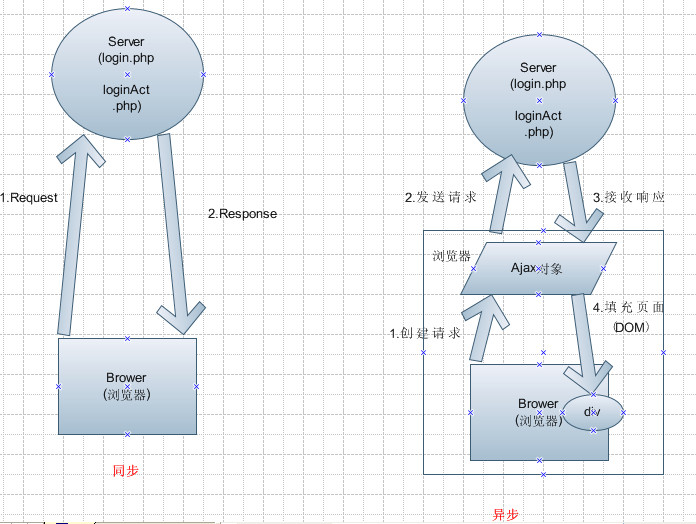
generator 结合 ajax

Proxy 和 Reflect
TIP
Proxy 和 Reflect 是 ES6 引入的元编程能力,用于拦截和定制对象的基本操作。
- Proxy:创建一个对象的代理,可以拦截并自定义对该对象的各种操作(读取、赋值、删除等)
- Reflect:一个内置对象,提供与 Proxy 拦截器一一对应的静态方法,代替过去在 Object 上的一些命令式操作
Proxy
// 基本语法
const obj = { name: 'Alice', age: 25 }
const proxy = new Proxy(obj, {
// 拦截读取
get(target, key, receiver) {
console.log(`读取了属性: ${key}`)
return Reflect.get(target, key, receiver)
},
// 拦截赋值
set(target, key, value, receiver) {
console.log(`设置了属性: ${key} = ${value}`)
return Reflect.set(target, key, value, receiver)
},
// 拦截删除
deleteProperty(target, key) {
console.log(`删除了属性: ${key}`)
return Reflect.deleteProperty(target, key)
},
// 拦截 in 操作符
has(target, key) {
console.log(`检查属性: ${key}`)
return Reflect.has(target, key)
}
})
proxy.name // 读取了属性: name
proxy.age = 30 // 设置了属性: age = 30// 基本语法
const obj = { name: 'Alice', age: 25 }
const proxy = new Proxy(obj, {
// 拦截读取
get(target, key, receiver) {
console.log(`读取了属性: ${key}`)
return Reflect.get(target, key, receiver)
},
// 拦截赋值
set(target, key, value, receiver) {
console.log(`设置了属性: ${key} = ${value}`)
return Reflect.set(target, key, value, receiver)
},
// 拦截删除
deleteProperty(target, key) {
console.log(`删除了属性: ${key}`)
return Reflect.deleteProperty(target, key)
},
// 拦截 in 操作符
has(target, key) {
console.log(`检查属性: ${key}`)
return Reflect.has(target, key)
}
})
proxy.name // 读取了属性: name
proxy.age = 30 // 设置了属性: age = 30Proxy 的常见拦截器(handler):
| 拦截器 | 对应操作 |
|---|---|
get(target, key, receiver) | 读取属性 |
set(target, key, value, receiver) | 设置属性 |
deleteProperty(target, key) | delete 操作 |
has(target, key) | in 操作符 |
apply(target, thisArg, args) | 函数调用 |
construct(target, args) | new 操作符 |
ownKeys(target) | Object.keys() / for...in |
getPrototypeOf(target) | Object.getPrototypeOf() |
Proxy 实用场景
数据校验
const validator = {
set(target, key, value) {
if (key === 'age') {
if (!Number.isInteger(value)) throw new Error('年龄必须是整数')
if (value < 0 || value > 150) throw new Error('年龄范围不合法')
}
target[key] = value
return true
}
}
const person = new Proxy({}, validator)
person.age = 25 // OK
// person.age = 'abc' // Error: 年龄必须是整数
// person.age = 200 // Error: 年龄范围不合法const validator = {
set(target, key, value) {
if (key === 'age') {
if (!Number.isInteger(value)) throw new Error('年龄必须是整数')
if (value < 0 || value > 150) throw new Error('年龄范围不合法')
}
target[key] = value
return true
}
}
const person = new Proxy({}, validator)
person.age = 25 // OK
// person.age = 'abc' // Error: 年龄必须是整数
// person.age = 200 // Error: 年龄范围不合法私有属性保护
const withPrivate = (obj, privateKeys = []) => new Proxy(obj, {
get(target, key) {
if (privateKeys.includes(key)) return undefined
return Reflect.get(target, key)
},
set(target, key, value) {
if (privateKeys.includes(key)) throw new Error('不能修改私有属性')
return Reflect.set(target, key, value)
},
has(target, key) {
if (privateKeys.includes(key)) return false
return Reflect.has(target, key)
}
})
const user = withPrivate({ name: 'Alice', _secret: '12345' }, ['_secret'])
console.log(user.name) // Alice
console.log(user._secret) // undefinedconst withPrivate = (obj, privateKeys = []) => new Proxy(obj, {
get(target, key) {
if (privateKeys.includes(key)) return undefined
return Reflect.get(target, key)
},
set(target, key, value) {
if (privateKeys.includes(key)) throw new Error('不能修改私有属性')
return Reflect.set(target, key, value)
},
has(target, key) {
if (privateKeys.includes(key)) return false
return Reflect.has(target, key)
}
})
const user = withPrivate({ name: 'Alice', _secret: '12345' }, ['_secret'])
console.log(user.name) // Alice
console.log(user._secret) // undefined默认值 / 负索引数组
// 负索引数组
const negativeArray = (arr) => new Proxy(arr, {
get(target, key) {
const index = Number(key)
if (index < 0) key = String(target.length + index)
return Reflect.get(target, key)
}
})
const arr = negativeArray(['a', 'b', 'c'])
console.log(arr[-1]) // 'c'
console.log(arr[-2]) // 'b'// 负索引数组
const negativeArray = (arr) => new Proxy(arr, {
get(target, key) {
const index = Number(key)
if (index < 0) key = String(target.length + index)
return Reflect.get(target, key)
}
})
const arr = negativeArray(['a', 'b', 'c'])
console.log(arr[-1]) // 'c'
console.log(arr[-2]) // 'b'Reflect
TIP
Reflect 是一个内置对象,不是构造函数(不能用 new),其所有方法都是静态的。
目的:
- 将 Object 上一些内部方法(如
[[Get]],[[Set]])变为显式调用 - 让函数式操作更统一(如
Reflect.deleteProperty(obj, key)替代delete obj[key]) - 与 Proxy 的拦截器一一对应,方便在 Proxy 中转发默认行为
const obj = { a: 1, b: 2 }
// 读取属性
Reflect.get(obj, 'a') // 1
// 设置属性
Reflect.set(obj, 'c', 3) // true
// 删除属性
Reflect.deleteProperty(obj, 'b') // true
// 判断属性是否存在
Reflect.has(obj, 'a') // true
// 获取 keys
Reflect.ownKeys(obj) // ['a', 'c']
// 函数调用
function fn(a, b) { return a + b }
Reflect.apply(fn, null, [1, 2]) // 3
// 构造
const instance = Reflect.construct(MyClass, [])const obj = { a: 1, b: 2 }
// 读取属性
Reflect.get(obj, 'a') // 1
// 设置属性
Reflect.set(obj, 'c', 3) // true
// 删除属性
Reflect.deleteProperty(obj, 'b') // true
// 判断属性是否存在
Reflect.has(obj, 'a') // true
// 获取 keys
Reflect.ownKeys(obj) // ['a', 'c']
// 函数调用
function fn(a, b) { return a + b }
Reflect.apply(fn, null, [1, 2]) // 3
// 构造
const instance = Reflect.construct(MyClass, [])为什么用 Reflect 而不是传统操作
// Reflect.set 返回布尔值表示成功与否
if (Reflect.set(obj, 'a', 1)) {
console.log('赋值成功')
}
// Proxy 中 return Reflect.get/set 确保 receiver 正确传递
const proxy = new Proxy(obj, {
get(target, key, receiver) {
return Reflect.get(target, key, receiver)
}
})// Reflect.set 返回布尔值表示成功与否
if (Reflect.set(obj, 'a', 1)) {
console.log('赋值成功')
}
// Proxy 中 return Reflect.get/set 确保 receiver 正确传递
const proxy = new Proxy(obj, {
get(target, key, receiver) {
return Reflect.get(target, key, receiver)
}
})module
Module 模块
ESModule 是 ES6 在语言标准的层面上实现的模块功能,其设计思想是尽量的静态化,使得编译时就能确定模块的依赖关系以及输入和输出的变量
ESModule是编译时加载,使静态分析成为可能- 模块内部自动使用严格模式
- 模块中的顶层
this指向undefined
export
export 命令用于规定模块的对外接口
- 一个模块就是一个独立的文件,该文件内部的所有变量外部无法获取,如果希望外部可以获取必须使用
export关键字输出该变量 - 通常情况下
export输出的变量就是本来的名字,但可以使用as关键字重命名 export命令规定的是对外的接口其必须与模块内部的变量建立一一对应关系export命令输出的接口与其对应的值是动态绑定关系(可以取到模块内部实时的值)export命令可以出现在模块的任何位置,只要处于模块顶层就可以(在块级作用域内使用会报错)
// util.js
/* 单个输出 */
export const name = 'maomao'
export function log() {
console.log(name)
}
/* 统一输出 */
const name = 'maomao'
function log() {
console.log(name)
}
export { name, log }
/* 使用 as 关键字重命名 */
const name = 'maomao'
export { name as nickname }// util.js
/* 单个输出 */
export const name = 'maomao'
export function log() {
console.log(name)
}
/* 统一输出 */
const name = 'maomao'
function log() {
console.log(name)
}
export { name, log }
/* 使用 as 关键字重命名 */
const name = 'maomao'
export { name as nickname }export default 命令注意点
- 一个模块只能有一个默认输出(
export default命令只能使用一次) export default命令本质上是输出一个叫做default的变量或方法,使用时可以为它取任意名字export default命令后面是一个表达式,不能跟变量声明语句
/* 错误 */
export default const a = 1;
/* 正确 */
const a = 1;
export default a;
// 直接输出
export default 'maomao'
export default 1 + 2/* 错误 */
export default const a = 1;
/* 正确 */
const a = 1;
export default a;
// 直接输出
export default 'maomao'
export default 1 + 2export 和 export default 的区别
export {}导出的都是引用export default导出的都是值而不是引用export default是对default赋值的特例,本质上是一种赋值(即export default后的语句会被视为表达式)所以拿到的是值而不是引用export default function是特例,导出的是引用export { thing as default }写法为引用导出
- 导入时除
{} = await import()外均为引用
import
导入模块内部功能
使用 export 命令定义了模块的对外接口后,其他 js 文件就可以通过 import 命令加载这个模块,import 命令具有提升效果,会提升到整个模块的头部,首先执行。是因为 import 命令是编译阶段执行的,在代码运行之前,如果多次重复执行同一句 import 语句,那么只会执行一次,而不会执行多次;
- 默认导入:
import Person from './Person' - 整体导入:
import * as Person from './Person' - 按需导入:
import {age, name, sex} from './Person' - 改名导入:
import {name as newName} from './Person' - 自执导入:
import 'reset.css' - 复合导入:
import Person, {name} from './Person'
// index.js
import { name, log } from './util'
/* 使用 as 关键字重命名 */
import { name as nickname, log as logName } from './util'
/* 模块的整体加载 */
import * as util from './util'
util.name
util.log()// index.js
import { name, log } from './util'
/* 使用 as 关键字重命名 */
import { name as nickname, log as logName } from './util'
/* 模块的整体加载 */
import * as util from './util'
util.name
util.log()动态引入
动态加载 import,返回 Promise,可以调用 then 方法;
component: () => import('./views/about.vue')component: () => import('./views/about.vue')import 与 require 的区别
require 是 commjs 的规范,import 是 es6 的规范;
require 是同步加载,import 是异步加载;
require 加载方式:
// 导出
// 单个暴露
exports.fn = function () {}
// 一起暴露
moudle.exports = {}
//导入
require('')// 导出
// 单个暴露
exports.fn = function () {}
// 一起暴露
moudle.exports = {}
//导入
require('')require.context
如果 require 参数含有表达式,比如:require('./template/'+name+'.ejs'),就可以使用require.context;
require.context(dir,deep,reg)
- dir:要搜索的文件夹目录
- deep:是否还应该搜索它的子目录
- reg:匹配文件的正则表达式;
require.context('./test', false, /\.vue$/) //匹配test目录以.vue结尾的文件名, 不深度匹配;require.context('./test', false, /\.vue$/) //匹配test目录以.vue结尾的文件名, 不深度匹配;require.context模块导出返回一个 require 函数,这个函数可以接收一个参数,将 context.keys()组成的数组随便一个传入进去就会返回一个模块;导出的方法有 3 个属性:
resolve(req):将路径传入获取当前文件的绝对路径;keys():返回一个数组,数组里面是所有的文件名id:返回当前路径
let context = require.context('./components', false, /\.vue$/)
let requireAll = (context) => context.keys().map(context) // map之后就是模块了;
let all = requireAll(context)
// 返回的是一个数组对象, 里面是导出的Module, 有一个default对象, 该对象就是一个模块;
console.log(all)
// 传入之后会返回导出的该文件;就是requireAll的单个对象
context(context.keys()[0])let context = require.context('./components', false, /\.vue$/)
let requireAll = (context) => context.keys().map(context) // map之后就是模块了;
let all = requireAll(context)
// 返回的是一个数组对象, 里面是导出的Module, 有一个default对象, 该对象就是一个模块;
console.log(all)
// 传入之后会返回导出的该文件;就是requireAll的单个对象
context(context.keys()[0])
- Vue 全局组件注册
(1)创建:./components/global/index.js,并写入以下代码,之后在 main.js 引入:import './components/global'即可;
const requireAll = (context) => context.keys().map(context)
let context = require.context('./', false, /\.vue$/)
requireAll(context).forEach(({ default: item }) => {
// 第一个小括号匹配文件夹名 第二个小括号匹配文件名
let reg = /\/(\w+)\/(\w+).vue$/
item.__file.match(reg)
// 引入组件时, 默认取组件里面的name属性, 如果没有name属性则取文件名, 如果文件名是index则取文件夹名, 注册的全局组件以my-[name]使用;
let name = item.name || (RegExp.$2 === 'index' ? RegExp.$1 : RegExp.$2)
Vue.component(`my-${name}`, item)
})const requireAll = (context) => context.keys().map(context)
let context = require.context('./', false, /\.vue$/)
requireAll(context).forEach(({ default: item }) => {
// 第一个小括号匹配文件夹名 第二个小括号匹配文件名
let reg = /\/(\w+)\/(\w+).vue$/
item.__file.match(reg)
// 引入组件时, 默认取组件里面的name属性, 如果没有name属性则取文件名, 如果文件名是index则取文件夹名, 注册的全局组件以my-[name]使用;
let name = item.name || (RegExp.$2 === 'index' ? RegExp.$1 : RegExp.$2)
Vue.component(`my-${name}`, item)
})(2)之后在 global 文件夹下面创建文件即可;
如何保证导入都是引用?
- 保证导入总是引用
- 尽量使用命名导入(使用除
{} = await import()外的写法) - 注意命名导出的写法
- 少用默认导出
- 尽量使用命名导入(使用除
- 做不到上面的要求时尽量把需要维持引用的变量使用
Object封装,不要使用简单变量
相关文章
:::
export 与 import 的复合写法
如果在一个模块之中,需要先输入后输出同一个模块,import 命令可以与 export 命令写在一起
export { foo, bar } from 'my_module'
// 等同于
import { foo, bar } from 'my_module'
export { foo, bar }
/* 接口改名 */
export { foo as myFoo } from 'my_module'
/* 整体输出 */
export * from 'my_module'
/* 具名接口改为默认接口 */
export { es6 as default } from 'my_module';
// 等同于
import { es6 } from 'my_module';
export default es6;
/* 默认接口改为具名接口 */
export { default as es6 } from 'my_module';
/* 整体加载 */
export * as util from "util";
// 等同于
import * as util from "util";
export {util};export { foo, bar } from 'my_module'
// 等同于
import { foo, bar } from 'my_module'
export { foo, bar }
/* 接口改名 */
export { foo as myFoo } from 'my_module'
/* 整体输出 */
export * from 'my_module'
/* 具名接口改为默认接口 */
export { es6 as default } from 'my_module';
// 等同于
import { es6 } from 'my_module';
export default es6;
/* 默认接口改为具名接口 */
export { default as es6 } from 'my_module';
/* 整体加载 */
export * as util from "util";
// 等同于
import * as util from "util";
export {util};注意点
在 export 与 import 的复合写法时,输入的接口不能在当前模块中使用,只是相当于对外转发了接口
浏览器对 ESModule 的加载规则
浏览器加载 ESModule 同样使用 <script> 标签但是需要设置 type="module" 属性
浏览器对于带有 type="module" 的 <script>都是异步加载,不会堵塞浏览器,即等到整个页面渲染完再执行模块脚本,等同于设置了 <script> 标签的 defer 属性
有多个 <script type="module"> 时会按照在页面出现的顺序依次执行
<script type="module" src="./util.js"></script>
<!-- 等同于 -->
<script type="module" src="./util.js" defer></script><script type="module" src="./util.js"></script>
<!-- 等同于 -->
<script type="module" src="./util.js" defer></script>当 <script> 同时设置了 type="module" 和 async 属性时,只要加载完成渲染引擎就会中断渲染立即执行,等执行完成后再恢复渲染,即不会按照在页面出现的顺序执行,而是只要该模块加载完成就执行该模块
在 script 中使用 ESModule
ESModule 内嵌在网页中使用时语法行为与加载外部脚本完全一致,只需注意以下几点
- 代码是在模块作用域之中运行而不是在全局作用域运行,模块内部的顶层变量外部不可见
- 自动采用严格模式不管有没有声明
use strict - 可以使用
import命令加载其他模块(.js后缀不可省略,需要提供绝对URL或相对URL) 也可以使用export命令输出对外接口 - 顶层的
this关键字返回undefined而不是指向window - 同一个模块如果加载多次将只执行一次
<script type="module">
import $ from './jquery/src/jquery.js'
$('#message').text('Hi from jQuery!')
</script><script type="module">
import $ from './jquery/src/jquery.js'
$('#message').text('Hi from jQuery!')
</script>小技巧
利用顶层的 this 等于 undefined 这个语法点可以判断当前代码是否在 ES6 模块之中
const isNotModuleScript = this !== undefinedconst isNotModuleScript = this !== undefined