 Cao Note
插件开发
创建自己的插件
- 目录结构
- lib 下面是我们所有的插件,创建一个新的插件名叫 wing;
- wing 下的目录是 lib 和 index.js 还有一个 test.vue 文件;
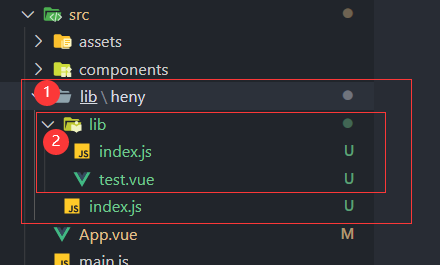
在 wing/index.js 文件写入
jsmodule.exports = require('./lib')module.exports = require('./lib')在 wing/lib/index.js 写入以下代码
jsimport test from './test.vue' export default { // Vue.use默认使用install方法 // 第一个参数是Vue, 第二个参数是选项 install(Vue, options) { Vue.component('test', test) }, }import test from './test.vue' export default { // Vue.use默认使用install方法 // 第一个参数是Vue, 第二个参数是选项 install(Vue, options) { Vue.component('test', test) }, }在 test.vue 文件可以写我们的公共组件代码了
vue<template> <div class="test">哈哈, 这是我的新插件</div> </template> <script> export default { name: 'test', } </script> <style lang="scss"></style><template> <div class="test">哈哈, 这是我的新插件</div> </template> <script> export default { name: 'test', } </script> <style lang="scss"></style>在 main.js 主入口文件引入创建好的 test 插件
jsimport test from './lib/wing' Vue.use(test)import test from './lib/wing' Vue.use(test)直接在 App.vue 将标签放入,就可以直接使用了
插件自动安装
在 UMD 构建中,插件开发者使用 Vue.use 来自动安装插件是一个通用的做法。例如,官方的 vue-router 插件是这样在浏览器环境中自行安装的:
var inBrowser = typeof window !== 'undefined'
/* … */
if (inBrowser && window.Vue) {
  window.Vue.use(VueRouter)
}
var inBrowser = typeof window !== 'undefined'
/* … */
if (inBrowser && window.Vue) {
window.Vue.use(VueRouter)
}发布到 npm
npm 初始化
进入 lib/wing 文件夹,并执行 npm init 命令
name:包名,默认就是文件夹名字,但是这个名字是需要唯一的,如果你命的名字已经被使用过了,那就只能换个名字。查看是否被用,可以直接输入 npm view 包名,如果报错即被使用version:包的版本,默认是 1.0.0, 你可以更换,例如 0.1.0 或 2.0.1 等。description:包的描述。主要描述你的包是用来做什么的。entry point:包入口文件,默认是 Index.js,可以自定义。test command:测试命令,这个直接回车就好了,因为目前还不需要这个。git repository:包的 git 仓库地址,npm 自动读取.git 目录作为这一项的默认值。没使用则回车略过。keyword:包的关键词。该项会影响到用户怎样才能搜到你的包,可以理解为搜索引擎悠哈的关键词。建议关键词要能准确描述你的包,例如:"vpay vue-pay vue-password password"author:作者。例如你的 npm 账号或者 github 账号license:开源协议,回车就好。
忽略文件不上传
创建.npmignore文件,和.gitignore差不多,希望哪些不发到 npm 包上面;
上传
测试插件是否可以上传到 npm 网上;
因为 main.js 引入时,都是从 node_modules 引入的,因此将 lib/wing 直接放入 node_modules 中,再引入的时候直接写:
jsimport test from 'wing' Vue.use(test)import test from 'wing' Vue.use(test)测试通过之后就可以直接开始发布到 npmjs 网上了;
注册 npm 账号
登录 npm 账号
如果有设置了淘宝镜像需要先设置回镜像
jsnpm config set registry http://registry.npmjs.orgnpm config set registry http://registry.npmjs.org之后执行 npm login 命令登录 npm;
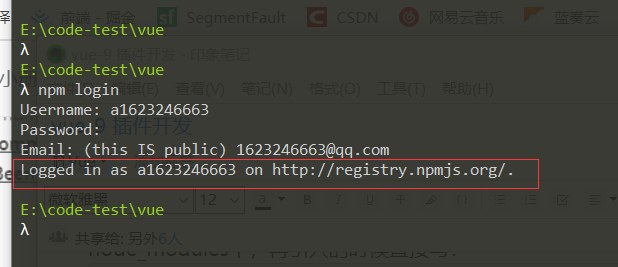
进入到项目的根目录,直接输入 npm publish 就发布成功了,直接到 npmjs 官网搜索包的 name 名字就有了;当然也可以直接在项目 npm i 名字;
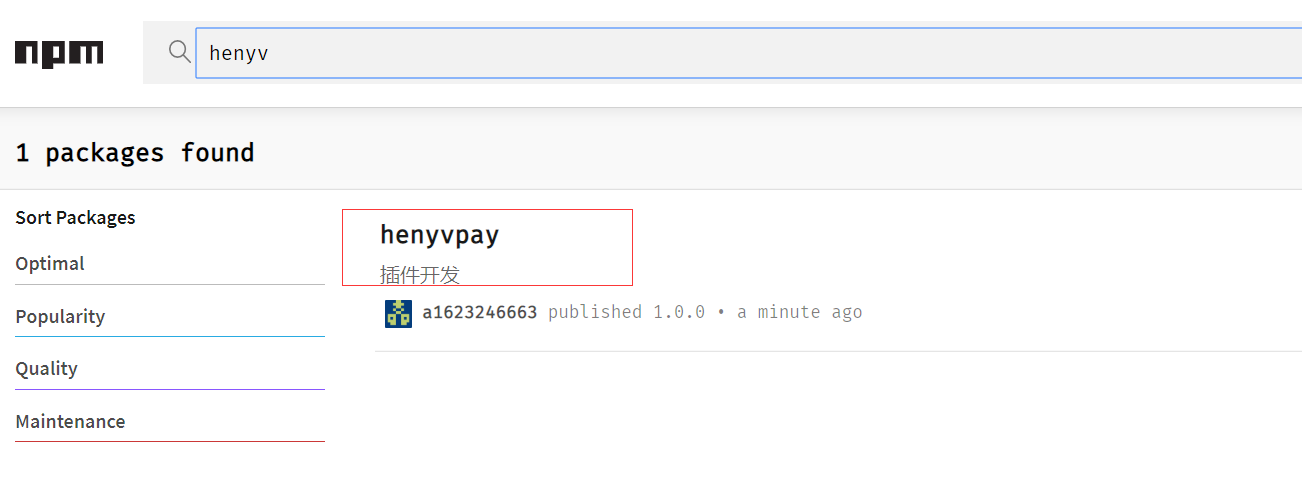
注意:第二次发布时,必须修改 version 版本号才能发布,否则会报错;
自动修改版本号
npm version <update_type>
type 值为:
- patch 0.0.
- minor 1.*.0
- major *.0.0
其他 npm 管理包命令
// 撤销整个包
npm unpublish --force 包名

// 撤销某个版本
npm publish 包名@版本号
// 撤销整个包
npm unpublish --force 包名
// 撤销某个版本
npm publish 包名@版本号Vue.extend
Vue.extend 属于 Vue 的全局 API,在实际业务开发中很少使用,因为相比常用 Vue.component 写法使用 extend 更加麻烦,用于注册插件使用
使用Vue.extend创建插件,传入一个组件,或者一个对象,里面写对应的组件
之后使用$mount挂载元素得到$el,将$el添加到body里面即可;
// 使用vue单组件
import CodeComponent from './CodeComponent.vue'
const C = Vue.extend(CodeComponent)

// 使用对象
const C = Vue.extend({
  data() {},
  render() {
    return <div>这是一个组件</div>
  },
})

// 挂载到body上
let vm = new C()
vm.$mount()
document.body.appendChild(vm.$el)
// 使用vue单组件
import CodeComponent from './CodeComponent.vue'
const C = Vue.extend(CodeComponent)
// 使用对象
const C = Vue.extend({
data() {},
render() {
return <div>这是一个组件</div>
},
})
// 挂载到body上
let vm = new C()
vm.$mount()
document.body.appendChild(vm.$el)开发一个 loading 全局组件
创建 Loading/Loading.vue
vue<template> <div v-if="visible">{{ text }}</div> </template> <script> export default { data() { return { visible: false, text: '', } }, } </script><template> <div v-if="visible">{{ text }}</div> </template> <script> export default { data() { return { visible: false, text: '', } }, } </script>创建 Loading/index.js
jsimport Vue from 'vue' import LoadingComponent from './Loading' const LoadingConstructor = Vue.extend(LoadingComponent) // 包装成vue实例 LoadingConstructor.prototype.close = function () { this.visible = false setTimeout(() => { if (this.$el.parentNode) { this.$el.parentNode.removeChild(this.$el) this.$destroy() } }, 300) } const Loading = (options = {}) => { const instance = new LoadingConstructor({ data: { text: '数据加载中...', ...options, }, }) instance.$mount() document.body.appendChild(instance.$el) return instance } export default Loadingimport Vue from 'vue' import LoadingComponent from './Loading' const LoadingConstructor = Vue.extend(LoadingComponent) // 包装成vue实例 LoadingConstructor.prototype.close = function () { this.visible = false setTimeout(() => { if (this.$el.parentNode) { this.$el.parentNode.removeChild(this.$el) this.$destroy() } }, 300) } const Loading = (options = {}) => { const instance = new LoadingConstructor({ data: { text: '数据加载中...', ...options, }, }) instance.$mount() document.body.appendChild(instance.$el) return instance } export default Loading修改 main.js
jsimport Loading from './Loading' Vue.prototype.$loading = Loadingimport Loading from './Loading' Vue.prototype.$loading = Loading在组件中使用
jsexport default { methods: { showLoading() { this.$loading({ text: '数据加载中' }) }, }, }export default { methods: { showLoading() { this.$loading({ text: '数据加载中' }) }, }, }