 Cao Note
Vue 路由相关
Vue-router 基本使用
mode
hashhistory
跳转
- 编程式(js 跳转)
this.$router.push('/') - 声明式(标签跳转)
<router-link to=""></router-link>
vue 路由传参数
- 使用
query方法传入的参数使用this.$route.query接受 - 使用
params方式传入的参数使用this.$route.params接受
占位
<router-view></router-view><router-view></router-view>vue-router 动态路由是什么
我们经常需要把某种模式匹配到的所有路由,全都映射到同个组件。例如,我们有一个
User组件,对于所有ID各不相同的用户,都要使用这个组件来渲染。那么,我们可以在vue-router的路由路径中使用“动态路径参数”(dynamic segment) 来达到这个效果
const User = {
  template: '<div>User</div>',
}

const router = new VueRouter({
  routes: [
    // 动态路径参数 以冒号开头
    { path: '/user/:id', component: User },
  ],
})
const User = {
template: '<div>User</div>',
}
const router = new VueRouter({
routes: [
// 动态路径参数 以冒号开头
{ path: '/user/:id', component: User },
],
})问题: vue-router 组件复用导致路由参数失效怎么办?
解决方法:
- 通过
watch监听路由参数再发请求
watch: { //通过watch来监听路由变化
 "$route": function(){
  this.getData(this.$route.params.xxx);
 }
}watch: { //通过watch来监听路由变化
"$route": function(){
this.getData(this.$route.params.xxx);
}
}- 用
:key来阻止“复用”
<router-view :key="$route.fullPath" /><router-view :key="$route.fullPath" />回答范例
- 很多时候,我们需要将给定匹配模式的路由映射到同一个组件,这种情况就需要定义动态路由
- 例如,我们可能有一个
User组件,它应该对所有用户进行渲染,但用户ID不同。在Vue Router中,我们可以在路径中使用一个动态字段来实现,例如:{ path: '/users/:id', component: User },其中:id就是路径参数 - 路径参数 用冒号
:表示。当一个路由被匹配时,它的params的值将在每个组件中以this.$route.params的形式暴露出来。 - 参数还可以有多个,例如/
users/:username/posts/:postId;除了$route.params之外,$route对象还公开了其他有用的信息,如$route.query、$route.hash等
router-link 和 router-view 是如何起作用的
分析
vue-router中两个重要组件router-link和router-view,分别起到导航作用和内容渲染作用,但是回答如何生效还真有一定难度
回答范例
vue-router中两个重要组件router-link和router-view,分别起到路由导航作用和组件内容渲染作用- 使用中
router-link默认生成一个a标签,设置to属性定义跳转path。实际上也可以通过custom和插槽自定义最终的展现形式。router-view是要显示组件的占位组件,可以嵌套,对应路由配置的嵌套关系,配合name可以显示具名组件,起到更强的布局作用。 router-link组件内部根据custom属性判断如何渲染最终生成节点,内部提供导航方法navigate,用户点击之后实际调用的是该方法,此方法最终会修改响应式的路由变量,然后重新去routes匹配出数组结果,router-view则根据其所处深度deep在匹配数组结果中找到对应的路由并获取组件,最终将其渲染出来。
Vue-router 除了 router-link 怎么实现跳转
声明式导航
<router-link to="/about">Go to About</router-link><router-link to="/about">Go to About</router-link>编程式导航
// literal string path
router.push('/users/1')

// object with path
router.push({ path: '/users/1' })

// named route with params to let the router build the url
router.push({ name: 'user', params: { username: 'test' } })
// literal string path
router.push('/users/1')
// object with path
router.push({ path: '/users/1' })
// named route with params to let the router build the url
router.push({ name: 'user', params: { username: 'test' } })回答范例
vue-router导航有两种方式:声明式导航和编程方式导航- 声明式导航方式使用
router-link组件,添加to属性导航;编程方式导航更加灵活,可传递调用router.push(),并传递path字符串或者RouteLocationRaw对象,指定path、name、params等信息 - 如果页面中简单表示跳转链接,使用
router-link最快捷,会渲染一个 a 标签;如果页面是个复杂的内容,比如商品信息,可以添加点击事件,使用编程式导航 - 实际上内部两者调用的导航函数是一样的
Vue-router 路由模式有几种
vue-router 有 3 种路由模式:hash、history、abstract,对应的源码如下所示
switch (mode) {
case 'history':
this.history = new HTML5History(this, options.base)
break
case 'hash':
this.history = new HashHistory(this, options.base, this.fallback)
break
case 'abstract':
this.history = new AbstractHistory(this, options.base)
break
default:
if (process.env. NODE_ENV !== 'production') {
assert(false, `invalid mode: ${mode}`)
}
}switch (mode) {
case 'history':
this.history = new HTML5History(this, options.base)
break
case 'hash':
this.history = new HashHistory(this, options.base, this.fallback)
break
case 'abstract':
this.history = new AbstractHistory(this, options.base)
break
default:
if (process.env. NODE_ENV !== 'production') {
assert(false, `invalid mode: ${mode}`)
}
}其中,3 种路由模式的说明如下:
hash: 使用URL hash值来作路由,支持所有浏览器。 缺点:SEO 不友好history: 依赖HTML5 History API和服务器配置。后端将所有前端路由都渲染同一页面,但不能是404页面。缺点:IE8不支持abstract: 支持所有JavaScript运行环境,如Node.js服务器端。如果发现没有浏览器的API,路由会自动强制进入这个模式。缺点:没有URL,只对单机有效。前面两种都是把路径存到URL上面。memory模式不放在URL里面,前端一般放在localstorage里面。
注意:
v4之前叫做abstract history,之后叫做MemoryHistory
Vue 路由 hash 模式和 history 模式
1. hash模式
早期的前端路由的实现就是基于 location.hash 来实现的。其实现原理很简单,location.hash 的值就是 URL中 # 后面的内容。比如下面这个网站,它的 location.hash 的值为 '#search'
https://interview.poetries.top#searchhttps://interview.poetries.top#searchhash 路由模式的实现主要是基于下面几个特性
URL中hash值只是客户端的一种状态,也就是说当向服务器端发出请求时,hash部分不会被发送;hash值的改变,都会在浏览器的访问历史中增加一个记录。因此我们能通过浏览器的回退、前进按钮控制hash的切换;- 可以通过
a标签,并设置href属性,当用户点击这个标签后,URL的hash值会发生改变;或者使用JavaScript来对loaction.hash进行赋值,改变URL的hash值; - 我们可以使用
hashchange事件来监听hash值的变化,从而对页面进行跳转(渲染)
window.addEventListener('hashchange', funcRef, false)window.addEventListener('hashchange', funcRef, false)每一次改变 hash(window.location.hash),都会在浏览器的访问历史中增加一个记录利用 hash 的以上特点,就可以来实现前端路由“更新视图但不重新请求页面”的功能了
特点:兼容性好但是不美观
2. history模式
history采用HTML5的新特性;且提供了两个新方法: pushState(), replaceState()可以对浏览器历史记录栈进行修改,以及popState事件的监听到状态变更
window.history.pushState(null, null, path)
window.history.replaceState(null, null, path)window.history.pushState(null, null, path)
window.history.replaceState(null, null, path)这两个方法有个共同的特点:当调用他们修改浏览器历史记录栈后,虽然当前 URL 改变了,但浏览器不会刷新页面,这就为单页应用前端路由“更新视图但不重新请求页面”提供了基础。
history 路由模式的实现主要基于存在下面几个特性:
pushState和repalceState两个API来操作实现URL的变化 ;- 我们可以使用
popstate事件来监听url的变化,从而对页面进行跳转(渲染); history.pushState()或history.replaceState()不会触发popstate事件,这时我们需要手动触发页面跳转(渲染)。
特点:虽然美观,但是刷新会出现 404 需要后端进行配置
了解 history 有哪些方法吗?说下它们的区别
history这个对象在html5的时候新加入两个apihistory.pushState()和history.repalceState()这两个API可以在不进行刷新的情况下,操作浏览器的历史纪录。唯一不同的是,前者是新增一个历史记录,后者是直接替换当前的历史记录。
从参数上来说:
window.history.pushState(state, title, url)
//state:需要保存的数据,这个数据在触发popstate事件时,可以在event.state里获取
//title:标题,基本没用,一般传null
//url:设定新的历史纪录的url。新的url与当前url的origin必须是一样的,否则会抛出错误。url可以时绝对路径,也可以是相对路径。
//如 当前url是 https://www.baidu.com/a/,执行history.pushState(null, null, './qq/'),则变成 https://www.baidu.com/a/qq/,
//执行history.pushState(null, null, '/qq/'),则变成 https://www.baidu.com/qq/

window.history.replaceState(state, title, url)
//与pushState 基本相同,但她是修改当前历史纪录,而 pushState 是创建新的历史纪录window.history.pushState(state, title, url)
//state:需要保存的数据,这个数据在触发popstate事件时,可以在event.state里获取
//title:标题,基本没用,一般传null
//url:设定新的历史纪录的url。新的url与当前url的origin必须是一样的,否则会抛出错误。url可以时绝对路径,也可以是相对路径。
//如 当前url是 https://www.baidu.com/a/,执行history.pushState(null, null, './qq/'),则变成 https://www.baidu.com/a/qq/,
//执行history.pushState(null, null, '/qq/'),则变成 https://www.baidu.com/qq/
window.history.replaceState(state, title, url)
//与pushState 基本相同,但她是修改当前历史纪录,而 pushState 是创建新的历史纪录另外还有:
window.history.back()后退window.history.forward()前进window.history.go(1)前进或者后退几步
从触发事件的监听上来说:
pushState()和replaceState()不能被popstate事件所监听- 而后面三者可以,且用户点击浏览器前进后退键时也可以
如何监听 pushState 和 replaceState 的变化呢?
利用自定义事件new Event()创建这两个事件,并全局监听:
<body>
  <button onclick="goPage2()">去page2</button>
  <div>Page1</div>
  <script>
    let count = 0
    function goPage2() {
      history.pushState({ count: count++ }, `bb${count}`, 'page1.html')
      console.log(history)
    }
    // 这个不能监听到 pushState
    // window.addEventListener('popstate', function (event) {
    //   console.log(event)
    // })
    function createHistoryEvent(type) {
      var fn = history[type]
      return function () {
        // 这里的 arguments 就是调用 pushState 时的三个参数集合
        var res = fn.apply(this, arguments)
        let e = new Event(type)
        e.arguments = arguments
        window.dispatchEvent(e)
        return res
      }
    }
    history.pushState = createHistoryEvent('pushState')
    history.replaceState = createHistoryEvent('replaceState')
    window.addEventListener('pushState', function (event) {
      // { type: 'pushState', arguments: [...], target: Window, ... }
      console.log(event)
    })
    window.addEventListener('replaceState', function (event) {
      console.log(event)
    })
  </script>
</body><body>
<button onclick="goPage2()">去page2</button>
<div>Page1</div>
<script>
let count = 0
function goPage2() {
history.pushState({ count: count++ }, `bb${count}`, 'page1.html')
console.log(history)
}
// 这个不能监听到 pushState
// window.addEventListener('popstate', function (event) {
// console.log(event)
// })
function createHistoryEvent(type) {
var fn = history[type]
return function () {
// 这里的 arguments 就是调用 pushState 时的三个参数集合
var res = fn.apply(this, arguments)
let e = new Event(type)
e.arguments = arguments
window.dispatchEvent(e)
return res
}
}
history.pushState = createHistoryEvent('pushState')
history.replaceState = createHistoryEvent('replaceState')
window.addEventListener('pushState', function (event) {
// { type: 'pushState', arguments: [...], target: Window, ... }
console.log(event)
})
window.addEventListener('replaceState', function (event) {
console.log(event)
})
</script>
</body>Vue 路由的钩子函数
首页可以控制导航跳转,
beforeEach,afterEach等,一般用于页面title的修改。一些需要登录才能调整页面的重定向功能。
beforeEach主要有 3 个参数to,from,next。to:route即将进入的目标路由对象。from:route当前导航正要离开的路由。next:function一定要调用该方法resolve这个钩子。执行效果依赖 next方法的调用参数。可以控制网页的跳转
$route和$router的区别
$route是“路由信息对象”,包括path,params,hash,query,fullPath,matched,name等路由信息参数。- 而
$router是“路由实例”对象包括了路由的跳转方法,钩子函数等
vue-router 路由钩子函数是什么 执行顺序是什么
路由钩子的执行流程, 钩子函数种类有:
全局守卫、路由守卫、组件守卫
- 导航被触发。
- 在失活的组件里调用
beforeRouteLeave守卫。 - 调用全局的
beforeEach守卫。 - 在重用的组件里调用
beforeRouteUpdate守卫 (2.2+)。 - 在路由配置里调用
beforeEnter。 - 解析异步路由组件。
- 在被激活的组件里调用
beforeRouteEnter。 - 调用全局的
beforeResolve守卫 (2.5+)。 - 导航被确认。
- 调用全局的
afterEach钩子。 - 触发
DOM更新。 - 调用
beforeRouteEnter守卫中传给next的回调函数,创建好的组件实例会作为回调函数的参数传入
vue-router 有哪几种导航守卫
- 全局守卫
- 路由独享守卫
- 路由组件内的守卫
全局守卫
vue-router 全局有三个守卫
router.beforeEach全局前置守卫 进入路由之前router.beforeResolve全局解析守卫(2.5.0+) 在beforeRouteEnter调用之后调用router.afterEach全局后置钩子 进入路由之后
// main.js 入口文件
import router from './router' // 引入路由
router.beforeEach((to, from, next) => {
  next()
})
router.beforeResolve((to, from, next) => {
  next()
})
router.afterEach((to, from) => {
  console.log('afterEach 全局后置钩子')
})
// main.js 入口文件
import router from './router' // 引入路由
router.beforeEach((to, from, next) => {
next()
})
router.beforeResolve((to, from, next) => {
next()
})
router.afterEach((to, from) => {
console.log('afterEach 全局后置钩子')
})路由独享守卫
如果你不想全局配置守卫的话,你可以为某些路由单独配置守卫
const router = new VueRouter({
routes: [
{
path: '/foo',
component: Foo,
beforeEnter: (to, from, next) => {
// 参数用法什么的都一样,调用顺序在全局前置守卫后面,所以不会被全局守卫覆盖
// ...
},
},
],
})const router = new VueRouter({
routes: [
{
path: '/foo',
component: Foo,
beforeEnter: (to, from, next) => {
// 参数用法什么的都一样,调用顺序在全局前置守卫后面,所以不会被全局守卫覆盖
// ...
},
},
],
})路由组件内的守卫
beforeRouteEnter进入路由前, 在路由独享守卫后调用 不能 获取组件实例this,组件实例还没被创建beforeRouteUpdate(2.2) 路由复用同一个组件时, 在当前路由改变,但是该组件被复用时调用 可以访问组件实例thisbeforeRouteLeave离开当前路由时, 导航离开该组件的对应路由时调用,可以访问组件实例this
vue-router 守卫
导航守卫
router.beforeEach全局前置守卫
to: Route: 即将要进入的目标(路由对象)from: Route: 当前导航正要离开的路由next: Function: 一定要调用该方法来resolve这个钩子。(一定要用这个函数才能去到下一个路由,如果不用就拦截)- 执行效果依赖 next 方法的调用参数。
next(): 进行管道中的下一个钩子。如果全部钩子执行完了,则导航的状态就是 confirmed (确认的)。next(false):取消进入路由,url 地址重置为 from 路由地址(也就是将要离开的路由地址)
// main.js 入口文件
import router from './router' // 引入路由
router.beforeEach((to, from, next) => {
  next()
})
router.beforeResolve((to, from, next) => {
  next()
})
router.afterEach((to, from) => {
  console.log('afterEach 全局后置钩子')
})// main.js 入口文件
import router from './router' // 引入路由
router.beforeEach((to, from, next) => {
next()
})
router.beforeResolve((to, from, next) => {
next()
})
router.afterEach((to, from) => {
console.log('afterEach 全局后置钩子')
})路由独享的守卫 你可以在路由配置上直接定义
beforeEnter守卫
const router = new VueRouter({
  routes: [
    {
      path: '/foo',
      component: Foo,
      beforeEnter: (to, from, next) => {
        // ...
      },
    },
  ],
})
const router = new VueRouter({
routes: [
{
path: '/foo',
component: Foo,
beforeEnter: (to, from, next) => {
// ...
},
},
],
})组件内的守卫你可以在路由组件内直接定义以下路由导航守卫
const Foo = {
  template: `...`,
  beforeRouteEnter (to, from, next) {
    // 在渲染该组件的对应路由被 confirm 前调用
    // 不!能!获取组件实例 `this`
    // 因为当守卫执行前,组件实例还没被创建
  },
  beforeRouteUpdate (to, from, next) {
    // 在当前路由改变,但是该组件被复用时调用
    // 举例来说,对于一个带有动态参数的路径 /foo/:id,在 /foo/1 和 /foo/2 之间跳转的时候,
    // 由于会渲染同样的 Foo 组件,因此组件实例会被复用。而这个钩子就会在这个情况下被调用。
    // 可以访问组件实例 `this`
  },
  beforeRouteLeave (to, from, next) {
    // 导航离开该组件的对应路由时调用,我们用它来禁止用户离开
    // 可以访问组件实例 `this`
    // 比如还未保存草稿,或者在用户离开前,
    将setInterval销毁,防止离开之后,定时器还在调用。
  }
}
const Foo = {
template: `...`,
beforeRouteEnter (to, from, next) {
// 在渲染该组件的对应路由被 confirm 前调用
// 不!能!获取组件实例 `this`
// 因为当守卫执行前,组件实例还没被创建
},
beforeRouteUpdate (to, from, next) {
// 在当前路由改变,但是该组件被复用时调用
// 举例来说,对于一个带有动态参数的路径 /foo/:id,在 /foo/1 和 /foo/2 之间跳转的时候,
// 由于会渲染同样的 Foo 组件,因此组件实例会被复用。而这个钩子就会在这个情况下被调用。
// 可以访问组件实例 `this`
},
beforeRouteLeave (to, from, next) {
// 导航离开该组件的对应路由时调用,我们用它来禁止用户离开
// 可以访问组件实例 `this`
// 比如还未保存草稿,或者在用户离开前,
将setInterval销毁,防止离开之后,定时器还在调用。
}
}vue-router 中如何保护路由
分析
路由保护在应用开发过程中非常重要,几乎每个应用都要做各种路由权限管理,因此相当考察使用者基本功。
体验
全局守卫:
const router = createRouter({ ... })

router.beforeEach((to, from) => {
  // ...
  // 返回 false 以取消导航
  return false
})
const router = createRouter({ ... })
router.beforeEach((to, from) => {
// ...
// 返回 false 以取消导航
return false
})路由独享守卫:
const routes = [
  {
    path: '/users/:id',
    component: UserDetails,
    beforeEnter: (to, from) => {
      // reject the navigation
      return false
    },
  },
]
const routes = [
{
path: '/users/:id',
component: UserDetails,
beforeEnter: (to, from) => {
// reject the navigation
return false
},
},
]组件内的守卫:
const UserDetails = {
  template: `...`,
  beforeRouteEnter(to, from) {
    // 在渲染该组件的对应路由被验证前调用
  },
  beforeRouteUpdate(to, from) {
    // 在当前路由改变,但是该组件被复用时调用
  },
  beforeRouteLeave(to, from) {
    // 在导航离开渲染该组件的对应路由时调用
  },
}
const UserDetails = {
template: `...`,
beforeRouteEnter(to, from) {
// 在渲染该组件的对应路由被验证前调用
},
beforeRouteUpdate(to, from) {
// 在当前路由改变,但是该组件被复用时调用
},
beforeRouteLeave(to, from) {
// 在导航离开渲染该组件的对应路由时调用
},
}回答
vue-router中保护路由的方法叫做路由守卫,主要用来通过跳转或取消的方式守卫导航。- 路由守卫有三个级别:
全局、路由独享、组件级。影响范围由大到小,例如全局的router.beforeEach(),可以注册一个全局前置守卫,每次路由导航都会经过这个守卫,因此在其内部可以加入控制逻辑决定用户是否可以导航到目标路由;在路由注册的时候可以加入单路由独享的守卫,例如beforeEnter,守卫只在进入路由时触发,因此只会影响这个路由,控制更精确;我们还可以为路由组件添加守卫配置,例如beforeRouteEnter,会在渲染该组件的对应路由被验证前调用,控制的范围更精确了。 - 用户的任何导航行为都会走
navigate方法,内部有个guards队列按顺序执行用户注册的守卫钩子函数,如果没有通过验证逻辑则会取消原有的导航。
原理
runGuardQueue(guards)链式的执行用户在各级别注册的守卫钩子函数,通过则继续下一个级别的守卫,不通过进入catch流程取消原本导航
// 源码
runGuardQueue(guards)
  .then(() => {
    // check global guards beforeEach
    guards = []
    for (const guard of beforeGuards.list()) {
      guards.push(guardToPromiseFn(guard, to, from))
    }
    guards.push(canceledNavigationCheck)

    return runGuardQueue(guards)
  })
  .then(() => {
    // check in components beforeRouteUpdate
    guards = extractComponentsGuards(updatingRecords, 'beforeRouteUpdate', to, from)

    for (const record of updatingRecords) {
      record.updateGuards.forEach((guard) => {
        guards.push(guardToPromiseFn(guard, to, from))
      })
    }
    guards.push(canceledNavigationCheck)

    // run the queue of per route beforeEnter guards
    return runGuardQueue(guards)
  })
  .then(() => {
    // check the route beforeEnter
    guards = []
    for (const record of to.matched) {
      // do not trigger beforeEnter on reused views
      if (record.beforeEnter && !from.matched.includes(record)) {
        if (isArray(record.beforeEnter)) {
          for (const beforeEnter of record.beforeEnter)
            guards.push(guardToPromiseFn(beforeEnter, to, from))
        } else {
          guards.push(guardToPromiseFn(record.beforeEnter, to, from))
        }
      }
    }
    guards.push(canceledNavigationCheck)

    // run the queue of per route beforeEnter guards
    return runGuardQueue(guards)
  })
  .then(() => {
    // NOTE: at this point to.matched is normalized and does not contain any () => Promise<Component>

    // clear existing enterCallbacks, these are added by extractComponentsGuards
    to.matched.forEach((record) => (record.enterCallbacks = {}))

    // check in-component beforeRouteEnter
    guards = extractComponentsGuards(enteringRecords, 'beforeRouteEnter', to, from)
    guards.push(canceledNavigationCheck)

    // run the queue of per route beforeEnter guards
    return runGuardQueue(guards)
  })
  .then(() => {
    // check global guards beforeResolve
    guards = []
    for (const guard of beforeResolveGuards.list()) {
      guards.push(guardToPromiseFn(guard, to, from))
    }
    guards.push(canceledNavigationCheck)

    return runGuardQueue(guards)
  })
  // catch any navigation canceled
  .catch((err) =>
    isNavigationFailure(err, ErrorTypes.NAVIGATION_CANCELLED) ? err : Promise.reject(err),
  )
// 源码
runGuardQueue(guards)
.then(() => {
// check global guards beforeEach
guards = []
for (const guard of beforeGuards.list()) {
guards.push(guardToPromiseFn(guard, to, from))
}
guards.push(canceledNavigationCheck)
return runGuardQueue(guards)
})
.then(() => {
// check in components beforeRouteUpdate
guards = extractComponentsGuards(updatingRecords, 'beforeRouteUpdate', to, from)
for (const record of updatingRecords) {
record.updateGuards.forEach((guard) => {
guards.push(guardToPromiseFn(guard, to, from))
})
}
guards.push(canceledNavigationCheck)
// run the queue of per route beforeEnter guards
return runGuardQueue(guards)
})
.then(() => {
// check the route beforeEnter
guards = []
for (const record of to.matched) {
// do not trigger beforeEnter on reused views
if (record.beforeEnter && !from.matched.includes(record)) {
if (isArray(record.beforeEnter)) {
for (const beforeEnter of record.beforeEnter)
guards.push(guardToPromiseFn(beforeEnter, to, from))
} else {
guards.push(guardToPromiseFn(record.beforeEnter, to, from))
}
}
}
guards.push(canceledNavigationCheck)
// run the queue of per route beforeEnter guards
return runGuardQueue(guards)
})
.then(() => {
// NOTE: at this point to.matched is normalized and does not contain any () => Promise<Component>
// clear existing enterCallbacks, these are added by extractComponentsGuards
to.matched.forEach((record) => (record.enterCallbacks = {}))
// check in-component beforeRouteEnter
guards = extractComponentsGuards(enteringRecords, 'beforeRouteEnter', to, from)
guards.push(canceledNavigationCheck)
// run the queue of per route beforeEnter guards
return runGuardQueue(guards)
})
.then(() => {
// check global guards beforeResolve
guards = []
for (const guard of beforeResolveGuards.list()) {
guards.push(guardToPromiseFn(guard, to, from))
}
guards.push(canceledNavigationCheck)
return runGuardQueue(guards)
})
// catch any navigation canceled
.catch((err) =>
isNavigationFailure(err, ErrorTypes.NAVIGATION_CANCELLED) ? err : Promise.reject(err),
)怎么实现路由懒加载呢
这是一道应用题。当打包应用时,JavaScript 包会变得非常大,影响页面加载。如果我们能把不同路由对应的组件分割成不同的代码块,然后当路由被访问时才加载对应组件,这样就会更加高效
// 将
// import UserDetails from './views/UserDetails'
// 替换为
const UserDetails = () => import('./views/UserDetails')

const router = createRouter({
  // ...
  routes: [{ path: '/users/:id', component: UserDetails }],
})
// 将
// import UserDetails from './views/UserDetails'
// 替换为
const UserDetails = () => import('./views/UserDetails')
const router = createRouter({
// ...
routes: [{ path: '/users/:id', component: UserDetails }],
})回答范例
- 当打包构建应用时,JavaScript 包会变得非常大,影响页面加载。利用路由懒加载我们能把不同路由对应的组件分割成不同的代码块,然后当路由被访问的时候才加载对应组件,这样会更加高效,是一种优化手段
- 一般来说,对所有的路由都使用动态导入是个好主意
- 给
component选项配置一个返回Promise组件的函数就可以定义懒加载路由。例如:{ path: '/users/:id', component: () => import('./views/UserDetails') } - 结合注释
() => import(/* webpackChunkName: "group-user" */ './UserDetails.vue')可以做webpack代码分块
Vue 要做权限管理该怎么做?控制到按钮级别的权限怎么做?
分析
- 综合实践题目,实际开发中经常需要面临权限管理的需求,考查实际应用能力。
- 权限管理一般需求是两个:页面权限和按钮权限,从这两个方面论述即可。
思路
- 权限管理需求分析:页面和按钮权限
- 权限管理的实现方案:分后端方案和前端方案阐述
- 说说各自的优缺点
回答范例
- 权限管理一般需求是页面权限和按钮权限的管理
- 具体实现的时候分后端和前端两种方案:
- 前端方案 会把所有路由信息在前端配置,通过路由守卫要求用户登录,用户登录后根据角色过滤出路由表。比如我会配置一个
asyncRoutes数组,需要认证的页面在其路由的meta中添加一个roles字段,等获取用户角色之后取两者的交集,若结果不为空则说明可以访问。此过滤过程结束,剩下的路由就是该用户能访问的页面,最后通过router.addRoutes(accessRoutes)方式动态添加路由即可 - 后端方案 会把所有页面路由信息存在数据库中,用户登录的时候根据其角色查询得到其能访问的所有页面路由信息返回给前端,前端再通过
addRoutes动态添加路由信息 - 按钮权限的控制通常会
实现一个指令,例如v-permission,将按钮要求角色通过值传给v-permission指令,在指令的moutned钩子中可以判断当前用户角色和按钮是否存在交集,有则保留按钮,无则移除按钮
- 纯前端方案的优点是实现简单,不需要额外权限管理页面,但是维护起来问题比较大,有新的页面和角色需求就要修改前端代码重新打包部署;服务端方案就不存在这个问题,通过专门的角色和权限管理页面,配置页面和按钮权限信息到数据库,应用每次登陆时获取的都是最新的路由信息,可谓一劳永逸!
可能的追问
- 类似
Tabs这类组件能不能使用v-permission指令实现按钮权限控制?
<el-tabs>
  <el-tab-pane label="⽤户管理" name="first">⽤户管理</el-tab-pane>
  <el-tab-pane label="⻆⾊管理" name="third">⻆⾊管理</el-tab-pane>
</el-tabs><el-tabs>
<el-tab-pane label="⽤户管理" name="first">⽤户管理</el-tab-pane>
<el-tab-pane label="⻆⾊管理" name="third">⻆⾊管理</el-tab-pane>
</el-tabs>- 服务端返回的路由信息如何添加到路由器中?
// 前端组件名和组件映射表
const map = {
  //xx: require('@/views/xx.vue').default // 同步的⽅式
  xx: () => import('@/views/xx.vue') // 异步的⽅式
}
// 服务端返回的asyncRoutes
const asyncRoutes = [
  { path: '/xx', component: 'xx',... }
]
// 遍历asyncRoutes,将component替换为map[component]
function mapComponent(asyncRoutes) {
  asyncRoutes.forEach(route => {
    route.component = map[route.component];
    if(route.children) {
      route.children.map(child => mapComponent(child))
    }
	})
}
mapComponent(asyncRoutes)
// 前端组件名和组件映射表
const map = {
//xx: require('@/views/xx.vue').default // 同步的⽅式
xx: () => import('@/views/xx.vue') // 异步的⽅式
}
// 服务端返回的asyncRoutes
const asyncRoutes = [
{ path: '/xx', component: 'xx',... }
]
// 遍历asyncRoutes,将component替换为map[component]
function mapComponent(asyncRoutes) {
asyncRoutes.forEach(route => {
route.component = map[route.component];
if(route.children) {
route.children.map(child => mapComponent(child))
}
})
}
mapComponent(asyncRoutes)如果让你从零开始写一个 vue 路由,说说你的思路
思路分析:
首先思考vue路由要解决的问题:用户点击跳转链接内容切换,页面不刷新。
- 借助
hash或者history api实现url跳转页面不刷新 - 同时监听
hashchange事件或者popstate事件处理跳转 - 根据
hash值或者state值从routes表中匹配对应component并渲染
回答范例:
一个SPA应用的路由需要解决的问题是页面跳转内容改变同时不刷新,同时路由还需要以插件形式存在,所以:
- 首先我会定义一个
createRouter函数,返回路由器实例,实例内部做几件事
- 保存用户传入的配置项
- 监听
hash或者popstate事件 - 回调里根据
path匹配对应路由
- 将
router定义成一个Vue插件,即实现install方法,内部做两件事
- 实现两个全局组件:
router-link和router-view,分别实现页面跳转和内容显示 - 定义两个全局变量:
$route和$router,组件内可以访问当前路由和路由器实例
Vuex 相关
vuex 是什么?怎么使用?哪种功能场景使用它?
Vuex是一个专为Vue.js应用程序开发的状态管理模式。vuex就是一个仓库,仓库里放了很多对象。其中state就是数据源存放地,对应于一般 vue 对象里面的data里面存放的数据是响应式的,vue组件从store读取数据,若是store中的数据发生改变,依赖这相数据的组件也会发生更新它通过mapState把全局的state和getters映射到当前组件的computed计算属性
vuex一般用于中大型web单页应用中对应用的状态进行管理,对于一些组件间关系较为简单的小型应用,使用vuex的必要性不是很大,因为完全可以用组件prop属性或者事件来完成父子组件之间的通信,vuex更多地用于解决跨组件通信以及作为数据中心集中式存储数据。- 使用
Vuex解决非父子组件之间通信问题vuex是通过将state作为数据中心、各个组件共享state实现跨组件通信的,此时的数据完全独立于组件,因此将组件间共享的数据置于State中能有效解决多层级组件嵌套的跨组件通信问题
vuex的State在单页应用的开发中本身具有一个“数据库”的作用,可以将组件中用到的数据存储在State中,并在Action中封装数据读写的逻辑。这时候存在一个问题,一般什么样的数据会放在State中呢? 目前主要有两种数据会使用vuex进行管理:
- 组件之间全局共享的数据
- 通过后端异步请求的数据
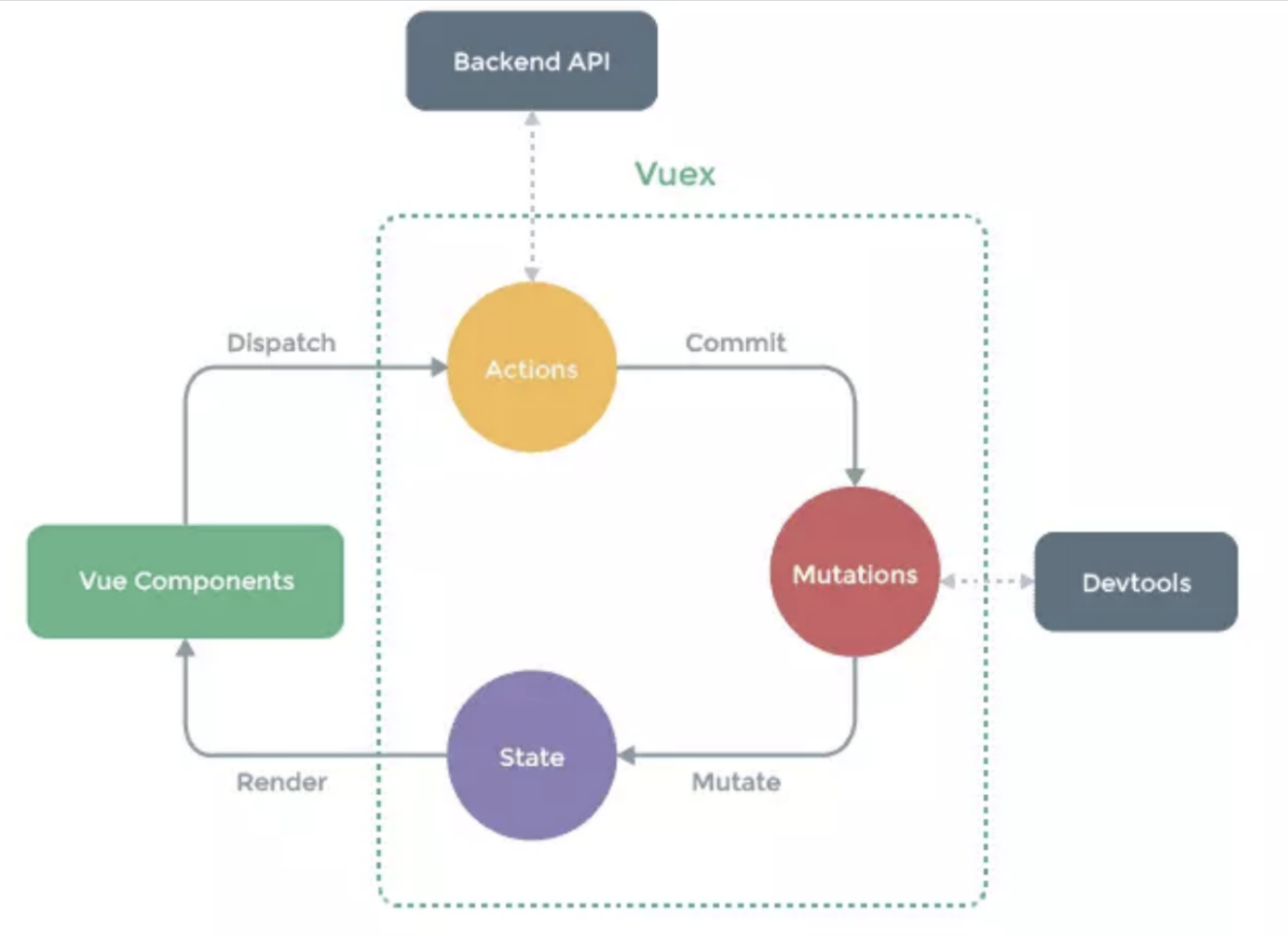
包括以下几个模块
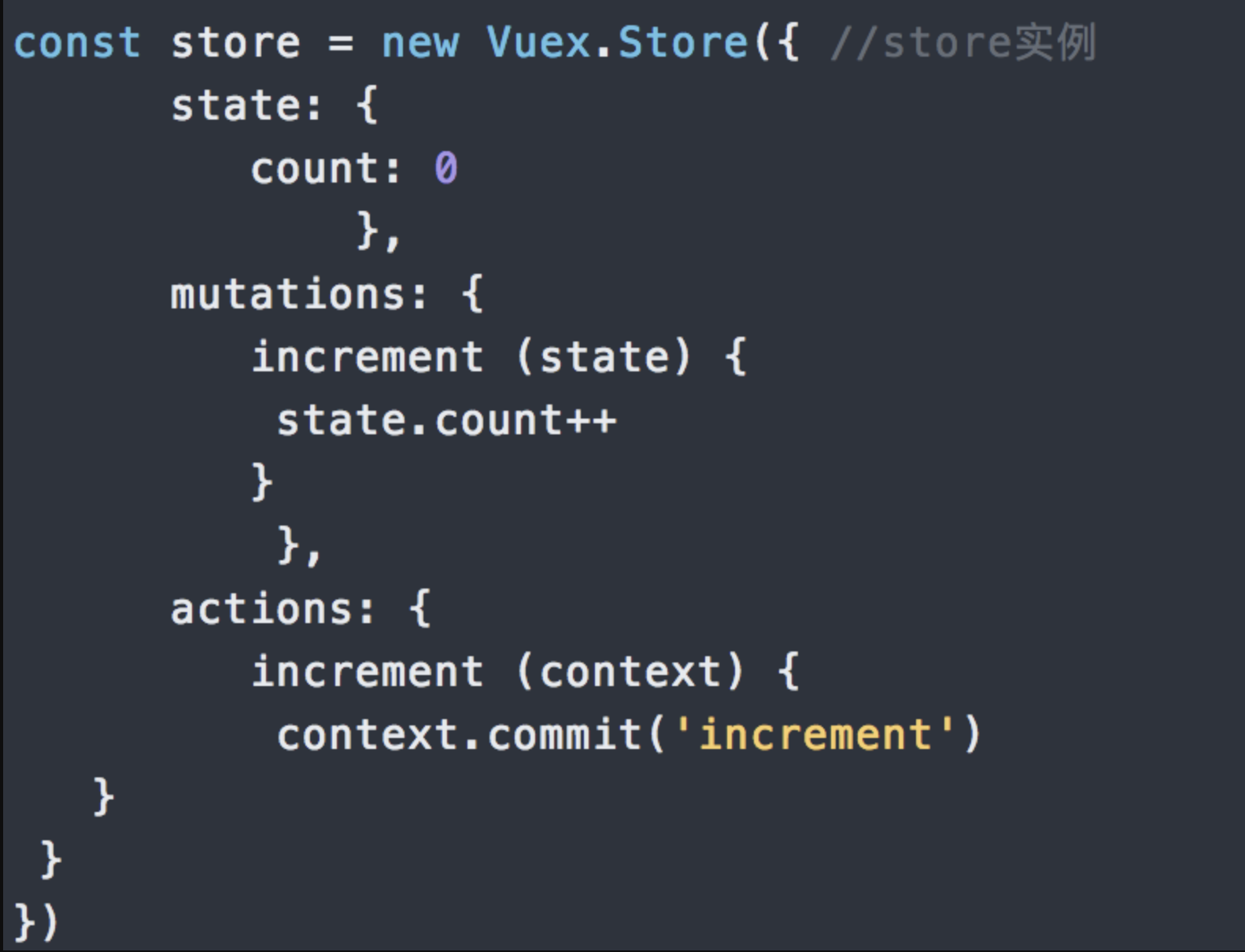
state:Vuex使用单一状态树,即每个应用将仅仅包含一个store实例。里面存放的数据是响应式的,vue组件从store读取数据,若是store中的数据发生改变,依赖这相数据的组件也会发生更新。它通过mapState把全局的state和getters映射到当前组件的computed计算属性mutations:更改Vuex的store中的状态的唯一方法是提交mutationgetters:getter可以对state进行计算操作,它就是store的计算属性虽然在组件内也可以做计算属性,但是getters可以在多给件之间复用如果一个状态只在一个组件内使用,是可以不用gettersaction:action类似于muation, 不同在于:action提交的是mutation,而不是直接变更状态action可以包含任意异步操作modules:面对复杂的应用程序,当管理的状态比较多时;我们需要将vuex的store对象分割成模块(modules)
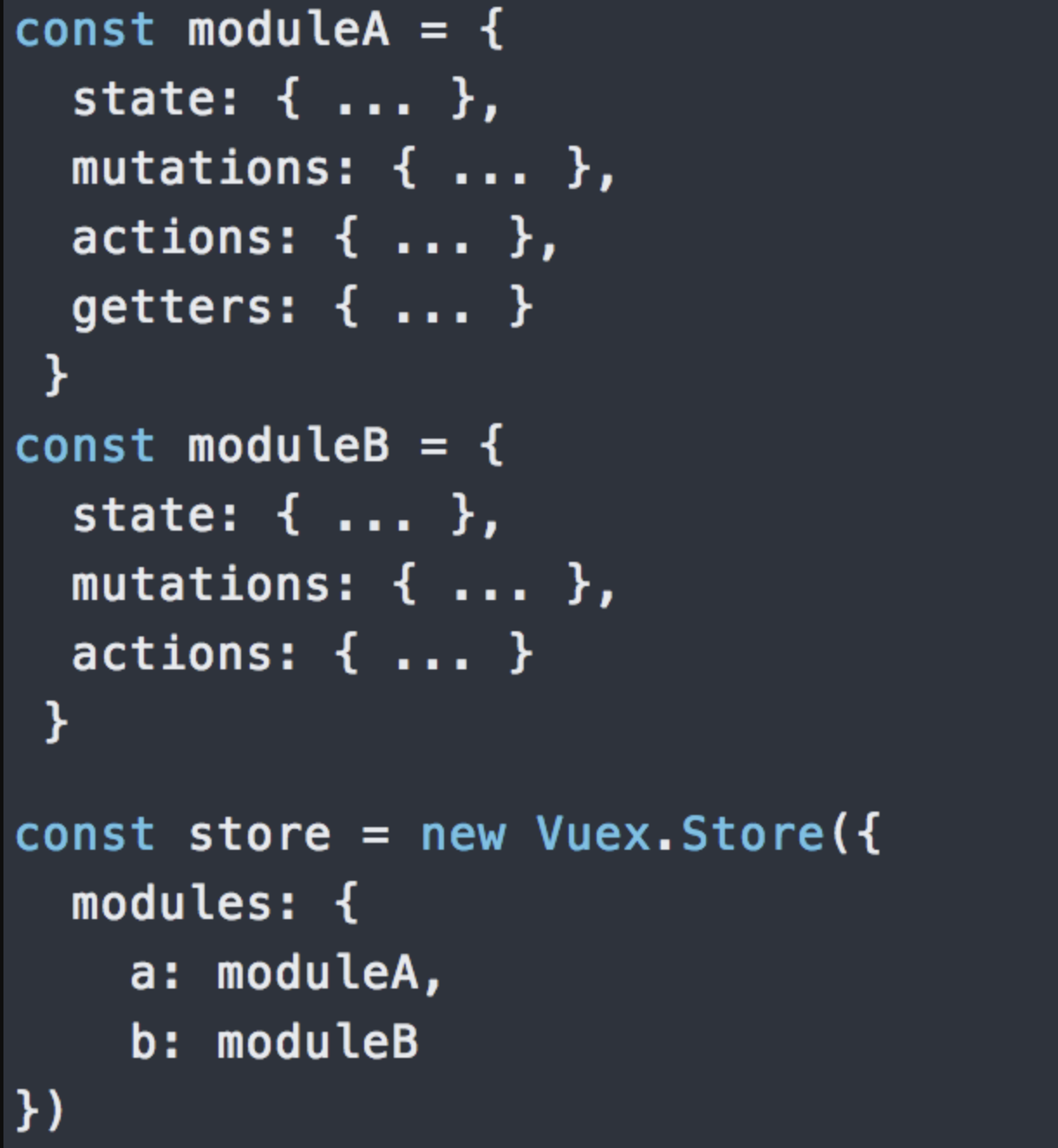
modules:项目特别复杂的时候,可以让每一个模块拥有自己的state、mutation、action、getters,使得结构非常清晰,方便管理
回答范例
思路
- 给定义
- 必要性阐述
- 何时使用
- 拓展:一些个人思考、实践经验等
回答范例
Vuex是一个专为Vue.js应用开发的状态管理模式 + 库。它采用集中式存储,管理应用的所有组件的状态,并以相应的规则保证状态以一种可预测的方式发生变化。- 我们期待以一种简单的“单向数据流”的方式管理应用,即状态 -> 视图 -> 操作单向循环的方式。但当我们的应用遇到多个组件共享状态时,比如:多个视图依赖于同一状态或者来自不同视图的行为需要变更同一状态。此时单向数据流的简洁性很容易被破坏。因此,我们有必要把组件的共享状态抽取出来,以一个全局单例模式管理。通过定义和隔离状态管理中的各种概念并通过强制规则维持视图和状态间的独立性,我们的代码将会变得更结构化且易维护。这是
vuex存在的必要性,它和react生态中的redux之类是一个概念 Vuex解决状态管理的同时引入了不少概念:例如state、mutation、action等,是否需要引入还需要根据应用的实际情况衡量一下:如果不打算开发大型单页应用,使用Vuex反而是繁琐冗余的,一个简单的store模式就足够了。但是,如果要构建一个中大型单页应用,Vuex基本是标配。- 我在使用
vuex过程中感受到一些等
可能的追问
vuex有什么缺点吗?你在开发过程中有遇到什么问题吗?
- 刷新浏览器,
vuex中的state会重新变为初始状态。解决方案-插件vuex-persistedstate
action和mutation的区别是什么?为什么要区分它们?
action中处理异步,mutation不可以mutation做原子操作action可以整合多个mutation的集合mutation是同步更新数据(内部会进行是否为异步方式更新数据的检测)$watch严格模式下会报错action异步操作,可以获取数据后调佣mutation提交最终数据
- 流程顺序:“相应视图—>修改 State”拆分成两部分,视图触发
Action,Action再触发Mutation`。 - 基于流程顺序,二者扮演不同的角色:
Mutation:专注于修改State,理论上是修改State的唯一途径。Action:业务代码、异步请求 - 角色不同,二者有不同的限制:
Mutation:必须同步执行。Action:可以异步,但不能直接操作State
Vuex 中 actions 和 mutations 有什么区别
题目分析
mutations和actions是vuex带来的两个独特的概念。新手程序员容易混淆,所以面试官喜欢问。- 我们只需记住修改状态只能是
mutations,actions只能通过提交mutation修改状态即可
回答范例
- 更改
Vuex的store中的状态的唯一方法是提交mutation,mutation非常类似于事件:每个mutation都有一个字符串的类型 (type)和一个 回调函数 (handler) 。Action类似于mutation,不同在于:Action可以包含任意异步操作,但它不能修改状态, 需要提交mutation才能变更状态 - 开发时,包含异步操作或者复杂业务组合时使用
action;需要直接修改状态则提交mutation。但由于dispatch和commit是两个API,容易引起混淆,实践中也会采用统一使用dispatch action的方式。调用dispatch和commit两个API时几乎完全一样,但是定义两者时却不甚相同,mutation的回调函数接收参数是state对象。action则是与Store实例具有相同方法和属性的上下文context对象,因此一般会解构它为{commit, dispatch, state},从而方便编码。另外dispatch会返回Promise实例便于处理内部异步结果 - 实现上
commit(type)方法相当于调用options.mutations[type](state);dispatch(type)方法相当于调用options.actions[type](store),这样就很容易理解两者使用上的不同了
实现
我们可以像下面这样简单实现commit和dispatch,从而辨别两者不同
class Store {
  constructor(options) {
    this.state = reactive(options.state)
    this.options = options
  }
  commit(type, payload) {
    // 传入上下文和参数1都是state对象
    this.options.mutations[type].call(this.state, this.state, payload)
  }
  dispatch(type, payload) {
    // 传入上下文和参数1都是store本身
    this.options.actions[type].call(this, this, payload)
  }
}
class Store {
constructor(options) {
this.state = reactive(options.state)
this.options = options
}
commit(type, payload) {
// 传入上下文和参数1都是state对象
this.options.mutations[type].call(this.state, this.state, payload)
}
dispatch(type, payload) {
// 传入上下文和参数1都是store本身
this.options.actions[type].call(this, this, payload)
}
}怎么监听 vuex 数据的变化
分析
vuex数据状态是响应式的,所以状态变视图跟着变,但是有时还是需要知道数据状态变了从而做一些事情。- 既然状态都是响应式的,那自然可以
watch,另外vuex也提供了订阅的 API:store.subscribe()
回答范例
- 我知道几种方法:
- 可以通过
watch选项或者watch方法监听状态 - 可以使用
vuex提供的 API:store.subscribe()
watch选项方式,可以以字符串形式监听$store.state.xx;subscribe方式,可以调用store.subscribe(cb),回调函数接收mutation对象和state对象,这样可以进一步判断mutation.type是否是期待的那个,从而进一步做后续处理。watch方式简单好用,且能获取变化前后值,首选;subscribe方法会被所有commit行为触发,因此还需要判断mutation.type,用起来略繁琐,一般用于vuex插件中
实践
watch方式
const app = createApp({
  watch: {
    '$store.state.counter'() {
      console.log('counter change!')
    },
  },
})
const app = createApp({
watch: {
'$store.state.counter'() {
console.log('counter change!')
},
},
})subscribe方式:
store.subscribe((mutation, state) => {
  if (mutation.type === 'add') {
    console.log('counter change in subscribe()!')
  }
})store.subscribe((mutation, state) => {
if (mutation.type === 'add') {
console.log('counter change in subscribe()!')
}
})Vuex 页面刷新数据丢失怎么解决
体验
可以从localStorage中获取作为状态初始值:
const store = createStore({
  state() {
    return {
      count: localStorage.getItem('count'),
    }
  },
})
const store = createStore({
state() {
return {
count: localStorage.getItem('count'),
}
},
})业务代码中,提交修改状态同时保存最新值:虽说实现了,但是每次还要手动刷新localStorage不太优雅
store.commit('increment')
localStorage.setItem('count', store.state.count)store.commit('increment')
localStorage.setItem('count', store.state.count)回答范例
vuex只是在内存保存状态,刷新之后就会丢失,如果要持久化就要存起来localStorage就很合适,提交mutation的时候同时存入localStorage,store中把值取出作为state的初始值即可。- 这里有两个问题,不是所有状态都需要持久化;如果需要保存的状态很多,编写的代码就不够优雅,每个提交的地方都要单独做保存处理。这里就可以利用
vuex提供的subscribe方法做一个统一的处理。甚至可以封装一个vuex插件以便复用。 - 类似的插件有
vuex-persist、vuex-persistedstate,内部的实现就是通过订阅mutation变化做统一处理,通过插件的选项控制哪些需要持久化
原理
可以看一下vuex-persist (opens new window)内部确实是利用subscribe实现的
Vuex 为什么要分模块并且加命名空间
- 模块: 由于使用单一状态树,应用的所有状态会集中到一个比较大的对象。当应用变得非常复杂时,
store对象就有可能变得相当臃肿。为了解决以上问题,Vuex允许我们将store分割成模块(module)。每个模块拥有自己的state、mutation、action、getter、甚至是嵌套子模块 - 命名空间:默认情况下,模块内部的
action、mutation和getter是注册在全局命名空间的——这样使得多个模块能够对同一mutation或action作出响应。如果希望你的模块具有更高的封装度和复用性,你可以通过添加namespaced: true的方式使其成为带命名空间的模块。当模块被注册后,它的所有getter、action及mutation都会自动根据模块注册的路径调整命名
你有使用过 vuex 的 module 吗?
const moduleA = {
  state: () => ({ ... }),
  mutations: { ... },
  actions: { ... },
  getters: { ... }
}
const moduleB = {
  state: () => ({ ... }),
  mutations: { ... },
  actions: { ... }
}
const store = createStore({
  modules: {
    a: moduleA,
    b: moduleB
  }
})
store.state.a // -> moduleA 的状态
store.state.b // -> moduleB 的状态
store.getters.c // -> moduleA里的getters
store.commit('d') // -> 能同时触发子模块中同名mutation
store.dispatch('e') // -> 能同时触发子模块中同名action
const moduleA = {
state: () => ({ ... }),
mutations: { ... },
actions: { ... },
getters: { ... }
}
const moduleB = {
state: () => ({ ... }),
mutations: { ... },
actions: { ... }
}
const store = createStore({
modules: {
a: moduleA,
b: moduleB
}
})
store.state.a // -> moduleA 的状态
store.state.b // -> moduleB 的状态
store.getters.c // -> moduleA里的getters
store.commit('d') // -> 能同时触发子模块中同名mutation
store.dispatch('e') // -> 能同时触发子模块中同名action- 用过
module,项目规模变大之后,单独一个store对象会过于庞大臃肿,通过模块方式可以拆分开来便于维护 - 可以按之前规则单独编写子模块代码,然后在主文件中通过
modules选项组织起来:reateStore({modules:{...}}) - 不过使用时要注意访问子模块状态时需要加上注册时模块名:
store.state.a.xxx,但同时getters、mutations和actions又在全局空间中,使用方式和之前一样。如果要做到完全拆分,需要在子块加上namespace选项,此时再访问它们就要加上命名空间前缀。 - 很显然,模块的方式可以拆分代码,但是缺点也很明显,就是使用起来比较繁琐复杂,容易出错。而且类型系统支持很差,不能给我们带来帮助。
pinia显然在这方面有了很大改进,是时候切换过去了
你觉得 vuex 有什么缺点
分析
相较于redux,vuex已经相当简便好用了。但模块的使用比较繁琐,对ts支持也不好。
体验
使用模块:用起来比较繁琐,使用模式也不统一,基本上得不到类型系统的任何支持
const store = createStore({
  modules: {
    a: moduleA,
  },
})
store.state.a // -> 要带上 moduleA 的key,内嵌模块的话会很长,不得不配合mapState使用
store.getters.c // -> moduleA里的getters,没有namespaced时又变成了全局的
store.getters['a/c'] // -> 有namespaced时要加path,使用模式又和state不一样
store.commit('d') // -> 没有namespaced时变成了全局的,能同时触发多个子模块中同名mutation
store.commit('a/d') // -> 有namespaced时要加path,配合mapMutations使用感觉也没简化
const store = createStore({
modules: {
a: moduleA,
},
})
store.state.a // -> 要带上 moduleA 的key,内嵌模块的话会很长,不得不配合mapState使用
store.getters.c // -> moduleA里的getters,没有namespaced时又变成了全局的
store.getters['a/c'] // -> 有namespaced时要加path,使用模式又和state不一样
store.commit('d') // -> 没有namespaced时变成了全局的,能同时触发多个子模块中同名mutation
store.commit('a/d') // -> 有namespaced时要加path,配合mapMutations使用感觉也没简化回答范例
vuex利用响应式,使用起来已经相当方便快捷了。但是在使用过程中感觉模块化这一块做的过于复杂,用的时候容易出错,还要经常查看文档- 比如:访问
state时要带上模块key,内嵌模块的话会很长,不得不配合mapState使用,加不加namespaced区别也很大,getters,mutations,actions这些默认是全局,加上之后必须用字符串类型的 path 来匹配,使用模式不统一,容易出错;对 ts 的支持也不友好,在使用模块时没有代码提示。 - 之前
Vue2项目中用过vuex-module-decorators的解决方案,虽然类型支持上有所改善,但又要学一套新东西,增加了学习成本。pinia出现之后使用体验好了很多,Vue3 + pinia会是更好的组合
原理
下面我们来看看vuex中store.state.x.y这种嵌套的路径是怎么搞出来的
首先是子模块安装过程:父模块状态
parentState上面设置了子模块名称moduleName,值为当前模块state对象。放在上面的例子中相当于:store.state['x'] = moduleX.state。此过程是递归的,那么store.state.x.y安装时就是:store.state['x']['y'] = moduleY.state
//源码位置 https://github1s.com/vuejs/vuex/blob/HEAD/src/store-util.js#L102-L115
if (!isRoot && !hot) {
  // 获取父模块state
  const parentState = getNestedState(rootState, path.slice(0, -1))
  // 获取子模块名称
  const moduleName = path[path.length - 1]
  store._withCommit(() => {
    // 把子模块state设置到父模块上
    parentState[moduleName] = module.state
  })
}
//源码位置 https://github1s.com/vuejs/vuex/blob/HEAD/src/store-util.js#L102-L115
if (!isRoot && !hot) {
// 获取父模块state
const parentState = getNestedState(rootState, path.slice(0, -1))
// 获取子模块名称
const moduleName = path[path.length - 1]
store._withCommit(() => {
// 把子模块state设置到父模块上
parentState[moduleName] = module.state
})
}用过 pinia 吗?有什么优点?
1. pinia 是什么?
- 在
Vue3中,可以使用传统的Vuex来实现状态管理,也可以使用最新的pinia来实现状态管理,我们来看看官网如何解释pinia的:Pinia是Vue的存储库,它允许您跨组件/页面共享状态。- 实际上,
pinia就是Vuex的升级版,官网也说过,为了尊重原作者,所以取名pinia,而没有取名Vuex,所以大家可以直接将pinia比作为Vue3的Vuex
2. 为什么要使用 pinia?
Vue2和Vue3都支持,这让我们同时使用Vue2和Vue3的小伙伴都能很快上手。pinia中只有state、getter、action,抛弃了Vuex中的Mutation,Vuex中mutation一直都不太受小伙伴们的待见,pinia直接抛弃它了,这无疑减少了我们工作量。pinia中action支持同步和异步,Vuex不支持- 良好的
Typescript支持,毕竟我们Vue3都推荐使用TS来编写,这个时候使用pinia就非常合适了 - 无需再创建各个模块嵌套了,
Vuex中如果数据过多,我们通常分模块来进行管理,稍显麻烦,而pinia中每个store都是独立的,互相不影响。 - 体积非常小,只有
1KB左右。 pinia支持插件来扩展自身功能。- 支持服务端渲染
3. pinna 使用
- 准备工作
我们这里搭建一个最新的Vue3 + TS + Vite项目
npm create vite@latest my-vite-app --template vue-tsnpm create vite@latest my-vite-app --template vue-tspinia基础使用
yarn add pinia


// main.ts
import { createApp } from "vue";
import App from "./App.vue";
import { createPinia } from "pinia";
const pinia = createPinia();

const app = createApp(App);
app.use(pinia);
app.mount("#app");
yarn add pinia
// main.ts
import { createApp } from "vue";
import App from "./App.vue";
import { createPinia } from "pinia";
const pinia = createPinia();
const app = createApp(App);
app.use(pinia);
app.mount("#app");2.1 创建store
//sbinsrc/store/user.ts
import { defineStore } from 'pinia'

// 第一个参数是应用程序中 store 的唯一 id
export const useUsersStore = defineStore('users', {
  // 其它配置项
})
//sbinsrc/store/user.ts
import { defineStore } from 'pinia'
// 第一个参数是应用程序中 store 的唯一 id
export const useUsersStore = defineStore('users', {
// 其它配置项
})创建store很简单,调用 pinia中的defineStore函数即可,该函数接收两个参数:
name:一个字符串,必传项,该store的唯一id。options:一个对象,store的配置项,比如配置store内的数据,修改数据的方法等等。
我们可以定义任意数量的store,因为我们其实一个store就是一个函数,这也是pinia的好处之一,让我们的代码扁平化了,这和Vue3的实现思想是一样的
2.2 使用store
<!-- src/App.vue -->
<script setup lang="ts">
  import { useUsersStore } from '../src/store/user'
  const store = useUsersStore()
  console.log(store)
</script>
<!-- src/App.vue -->
<script setup lang="ts">
import { useUsersStore } from '../src/store/user'
const store = useUsersStore()
console.log(store)
</script>2.3 添加state
export const useUsersStore = defineStore('users', {
  state: () => {
    return {
      name: 'test',
      age: 20,
      sex: '男',
    }
  },
})
export const useUsersStore = defineStore('users', {
state: () => {
return {
name: 'test',
age: 20,
sex: '男',
}
},
})2.4 读取state数据
<template>
  <img alt="Vue logo" src="./assets/logo.png" />
  <p>姓名:{{ name }}</p>
  <p>年龄:{{ age }}</p>
  <p>性别:{{ sex }}</p>
</template>
<script setup lang="ts">
  import { ref } from 'vue'
  import { useUsersStore } from '../src/store/user'
  const store = useUsersStore()
  const name = ref<string>(store.name)
  const age = ref<number>(store.age)
  const sex = ref<string>(store.sex)
</script><template>
<img alt="Vue logo" src="./assets/logo.png" />
<p>姓名:{{ name }}</p>
<p>年龄:{{ age }}</p>
<p>性别:{{ sex }}</p>
</template>
<script setup lang="ts">
import { ref } from 'vue'
import { useUsersStore } from '../src/store/user'
const store = useUsersStore()
const name = ref<string>(store.name)
const age = ref<number>(store.age)
const sex = ref<string>(store.sex)
</script>上段代码中我们直接通过store.age等方式获取到了store存储的值,但是大家有没有发现,这样比较繁琐,我们其实可以用解构的方式来获取值,使得代码更简洁一点
import { useUsersStore, storeToRefs } from '../src/store/user'
const store = useUsersStore()
const { name, age, sex } = storeToRefs(store) // storeToRefs获取的值是响应式的
import { useUsersStore, storeToRefs } from '../src/store/user'
const store = useUsersStore()
const { name, age, sex } = storeToRefs(store) // storeToRefs获取的值是响应式的2.5 修改state数据
<template>
  <img alt="Vue logo" src="./assets/logo.png" />
  <p>姓名:{{ name }}</p>
  <p>年龄:{{ age }}</p>
  <p>性别:{{ sex }}</p>
  <button @click="changeName">更改姓名</button>
</template>
<script setup lang="ts">
  import child from './child.vue'
  import { useUsersStore, storeToRefs } from '../src/store/user'
  const store = useUsersStore()
  const { name, age, sex } = storeToRefs(store)
  const changeName = () => {
    store.name = '张三'
    console.log(store)
  }
</script><template>
<img alt="Vue logo" src="./assets/logo.png" />
<p>姓名:{{ name }}</p>
<p>年龄:{{ age }}</p>
<p>性别:{{ sex }}</p>
<button @click="changeName">更改姓名</button>
</template>
<script setup lang="ts">
import child from './child.vue'
import { useUsersStore, storeToRefs } from '../src/store/user'
const store = useUsersStore()
const { name, age, sex } = storeToRefs(store)
const changeName = () => {
store.name = '张三'
console.log(store)
}
</script>2.6 重置state
- 有时候我们修改了
state数据,想要将它还原,这个时候该怎么做呢?就比如用户填写了一部分表单,突然想重置为最初始的状态。 - 此时,我们直接调用
store的$reset()方法即可,继续使用我们的例子,添加一个重置按钮
<button @click="reset">重置store</button>
// 重置store
const reset = () => {
  store.$reset();
};
<button @click="reset">重置store</button>
// 重置store
const reset = () => {
store.$reset();
};当我们点击重置按钮时,store中的数据会变为初始状态,页面也会更新
2.7 批量更改state数据
如果我们一次性需要修改很多条数据的话,有更加简便的方法,使用store的$patch方法,修改app.vue代码,添加一个批量更改数据的方法
<button @click="patchStore">批量修改数据</button>
// 批量修改数据
const patchStore = () => {
  store.$patch({
    name: "张三",
    age: 100,
    sex: "女",
  });
};
<button @click="patchStore">批量修改数据</button>
// 批量修改数据
const patchStore = () => {
store.$patch({
name: "张三",
age: 100,
sex: "女",
});
};- 有经验的小伙伴可能发现了,我们采用这种批量更改的方式似乎代价有一点大,假如我们
state中有些字段无需更改,但是按照上段代码的写法,我们必须要将 state 中的所有字段例举出了。 - 为了解决该问题,
pinia提供的$patch方法还可以接收一个回调函数,它的用法有点像我们的数组循环回调函数了。
store.$patch((state) => {
  state.items.push({ name: 'shoes', quantity: 1 })
  state.hasChanged = true
})store.$patch((state) => {
state.items.push({ name: 'shoes', quantity: 1 })
state.hasChanged = true
})2.8 直接替换整个state
pinia提供了方法让我们直接替换整个state对象,使用store的$state方法
store.$state = { counter: 666, name: '张三' }store.$state = { counter: 666, name: '张三' }上段代码会将我们提前声明的state替换为新的对象,可能这种场景用得比较少
getters属性
getters是defineStore参数配置项里面的另一个属性可以把
getter想象成Vue中的计算属性,它的作用就是返回一个新的结果,既然它和Vue中的计算属性类似,那么它肯定也是会被缓存的,就和computed一样3.1 添加
getter
export const useUsersStore = defineStore('users', {
  state: () => {
    return {
      name: 'test',
      age: 10,
      sex: '男',
    }
  },
  getters: {
    getAddAge: (state) => {
      return state.age + 100
    },
  },
})
export const useUsersStore = defineStore('users', {
state: () => {
return {
name: 'test',
age: 10,
sex: '男',
}
},
getters: {
getAddAge: (state) => {
return state.age + 100
},
},
})上段代码中我们在配置项参数中添加了getter属性,该属性对象中定义了一个getAddAge方法,该方法会默认接收一个state参数,也就是state对象,然后该方法返回的是一个新的数据
3.2 使用getter
<template>
  <p>新年龄:{{ store.getAddAge }}</p>
  <button @click="patchStore">批量修改数据</button>
</template>
<script setup lang="ts">
  import { useUsersStore } from '../src/store/user'
  const store = useUsersStore()
  // 批量修改数据
  const patchStore = () => {
    store.$patch({
      name: '张三',
      age: 100,
      sex: '女',
    })
  }
</script><template>
<p>新年龄:{{ store.getAddAge }}</p>
<button @click="patchStore">批量修改数据</button>
</template>
<script setup lang="ts">
import { useUsersStore } from '../src/store/user'
const store = useUsersStore()
// 批量修改数据
const patchStore = () => {
store.$patch({
name: '张三',
age: 100,
sex: '女',
})
}
</script>上段代码中我们直接在标签上使用了store.gettAddAge方法,这样可以保证响应式,其实我们state中的name等属性也可以以此种方式直接在标签上使用,也可以保持响应式
3.3 getter中调用其它getter
export const useUsersStore = defineStore('users', {
  state: () => {
    return {
      name: 'test',
      age: 20,
      sex: '男',
    }
  },
  getters: {
    getAddAge: (state) => {
      return state.age + 100
    },
    getNameAndAge(): string {
      return this.name + this.getAddAge // 调用其它getter
    },
  },
})
export const useUsersStore = defineStore('users', {
state: () => {
return {
name: 'test',
age: 20,
sex: '男',
}
},
getters: {
getAddAge: (state) => {
return state.age + 100
},
getNameAndAge(): string {
return this.name + this.getAddAge // 调用其它getter
},
},
})3.3 getter传参
export const useUsersStore = defineStore("users", {
  state: () => {
    return {
      name: "test",
      age: 20,
      sex: "男",
    };
  },
  getters: {
    getAddAge: (state) => {
      return (num: number) => state.age + num;
    },
    getNameAndAge(): string {
      return this.name + this.getAddAge; // 调用其它getter
    },
  },
});


<p>新年龄:{{ store.getAddAge(1100) }}</p>
export const useUsersStore = defineStore("users", {
state: () => {
return {
name: "test",
age: 20,
sex: "男",
};
},
getters: {
getAddAge: (state) => {
return (num: number) => state.age + num;
},
getNameAndAge(): string {
return this.name + this.getAddAge; // 调用其它getter
},
},
});
<p>新年龄:{{ store.getAddAge(1100) }}</p>actions属性
前面我们提到的
state和getters 属性都主要是数据层面的,并没有具体的业务逻辑代码,它们两个就和我们组件代码中的data数据和computed计算属性一样。那么,如果我们有业务代码的话,最好就是卸载
actions属性里面,该属性就和我们组件代码中的methods相似,用来放置一些处理业务逻辑的方法。actions属性值同样是一个对象,该对象里面也是存储的各种各样的方法,包括同步方法和异步方法4.1 添加
actions
export const useUsersStore = defineStore('users', {
  state: () => {
    return {
      name: 'test',
      age: 20,
      sex: '男',
    }
  },
  getters: {
    getAddAge: (state) => {
      return (num: number) => state.age + num
    },
    getNameAndAge(): string {
      return this.name + this.getAddAge // 调用其它getter
    },
  },
  actions: {
    // 在实际场景中,该方法可以是任何逻辑,比如发送请求、存储token等等。大家把actions方法当作一个普通的方法即可,特殊之处在于该方法内部的this指向的是当前store
    saveName(name: string) {
      this.name = name
    },
  },
})
export const useUsersStore = defineStore('users', {
state: () => {
return {
name: 'test',
age: 20,
sex: '男',
}
},
getters: {
getAddAge: (state) => {
return (num: number) => state.age + num
},
getNameAndAge(): string {
return this.name + this.getAddAge // 调用其它getter
},
},
actions: {
// 在实际场景中,该方法可以是任何逻辑,比如发送请求、存储token等等。大家把actions方法当作一个普通的方法即可,特殊之处在于该方法内部的this指向的是当前store
saveName(name: string) {
this.name = name
},
},
})4.2 使用actions
使用actions中的方法也非常简单,比如我们在App.vue中想要调用该方法
const saveName = () => {
  store.saveName('poetries')
}
const saveName = () => {
store.saveName('poetries')
}总结
pinia的知识点很少,如果你有 Vuex 基础,那么学起来更是易如反掌
pinia 无非就是以下 3 个大点:
stategettersactions
对 Vue SSR 的理解
Vue.js是构建客户端应用程序的框架。默认情况下,可以在浏览器中输出Vue组件,进行生成DOM和操作DOM。然而,也可以将同一个组件渲染为服务端的HTML字符串,将它们直接发送到浏览器,最后将这些静态标记"激活"为客户端上完全可交互的应用程序。
SSR也就是服务端渲染,也就是将Vue在客户端把标签渲染成HTML的工作放在服务端完成,然后再把html直接返回给客户端
优点:SSR 有着更好的
SEO并且首屏加载速度更快- 因为
SPA页面的内容是通过Ajax获取,而搜索引擎爬取工具并不会等待Ajax异步完成后再抓取页面内容,所以在SPA中是抓取不到页面通过Ajax获取到的内容;而SSR是直接由服务端返回已经渲染好的页面(数据已经包含在页面中),所以搜索引擎爬取工具可以抓取渲染好的页面 - 更快的内容到达时间(首屏加载更快):
SPA会等待所有Vue编译后的js文件都下载完成后,才开始进行页面的渲染,文件下载等需要一定的时间等,所以首屏渲染需要一定的时间;SSR直接由服务端渲染好页面直接返回显示,无需等待下载 js 文件及再去渲染等,所以 SSR 有更快的内容到达时间
- 因为
缺点
: 开发条件会受到限制,服务器端渲染只支持
beforeCreate和created两个钩子,当我们需要一些外部扩展库时需要特殊处理,服务端渲染应用程序也需要处于Node.js的运行环境。服务器会有更大的负载需求- 在 Node.js 中渲染完整的应用程序,显然会比仅仅提供静态文件的
server更加大量占用CPU资源 (CPU-intensive - CPU 密集),因此如果你预料在高流量环境 ( high traffic ) 下使用,请准备相应的服务器负载,并明智地采用缓存策略
- 在 Node.js 中渲染完整的应用程序,显然会比仅仅提供静态文件的
其基本实现原理
app.js作为客户端与服务端的公用入口,导出Vue根实例,供客户端entry与服务端entry使用。客户端entry主要作用挂载到DOM上,服务端entry除了创建和返回实例,还进行路由匹配与数据预获取。webpack为客服端打包一个Client Bundle,为服务端打包一个Server Bundle。- 服务器接收请求时,会根据
url,加载相应组件,获取和解析异步数据,创建一个读取Server Bundle的BundleRenderer,然后生成html发送给客户端。 - 客户端混合,客户端收到从服务端传来的
DOM与自己的生成的 DOM 进行对比,把不相同的DOM激活,使其可以能够响应后续变化,这个过程称为客户端激活 。为确保混合成功,客户端与服务器端需要共享同一套数据。在服务端,可以在渲染之前获取数据,填充到stroe里,这样,在客户端挂载到DOM之前,可以直接从store里取数据。首屏的动态数据通过window.__INITIAL_STATE__发送到客户端
Vue SSR的实现,主要就是把Vue的组件输出成一个完整HTML,vue-server-renderer就是干这事的
Vue SSR需要做的事多点(输出完整 HTML),除了complier -> vnode,还需如数据获取填充至 HTML、客户端混合(hydration)、缓存等等。相比于其他模板引擎(ejs, jade 等),最终要实现的目的是一样的,性能上可能要差点
Vue 修饰符有哪些
vue 中修饰符分为以下五种
- 表单修饰符
- 事件修饰符
- 鼠标按键修饰符
- 键值修饰符
v-bind修饰符
1. 表单修饰符
在我们填写表单的时候用得最多的是input标签,指令用得最多的是v-model
关于表单的修饰符有如下:
lazy
在我们填完信息,光标离开标签的时候,才会将值赋予给value,也就是在change事件之后再进行信息同步
<input type="text" v-model.lazy="value" />
<p>{{value}}</p><input type="text" v-model.lazy="value" />
<p>{{value}}</p>trim
自动过滤用户输入的首空格字符,而中间的空格不会过滤
<input type="text" v-model.trim="value" /><input type="text" v-model.trim="value" />number
自动将用户的输入值转为数值类型,但如果这个值无法被parseFloat解析,则会返回原来的值
<input v-model.number="age" type="number" /><input v-model.number="age" type="number" />2. 事件修饰符
事件修饰符是对事件捕获以及目标进行了处理,有如下修饰符
.stop阻止了事件冒泡,相当于调用了event.stopPropagation方法
<div @click="shout(2)">
  <button @click.stop="shout(1)">ok</button>
</div>
//只输出1<div @click="shout(2)">
<button @click.stop="shout(1)">ok</button>
</div>
//只输出1.prevent阻止了事件的默认行为,相当于调用了event.preventDefault方法
<form v-on:submit.prevent="onSubmit"></form><form v-on:submit.prevent="onSubmit"></form>.capture使用事件捕获模式,使事件触发从包含这个元素的顶层开始往下触发
<div @click.capture="shout(1)">
  obj1
  <div @click.capture="shout(2)">
    obj2
    <div @click="shout(3)">
      obj3
      <div @click="shout(4)">obj4</div>
    </div>
  </div>
</div>
// 输出结构: 1 2 4 3<div @click.capture="shout(1)">
obj1
<div @click.capture="shout(2)">
obj2
<div @click="shout(3)">
obj3
<div @click="shout(4)">obj4</div>
</div>
</div>
</div>
// 输出结构: 1 2 4 3.self只当在event.target是当前元素自身时触发处理函数
<div v-on:click.self="doThat">...</div><div v-on:click.self="doThat">...</div>使用修饰符时,顺序很重要;相应的代码会以同样的顺序产生。因此,用
v-on:click.prevent.self会阻止所有的点击,而v-on:click.self.prevent只会阻止对元素自身的点击
.once绑定了事件以后只能触发一次,第二次就不会触发
<button @click.once="shout(1)">ok</button><button @click.once="shout(1)">ok</button>.passive告诉浏览器你不想阻止事件的默认行为
在移动端,当我们在监听元素滚动事件的时候,会一直触发onscroll事件会让我们的网页变卡,因此我们使用这个修饰符的时候,相当于给onscroll事件整了一个.lazy修饰符
<!-- 滚动事件的默认行为 (即滚动行为) 将会立即触发 -->
<!-- 而不会等待 `onScroll` 完成  -->
<!-- 这其中包含 `event.preventDefault()` 的情况 -->
<div v-on:scroll.passive="onScroll">...</div>
<!-- 滚动事件的默认行为 (即滚动行为) 将会立即触发 -->
<!-- 而不会等待 `onScroll` 完成 -->
<!-- 这其中包含 `event.preventDefault()` 的情况 -->
<div v-on:scroll.passive="onScroll">...</div>
- 不要把
.passive和.prevent一起使用,因为.prevent将会被忽略,同时浏览器可能会向你展示一个警告。passive会告诉浏览器你不想阻止事件的默认行为
native让组件变成像html内置标签那样监听根元素的原生事件,否则组件上使用v-on只会监听自定义事件
<my-component v-on:click.native="doSomething"></my-component>

<!-- 使用.native修饰符来操作普通HTML标签是会令事件失效的 --><my-component v-on:click.native="doSomething"></my-component>
<!-- 使用.native修饰符来操作普通HTML标签是会令事件失效的 -->3. 鼠标按钮修饰符
鼠标按钮修饰符针对的就是左键、右键、中键点击,有如下:
.left左键点击.right右键点击.middle中键点击
<button @click.left="shout(1)">ok</button>
<button @click.right="shout(1)">ok</button>
<button @click.middle="shout(1)">ok</button><button @click.left="shout(1)">ok</button>
<button @click.right="shout(1)">ok</button>
<button @click.middle="shout(1)">ok</button>4. 键盘事件的修饰符
键盘修饰符是用来修饰键盘事件(onkeyup,onkeydown)的,有如下:
keyCode存在很多,但 vue 为我们提供了别名,分为以下两种:
- 普通键(
enter、tab、delete、space、esc、up、down、left、right...) - 系统修饰键(
ctrl、alt、meta、shift...)
<!-- 只有按键为keyCode的时候才触发 -->
<input type="text" @keyup.keyCode="shout()" />
<!-- 只有按键为keyCode的时候才触发 -->
<input type="text" @keyup.keyCode="shout()" />还可以通过以下方式自定义一些全局的键盘码别名
Vue.config.keyCodes.f2 = 113Vue.config.keyCodes.f2 = 1135. v-bind 修饰符
v-bind修饰符主要是为属性进行操作,用来分别有如下:
- async 能对
props进行一个双向绑定
//父组件
<comp :myMessage.sync="bar"></comp>
//子组件
this.$emit('update:myMessage',params);
//父组件
<comp :myMessage.sync="bar"></comp>
//子组件
this.$emit('update:myMessage',params);以上这种方法相当于以下的简写
//父亲组件
<comp :myMessage="bar" @update:myMessage="func"></comp>
func(e){
 this.bar = e;
}

//子组件js
func2(){
  this.$emit('update:myMessage',params);
}
//父亲组件
<comp :myMessage="bar" @update:myMessage="func"></comp>
func(e){
this.bar = e;
}
//子组件js
func2(){
this.$emit('update:myMessage',params);
}使用async需要注意以下两点:
- 使用
sync的时候,子组件传递的事件名格式必须为update:value,其中value必须与子组件中props中声明的名称完全一致 - 注意带有
.sync修饰符的v-bind不能和表达式一起使用 - prop 设置自定义标签属性,避免暴露数据,防止污染 HTML 结构
<input id="uid" title="title1" value="1" :index.prop="index" /><input id="uid" title="title1" value="1" :index.prop="index" />- camel 将命名变为驼峰命名法,如将
view-Box属性名转换为viewBox
<svg :viewBox="viewBox"></svg><svg :viewBox="viewBox"></svg>应用场景
根据每一个修饰符的功能,我们可以得到以下修饰符的应用场景:
.stop:阻止事件冒泡.native:绑定原生事件.once:事件只执行一次.self:将事件绑定在自身身上,相当于阻止事件冒泡.prevent:阻止默认事件.caption:用于事件捕获.once:只触发一次.keyCode:监听特定键盘按下.right:右键
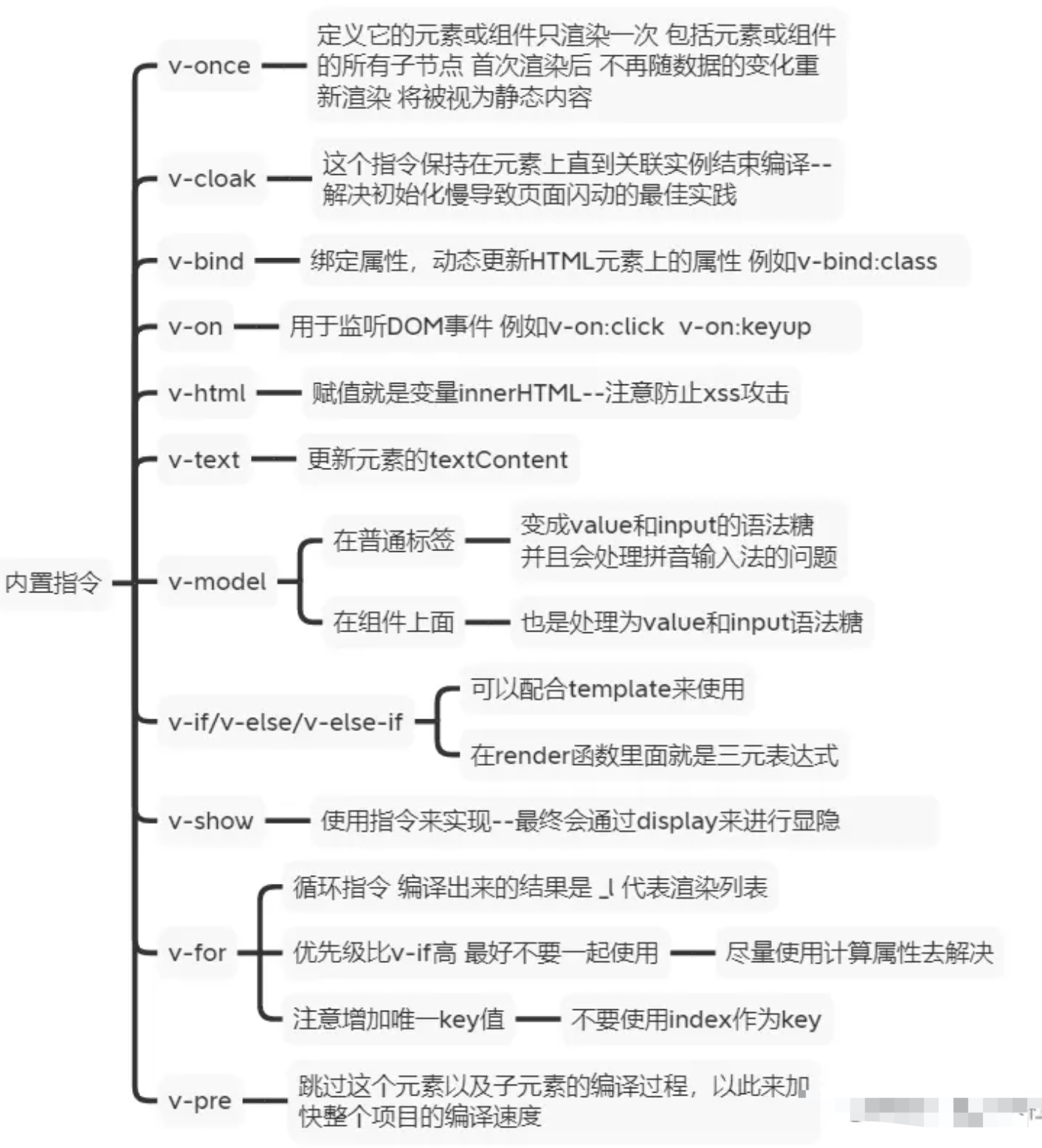
说说 vue 内置指令
怎样理解 Vue 的单向数据流
数据总是从父组件传到子组件,子组件没有权利修改父组件传过来的数据,只能请求父组件对原始数据进行修改。这样会防止从子组件意外改变父级组件的状态,从而导致你的应用的数据流向难以理解
注意:在子组件直接用 v-model 绑定父组件传过来的 prop 这样是不规范的写法 开发环境会报警告
如果实在要改变父组件的 prop 值,可以在 data 里面定义一个变量 并用 prop 的值初始化它 之后用$emit 通知父组件去修改
有两种常见的试图改变一个 prop 的情形 :
- 这个
prop用来传递一个初始值;这个子组件接下来希望将其作为一个本地的prop数据来使用。 在这种情况下,最好定义一个本地的data属性并将这个prop用作其初始值
props: ['initialCounter'],
data: function () {
  return {
    counter: this.initialCounter
  }
}props: ['initialCounter'],
data: function () {
return {
counter: this.initialCounter
}
}- 这个
prop以一种原始的值传入且需要进行转换。 在这种情况下,最好使用这个prop的值来定义一个计算属性
props: ['size'],
computed: {
  normalizedSize: function () {
    return this.size.trim().toLowerCase()
  }
}props: ['size'],
computed: {
normalizedSize: function () {
return this.size.trim().toLowerCase()
}
}写过自定义指令吗?原理是什么
回答范例
Vue有一组默认指令,比如v-model或v-for,同时Vue也允许用户注册自定义指令来扩展 Vue 能力- 自定义指令主要完成一些可复用低层级
DOM操作 - 使用自定义指令分为定义、注册和使用三步:
- 定义自定义指令有两种方式:对象和函数形式,前者类似组件定义,有各种生命周期;后者只会在
mounted 和updated时执行 - 注册自定义指令类似组件,可以使用
app.directive()全局注册,使用{directives:{xxx}}局部注册 - 使用时在注册名称前加上
v-即可,比如v-focus
- 我在项目中常用到一些自定义指令,例如:
- 复制粘贴
v-copy - 长按
v-longpress - 防抖
v-debounce - 图片懒加载
v-lazy - 按钮权限
v-premission - 页面水印
v-waterMarker - 拖拽指令
v-draggable
vue3中指令定义发生了比较大的变化,主要是钩子的名称保持和组件一致,这样开发人员容易记忆,不易犯错。另外在v3.2之后,可以在setup中以一个小写v开头方便的定义自定义指令,更简单了
基本使用
当 Vue 中的核心内置指令不能够满足我们的需求时,我们可以定制自定义的指令用来满足开发的需求
我们看到的v-开头的行内属性,都是指令,不同的指令可以完成或实现不同的功能,对普通 DOM 元素进行底层操作,这时候就会用到自定义指令。除了核心功能默认内置的指令 (v-model 和 v-show),Vue 也允许注册自定义指令
// 指令使用的几种方式:
//会实例化一个指令,但这个指令没有参数
;`v-xxx`// -- 将值传到指令中
`v-xxx="value"`// -- 将字符串传入到指令中,如`v-html="'<p>内容</p>'"`
`v-xxx="'string'"`// -- 传参数(`arg`),如`v-bind:class="className"`
`v-xxx:arg="value"`// -- 使用修饰符(`modifier`)
`v-xxx:arg.modifier="value"`
// 指令使用的几种方式:
//会实例化一个指令,但这个指令没有参数
;`v-xxx`// -- 将值传到指令中
`v-xxx="value"`// -- 将字符串传入到指令中,如`v-html="'<p>内容</p>'"`
`v-xxx="'string'"`// -- 传参数(`arg`),如`v-bind:class="className"`
`v-xxx:arg="value"`// -- 使用修饰符(`modifier`)
`v-xxx:arg.modifier="value"`注册一个自定义指令有全局注册与局部注册
// 全局注册注册主要是用过Vue.directive方法进行注册
// Vue.directive第一个参数是指令的名字(不需要写上v-前缀),第二个参数可以是对象数据,也可以是一个指令函数
// 注册一个全局自定义指令 `v-focus`
Vue.directive('focus', {
  // 当被绑定的元素插入到 DOM 中时……
  inserted: function (el) {
    // 聚焦元素
    el.focus()  // 页面加载完成之后自动让输入框获取到焦点的小功能
  }
})

// 局部注册通过在组件options选项中设置directive属性
directives: {
  focus: {
    // 指令的定义
    inserted: function (el) {
      el.focus() // 页面加载完成之后自动让输入框获取到焦点的小功能
    }
  }
}

// 然后你可以在模板中任何元素上使用新的 v-focus property,如下:

<input v-focus />
// 全局注册注册主要是用过Vue.directive方法进行注册
// Vue.directive第一个参数是指令的名字(不需要写上v-前缀),第二个参数可以是对象数据,也可以是一个指令函数
// 注册一个全局自定义指令 `v-focus`
Vue.directive('focus', {
// 当被绑定的元素插入到 DOM 中时……
inserted: function (el) {
// 聚焦元素
el.focus() // 页面加载完成之后自动让输入框获取到焦点的小功能
}
})
// 局部注册通过在组件options选项中设置directive属性
directives: {
focus: {
// 指令的定义
inserted: function (el) {
el.focus() // 页面加载完成之后自动让输入框获取到焦点的小功能
}
}
}
// 然后你可以在模板中任何元素上使用新的 v-focus property,如下:
<input v-focus />钩子函数
bind:只调用一次,指令第一次绑定到元素时调用。在这里可以进行一次性的初始化设置。inserted:被绑定元素插入父节点时调用 (仅保证父节点存在,但不一定已被插入文档中)。update:被绑定于元素所在的模板更新时调用,而无论绑定值是否变化。通过比较更新前后的绑定值,可以忽略不必要的模板更新。componentUpdated:被绑定元素所在模板完成一次更新周期时调用。unbind:只调用一次,指令与元素解绑时调用。
所有的钩子函数的参数都有以下:
el:指令所绑定的元素,可以用来直接操作 DOMbindingbinding:一个对象,包含以下
propertyproperty:
name:指令名,不包括v-前缀。value:指令的绑定值,例如:v-my-directive="1 + 1"中,绑定值为2。oldValue:指令绑定的前一个值,仅在update和componentUpdated钩子中可用。无论值是否改变都可用。expression:字符串形式的指令表达式。例如v-my-directive="1 + 1"中,表达式为"1 + 1"。arg:传给指令的参数,可选。例如v-my-directive:foo中,参数为"foo"。modifiers:一个包含修饰符的对象。例如:v-my-directive.foo.bar中,修饰符对象为{ foo: true, bar: true }vnode:Vue编译生成的虚拟节点oldVnode:上一个虚拟节点,仅在update和componentUpdated钩子中可用
除了 el 之外,其它参数都应该是只读的,切勿进行修改。如果需要在钩子之间共享数据,建议通过元素的 dataset 来进行
<div v-demo="{ color: 'white', text: 'hello!' }"></div>
<script>
  Vue.directive('demo', function (el, binding) {
    console.log(binding.value.color) // "white"
    console.log(binding.value.text) // "hello!"
  })
</script><div v-demo="{ color: 'white', text: 'hello!' }"></div>
<script>
Vue.directive('demo', function (el, binding) {
console.log(binding.value.color) // "white"
console.log(binding.value.text) // "hello!"
})
</script>应用场景
使用自定义组件组件可以满足我们日常一些场景,这里给出几个自定义组件的案例:
- 防抖
// 1.设置v-throttle自定义指令
Vue.directive('throttle', {
  bind: (el, binding) => {
    let throttleTime = binding.value; // 防抖时间
    if (!throttleTime) { // 用户若不设置防抖时间,则默认2s
      throttleTime = 2000;
    }
    let cbFun;
    el.addEventListener('click', event => {
      if (!cbFun) { // 第一次执行
        cbFun = setTimeout(() => {
          cbFun = null;
        }, throttleTime);
      } else {
        event && event.stopImmediatePropagation();
      }
    }, true);
  },
});
// 2.为button标签设置v-throttle自定义指令
<button @click="sayHello" v-throttle>提交</button>
// 1.设置v-throttle自定义指令
Vue.directive('throttle', {
bind: (el, binding) => {
let throttleTime = binding.value; // 防抖时间
if (!throttleTime) { // 用户若不设置防抖时间,则默认2s
throttleTime = 2000;
}
let cbFun;
el.addEventListener('click', event => {
if (!cbFun) { // 第一次执行
cbFun = setTimeout(() => {
cbFun = null;
}, throttleTime);
} else {
event && event.stopImmediatePropagation();
}
}, true);
},
});
// 2.为button标签设置v-throttle自定义指令
<button @click="sayHello" v-throttle>提交</button>- 图片懒加载
设置一个v-lazy自定义组件完成图片懒加载
const LazyLoad = {
  // install方法
  install(Vue, options) {
    // 代替图片的loading图
    let defaultSrc = options.default
    Vue.directive('lazy', {
      bind(el, binding) {
        LazyLoad.init(el, binding.value, defaultSrc)
      },
      inserted(el) {
        // 兼容处理
        if ('InterpObserver' in window) {
          LazyLoad.observe(el)
        } else {
          LazyLoad.listenerScroll(el)
        }
      },
    })
  },
  // 初始化
  init(el, val, def) {
    // src 储存真实src
    el.setAttribute('src', val)
    // 设置src为loading图
    el.setAttribute('src', def)
  },
  // 利用InterpObserver监听el
  observe(el) {
    let io = new InterpObserver((entries) => {
      let realSrc = el.dataset.src
      if (entries[0].isIntersecting) {
        if (realSrc) {
          el.src = realSrc
          el.removeAttribute('src')
        }
      }
    })
    io.observe(el)
  },
  // 监听scroll事件
  listenerScroll(el) {
    let handler = LazyLoad.throttle(LazyLoad.load, 300)
    LazyLoad.load(el)
    window.addEventListener('scroll', () => {
      handler(el)
    })
  },
  // 加载真实图片
  load(el) {
    let windowHeight = document.documentElement.clientHeight
    let elTop = el.getBoundingClientRect().top
    let elBtm = el.getBoundingClientRect().bottom
    let realSrc = el.dataset.src
    if (elTop - windowHeight < 0 && elBtm > 0) {
      if (realSrc) {
        el.src = realSrc
        el.removeAttribute('src')
      }
    }
  },
  // 节流
  throttle(fn, delay) {
    let timer
    let prevTime
    return function (...args) {
      let currTime = Date.now()
      let context = this
      if (!prevTime) prevTime = currTime
      clearTimeout(timer)

      if (currTime - prevTime > delay) {
        prevTime = currTime
        fn.apply(context, args)
        clearTimeout(timer)
        return
      }

      timer = setTimeout(function () {
        prevTime = Date.now()
        timer = null
        fn.apply(context, args)
      }, delay)
    }
  },
}
export default LazyLoad
const LazyLoad = {
// install方法
install(Vue, options) {
// 代替图片的loading图
let defaultSrc = options.default
Vue.directive('lazy', {
bind(el, binding) {
LazyLoad.init(el, binding.value, defaultSrc)
},
inserted(el) {
// 兼容处理
if ('InterpObserver' in window) {
LazyLoad.observe(el)
} else {
LazyLoad.listenerScroll(el)
}
},
})
},
// 初始化
init(el, val, def) {
// src 储存真实src
el.setAttribute('src', val)
// 设置src为loading图
el.setAttribute('src', def)
},
// 利用InterpObserver监听el
observe(el) {
let io = new InterpObserver((entries) => {
let realSrc = el.dataset.src
if (entries[0].isIntersecting) {
if (realSrc) {
el.src = realSrc
el.removeAttribute('src')
}
}
})
io.observe(el)
},
// 监听scroll事件
listenerScroll(el) {
let handler = LazyLoad.throttle(LazyLoad.load, 300)
LazyLoad.load(el)
window.addEventListener('scroll', () => {
handler(el)
})
},
// 加载真实图片
load(el) {
let windowHeight = document.documentElement.clientHeight
let elTop = el.getBoundingClientRect().top
let elBtm = el.getBoundingClientRect().bottom
let realSrc = el.dataset.src
if (elTop - windowHeight < 0 && elBtm > 0) {
if (realSrc) {
el.src = realSrc
el.removeAttribute('src')
}
}
},
// 节流
throttle(fn, delay) {
let timer
let prevTime
return function (...args) {
let currTime = Date.now()
let context = this
if (!prevTime) prevTime = currTime
clearTimeout(timer)
if (currTime - prevTime > delay) {
prevTime = currTime
fn.apply(context, args)
clearTimeout(timer)
return
}
timer = setTimeout(function () {
prevTime = Date.now()
timer = null
fn.apply(context, args)
}, delay)
}
},
}
export default LazyLoad- 一键 Copy 的功能
import { Message } from 'ant-design-vue'

const vCopy = {
  //
  /*
    bind 钩子函数,第一次绑定时调用,可以在这里做初始化设置
    el: 作用的 dom 对象
    value: 传给指令的值,也就是我们要 copy 的值
  */
  bind(el, { value }) {
    el.$value = value // 用一个全局属性来存传进来的值,因为这个值在别的钩子函数里还会用到
    el.handler = () => {
      if (!el.$value) {
        // 值为空的时候,给出提示,我这里的提示是用的 ant-design-vue 的提示,你们随意
        Message.warning('无复制内容')
        return
      }
      // 动态创建 textarea 标签
      const textarea = document.createElement('textarea')
      // 将该 textarea 设为 readonly 防止 iOS 下自动唤起键盘,同时将 textarea 移出可视区域
      textarea.readOnly = 'readonly'
      textarea.style.position = 'absolute'
      textarea.style.left = '-9999px'
      // 将要 copy 的值赋给 textarea 标签的 value 属性
      textarea.value = el.$value
      // 将 textarea 插入到 body 中
      document.body.appendChild(textarea)
      // 选中值并复制
      textarea.select()
      // textarea.setSelectionRange(0, textarea.value.length);
      const result = document.execCommand('Copy')
      if (result) {
        Message.success('复制成功')
      }
      document.body.removeChild(textarea)
    }
    // 绑定点击事件,就是所谓的一键 copy 啦
    el.addEventListener('click', el.handler)
  },
  // 当传进来的值更新的时候触发
  componentUpdated(el, { value }) {
    el.$value = value
  },
  // 指令与元素解绑的时候,移除事件绑定
  unbind(el) {
    el.removeEventListener('click', el.handler)
  },
}

export default vCopy
import { Message } from 'ant-design-vue'
const vCopy = {
//
/*
bind 钩子函数,第一次绑定时调用,可以在这里做初始化设置
el: 作用的 dom 对象
value: 传给指令的值,也就是我们要 copy 的值
*/
bind(el, { value }) {
el.$value = value // 用一个全局属性来存传进来的值,因为这个值在别的钩子函数里还会用到
el.handler = () => {
if (!el.$value) {
// 值为空的时候,给出提示,我这里的提示是用的 ant-design-vue 的提示,你们随意
Message.warning('无复制内容')
return
}
// 动态创建 textarea 标签
const textarea = document.createElement('textarea')
// 将该 textarea 设为 readonly 防止 iOS 下自动唤起键盘,同时将 textarea 移出可视区域
textarea.readOnly = 'readonly'
textarea.style.position = 'absolute'
textarea.style.left = '-9999px'
// 将要 copy 的值赋给 textarea 标签的 value 属性
textarea.value = el.$value
// 将 textarea 插入到 body 中
document.body.appendChild(textarea)
// 选中值并复制
textarea.select()
// textarea.setSelectionRange(0, textarea.value.length);
const result = document.execCommand('Copy')
if (result) {
Message.success('复制成功')
}
document.body.removeChild(textarea)
}
// 绑定点击事件,就是所谓的一键 copy 啦
el.addEventListener('click', el.handler)
},
// 当传进来的值更新的时候触发
componentUpdated(el, { value }) {
el.$value = value
},
// 指令与元素解绑的时候,移除事件绑定
unbind(el) {
el.removeEventListener('click', el.handler)
},
}
export default vCopy- 拖拽
<div ref="a" id="bg" v-drag></div>

  directives: {
    drag: {
      bind() {},
      inserted(el) {
        el.onmousedown = (e) => {
          let x = e.clientX - el.offsetLeft;
          let y = e.clientY - el.offsetTop;
          document.onmousemove = (e) => {
            let xx = e.clientX - x + "px";
            let yy = e.clientY - y + "px";
            el.style.left = xx;
            el.style.top = yy;
          };
          el.onmouseup = (e) => {
            document.onmousemove = null;
          };
        };
      },
    },
}<div ref="a" id="bg" v-drag></div>
directives: {
drag: {
bind() {},
inserted(el) {
el.onmousedown = (e) => {
let x = e.clientX - el.offsetLeft;
let y = e.clientY - el.offsetTop;
document.onmousemove = (e) => {
let xx = e.clientX - x + "px";
let yy = e.clientY - y + "px";
el.style.left = xx;
el.style.top = yy;
};
el.onmouseup = (e) => {
document.onmousemove = null;
};
};
},
},
}原理
- 指令本质上是装饰器,是
vue对HTML元素的扩展,给HTML元素增加自定义功能。vue编译DOM时,会找到指令对象,执行指令的相关方法。 - 自定义指令有五个生命周期(也叫钩子函数),分别是
bind、inserted、update、componentUpdated、unbind
原理
- 在生成
ast语法树时,遇到指令会给当前元素添加directives属性 - 通过
genDirectives生成指令代码 - 在
patch前将指令的钩子提取到cbs中,在patch过程中调用对应的钩子 - 当执行指令对应钩子函数时,调用对应指令定义的方法
自定义全局指令、局部指令
// 在src目录下新建一个directive文件,在此文件夹下新建一个index.js文件夹,接着输入如下内容
const directives =  (app) => {
  //这里是给元素取得名字,虽然是focus,但是实际引用的时候必须以v开头
  app.directive('focus',{
    //这里的el就是获取的元素
    mounted(el) {
      el.focus()
     }
  })
}

//默认导出 directives
export default directives


// 在全局注册directive
import { createApp } from 'vue'
import App from './App.vue'
import router from './router'
import store from './store'
import directives from './directives'

const app = createApp(App)
directives(app)

app.use(store).use(router).mount('#app')


<!-- 在你需要的页面进行自定义指令的使用 -->
<template>
  <div class="container">
    <div class="content">
      <input type="text"  v-focus>
      内容
    </div>
  </div>
</template>

<script setup>
import { reactive, ref } from 'vue'
// const vMove:Directive = () =>{

// }
</script>
// 在src目录下新建一个directive文件,在此文件夹下新建一个index.js文件夹,接着输入如下内容
const directives = (app) => {
//这里是给元素取得名字,虽然是focus,但是实际引用的时候必须以v开头
app.directive('focus',{
//这里的el就是获取的元素
mounted(el) {
el.focus()
}
})
}
//默认导出 directives
export default directives
// 在全局注册directive
import { createApp } from 'vue'
import App from './App.vue'
import router from './router'
import store from './store'
import directives from './directives'
const app = createApp(App)
directives(app)
app.use(store).use(router).mount('#app')
<!-- 在你需要的页面进行自定义指令的使用 -->
<template>
<div class="container">
<div class="content">
<input type="text" v-focus>
内容
</div>
</div>
</template>
<script setup>
import { reactive, ref } from 'vue'
// const vMove:Directive = () =>{
// }
</script>在
vue3.2 setup语法糖模式下,自定义指令变得及其简单
<input type="text" v-model="value" v-focus />

<script setup>
  //直接写,但是必须是v开头
  const vFocus = {
    mounted(el) {
      // 获取input,并调用其focus()方法
      el.focus()
    },
  }
</script>

<!-- demo 进去页面自动获取焦点,然后让盒子的颜色根据你input框输入的内容变色,并且作防抖处理 -->

<template>
  <div class="container">
    <div class="content" v-move="{ background: value }">
      内容
      <input type="text" v-model="value" v-focus @keyup="see" />
    </div>
  </div>
</template>

<script setup>
  import { reactive, ref } from 'vue'
  const value = ref('')

  const vFocus = {
    mounted(el) {
      // 获取input,并调用其focus()方法
      el.focus()
    },
  }

  let timer = null

  const vMove = (el, binding) => {
    if (timer !== null) {
      clearTimeout(timer)
    }
    timer = setTimeout(() => {
      el.style.background = binding.value.background
      console.log(el)
    }, 1000)
  }
</script>

<style lang="scss" scoped>
  .container {
    width: 100%;
    height: 100%;
    display: flex;
    justify-content: center;
    align-items: center;

    .content {
      border-top: 5px solid black;
      width: 200px;
      height: 200px;
      cursor: pointer;
      border-left: 1px solid #ccc;
      border-right: 1px solid #ccc;
      border-bottom: 1px solid #ccc;
    }
  }
</style><input type="text" v-model="value" v-focus />
<script setup>
//直接写,但是必须是v开头
const vFocus = {
mounted(el) {
// 获取input,并调用其focus()方法
el.focus()
},
}
</script>
<!-- demo 进去页面自动获取焦点,然后让盒子的颜色根据你input框输入的内容变色,并且作防抖处理 -->
<template>
<div class="container">
<div class="content" v-move="{ background: value }">
内容
<input type="text" v-model="value" v-focus @keyup="see" />
</div>
</div>
</template>
<script setup>
import { reactive, ref } from 'vue'
const value = ref('')
const vFocus = {
mounted(el) {
// 获取input,并调用其focus()方法
el.focus()
},
}
let timer = null
const vMove = (el, binding) => {
if (timer !== null) {
clearTimeout(timer)
}
timer = setTimeout(() => {
el.style.background = binding.value.background
console.log(el)
}, 1000)
}
</script>
<style lang="scss" scoped>
.container {
width: 100%;
height: 100%;
display: flex;
justify-content: center;
align-items: center;
.content {
border-top: 5px solid black;
width: 200px;
height: 200px;
cursor: pointer;
border-left: 1px solid #ccc;
border-right: 1px solid #ccc;
border-bottom: 1px solid #ccc;
}
}
</style>